


-
Solo Business Courses
-
 Others
-
Overseas Tutorials
-
Photography & Editing
-
Community & Private Domain
-
Self-Media Writing & Copywriting
-
Side Income Projects
-
E-commerce
-
Short Video & Live Streaming
-
Artificial Intelligence (AI)
-
Software & Tools
-
Operating Systems
-
Plugins & Scripts
-
MacOS Software
-
Android Software
-
Windows Software



Doubao Watermark-Free Download Is Finally Here! Supports Doubao Images/Videos, the Only Currently Free Browser Extension Plugin
-
Game Gold-Farming Money-Making Plan: Earn 1k+ Daily, a Stable 3-Year Project Anyone Can Do in Spare Time [Revealed]
Study material — included with membership Get Membership -
Hot-game fully-automated earning: 500+ a day, no experience, simple operation - the steadiest long-term game-earning side hustle (revealed)
Study material — included with membership Get Membership -
FlyingMouse earns merit this time! Don't panic at Windows format problems — the open-source FlyingMouse format conversion tool helps, a popular GitHub gem
Study material — included with membership Get Membership -
Douyin Product-Selling Coaching Bootcamp: No On-Camera Appearance Needed, Newbies Can Produce Selling Short Videos by Following the Steps
Study material — included with membership Get Membership -
First-release game gold-farming money plan: 1K+ a day, ordinary people in spare time
Study material — included with membership Get Membership





-
FlyingMouse earns merit this time! Don't panic at Windows format problems — the open-source FlyingMouse format conversion tool helps, a popular GitHub gem
Study material — included with membership Get Membership -
LuDaShi v6.1024.4105.1121 Slim Single File
Study material — included with membership Get Membership -
2D Cartoon Animation Software Moho Pro v14.3
Study material — included with membership Get Membership -
Video Editor Aiseesoft Filmai v1.0.18
Study material — included with membership Get Membership -
To-Do Microsoft To Do v2.147 Free
Study material — included with membership Get Membership -
PR/AE/DaVinci/FCPX video Plugin Nobe OmniScope Win1.11.15 / Mac1.10.138
Study material — included with membership Get Membership






The old Doubao watermark-removal plugins and desktop software have all stopped working. Many people urged an update, and seeing that many are selling it online, I have brought this plugin for everyone. It is free forever and works with your browser to download Doubao videos and images without watermarks. No need to install software; the browser parses it online, using the latest technology.
This plugin comes from a group member: shared and personally tested to work.
Software Features
Supports Doubao images/videos, free with no limits, latest working version as of 2026.7.14.
No watermark, no compression, extracts the original image and original video.
Completely free browser extension plugin.
Can remove 100% of the watermark; you need to use the online Doubao in your browser.
Best used with Google Chrome.
Software Screenshots


Usage Tutorial
Supports Chromium-based browsers such as Chrome, Edge, 360, QQ.
How to install a .crx file?
Some browsers may block installing a .crx file online from this store. If so, you can do the following:
Type chrome://extensions in the browser address bar and check “Developer mode”.
Find the .crx installer you just downloaded and drag it onto the extensions management page.
How to install a .zip file?
Type chrome://extensions in the browser address bar and check “Developer mode”.
Drag the compressed file directly in and it is done; refresh the Doubao web version and use it.
Additional Notes
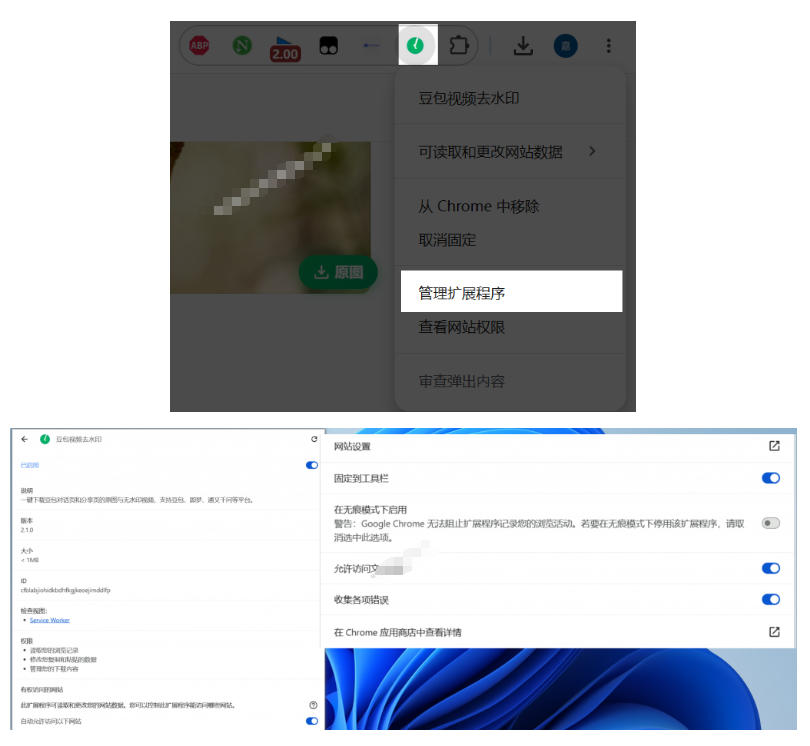
Turn on the permissions first, otherwise it cannot download.
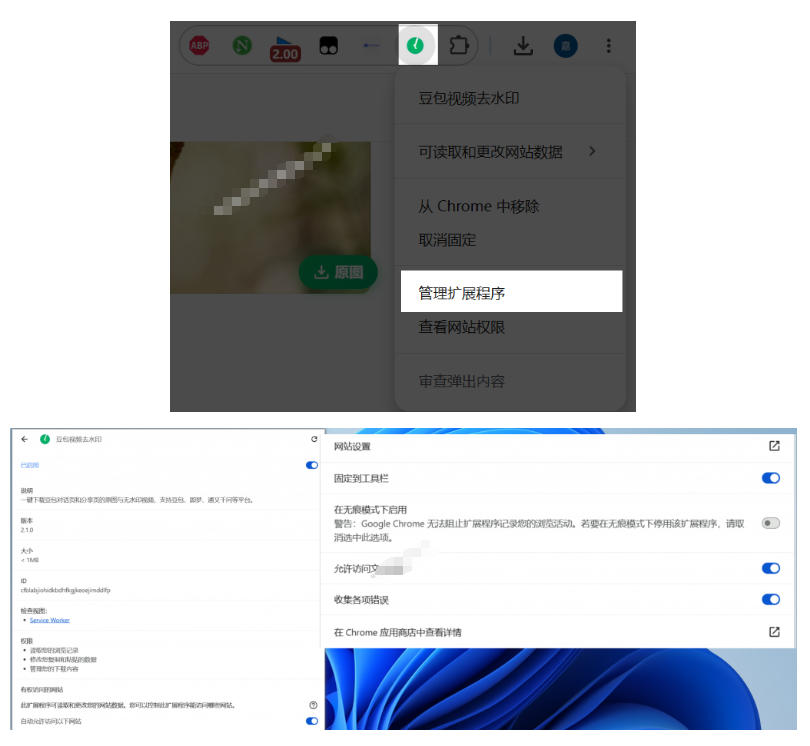
In Edge, you also need to enable this, otherwise the “automatic watermark-removal interception” will pop up.

*Note: this text is for introduction only and does not constitute any income promise; monetization results vary by person and depend on your own effort and practice. Use what you learn reasonably and strictly follow the platform rules and relevant laws and regulations.*
Supporting Study Materials
This course comes with a materials pack. Members receive the access link by email after requesting the course.
Related Courses

Xiaohongshu IP Gold-Mining Bootcamp: Master Topic Selection, Copywriting, Shooting & Editing, and Viral Operations with Private-Domain Monetization



Douyin Emotional-Card GIF Practical Course: Phone Production + Livestream Tactics, Unlock GIF Traffic Monetization

Kuaishou Good-Stuff Practical Course: Product Selection & Operations + Site-Wide Promotion + Re-Creation Editing for Affiliate Sales



Bilibili short-video product-promo dividend: free teaching plus managed operation, two playbooks, single-account seven-day income 1200-3600

Xiaohongshu electronic-resource category opening tutorial: targeted-access rules, qualification materials and the self-recommendation submission flow

Game Gold-Farming Money-Making Plan: Earn 1k+ Daily, a Stable 3-Year Project Anyone Can Do in Spare Time [Revealed]

