


-
Solo Business Courses
-
 Others
-
Overseas Tutorials
-
Photography & Editing
-
Community & Private Domain
-
Self-Media Writing & Copywriting
-
Side Income Projects
-
E-commerce
-
Short Video & Live Streaming
-
Artificial Intelligence (AI)
-
Software & Tools
-
Operating Systems
-
Plugins & Scripts
-
MacOS Software
-
Android Software
-
Windows Software

AI+UI Practical Course: Full 10-Week Program | Icon IP Ops Visual | Written-Test Portfolio Motion, Complete Landing Tutorial
-
Game Gold-Farming Money-Making Plan: Earn 1k+ Daily, a Stable 3-Year Project Anyone Can Do in Spare Time [Revealed]
Study material — included with membership Get Membership -
Hot-game fully-automated earning: 500+ a day, no experience, simple operation - the steadiest long-term game-earning side hustle (revealed)
Study material — included with membership Get Membership -
FlyingMouse earns merit this time! Don't panic at Windows format problems — the open-source FlyingMouse format conversion tool helps, a popular GitHub gem
Study material — included with membership Get Membership -
Douyin Product-Selling Coaching Bootcamp: No On-Camera Appearance Needed, Newbies Can Produce Selling Short Videos by Following the Steps
Study material — included with membership Get Membership -
First-release game gold-farming money plan: 1K+ a day, ordinary people in spare time
Study material — included with membership Get Membership






-
FlyingMouse earns merit this time! Don't panic at Windows format problems — the open-source FlyingMouse format conversion tool helps, a popular GitHub gem
Study material — included with membership Get Membership -
LuDaShi v6.1024.4105.1121 Slim Single File
Study material — included with membership Get Membership -
2D Cartoon Animation Software Moho Pro v14.3
Study material — included with membership Get Membership -
Video Editor Aiseesoft Filmai v1.0.18
Study material — included with membership Get Membership -
To-Do Microsoft To Do v2.147 Free
Study material — included with membership Get Membership -
PR/AE/DaVinci/FCPX video Plugin Nobe OmniScope Win1.11.15 / Mac1.10.138
Study material — included with membership Get Membership





 Course Introduction
The 2026 Issue 5 Caixin AI+UI new-process systematic course runs 10 weeks with 30 core lessons, combining live + recorded + homework-review teaching, plus a bonus ZCOCOL hot-motion special. It teaches step by step from AI icons, interface refinement, B-end visuals, IP mascots, badge levels to campaign visuals, covering portfolio packaging, big-tech written tests, competitor experience analysis, interactive prototypes and the whole job pipeline, with full hands-on netdisk assets, fully opening up the standardized AI-assisted UI workflow from asset generation and page implementation to a job-ready portfolio.
Who Should Learn
- Beginner designers with zero base who want to switch into AI UI design
- Traditional UI designers who want AI to speed up output
- Practitioners who can't yet build IP, campaign visuals or a portfolio
- Design newbies preparing for big-tech UI/UX written tests
- Experience designers who want to master interface motion and interactive prototypes
What You'll Gain
- Master the full output method for AI icons, interfaces, IP and campaign visuals
- Master the standardized design process for B-end controls and badge-level systems
- Learn portfolio packaging and complete approaches for big-tech written tests
- Master competitor analysis, experience maps and interactive prototyping
- Learn 3 types of commercial UI motion to sharpen your project competitiveness
Course Outline
Full 10-Week Outline
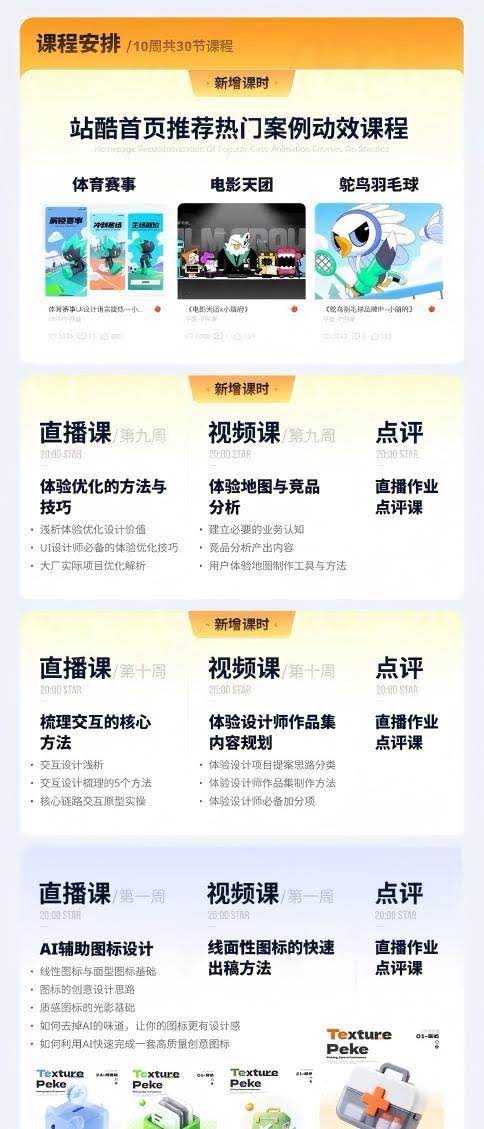
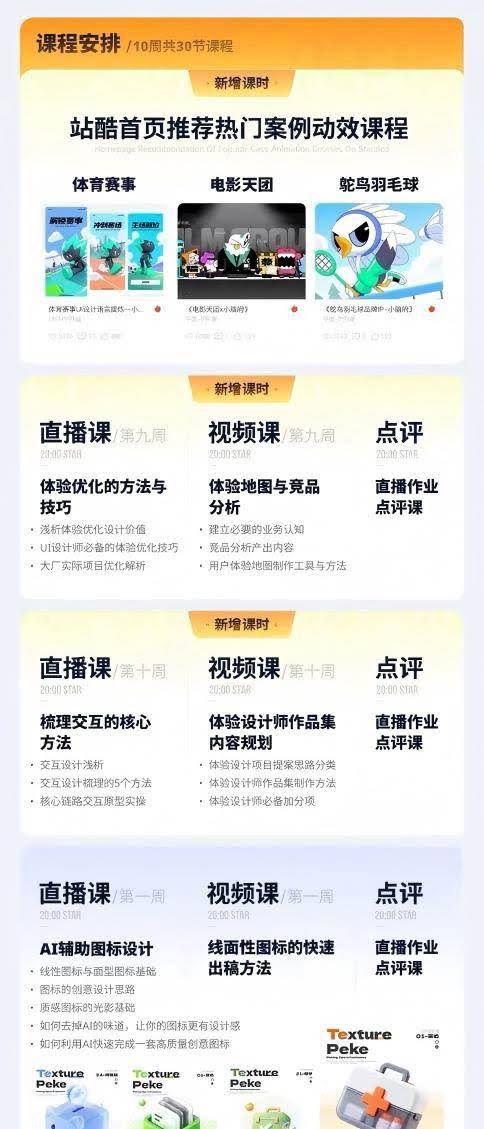
Week 1 | AI Icon Design Basics
- Live: AI-assisted icon design
Linear and solid icon basics
Creative thinking for icons
Light and shadow basics for textured icons
Remove AI-generated traces and lift icon quality
Quickly output a full set of high-quality creative icons - Video: Quick drafting methods for line/solid icons
- Bonus: Week 1 live homework review
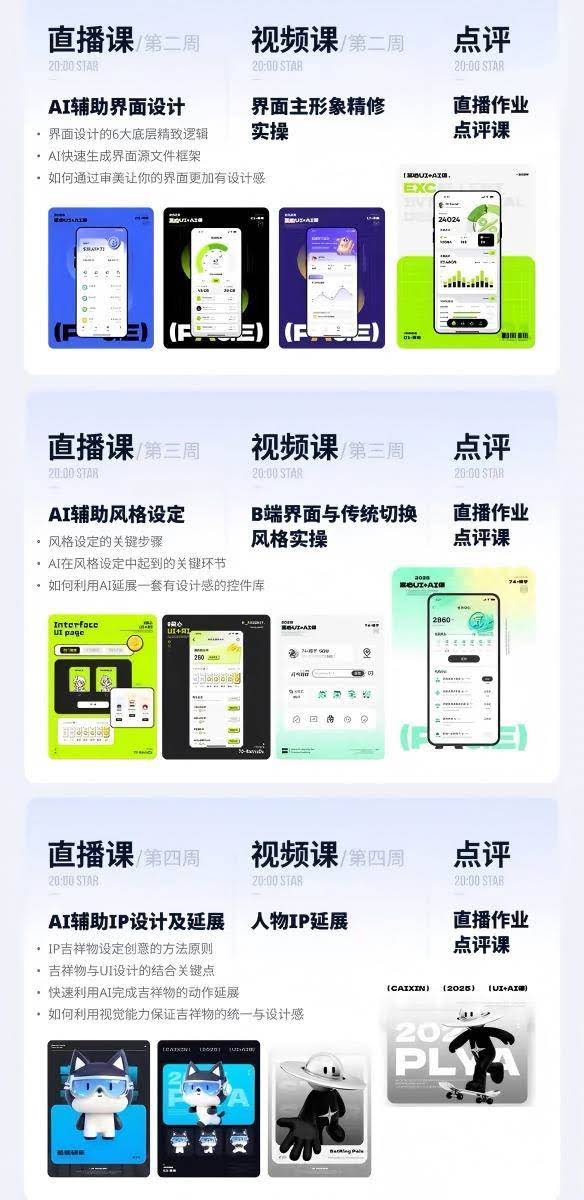
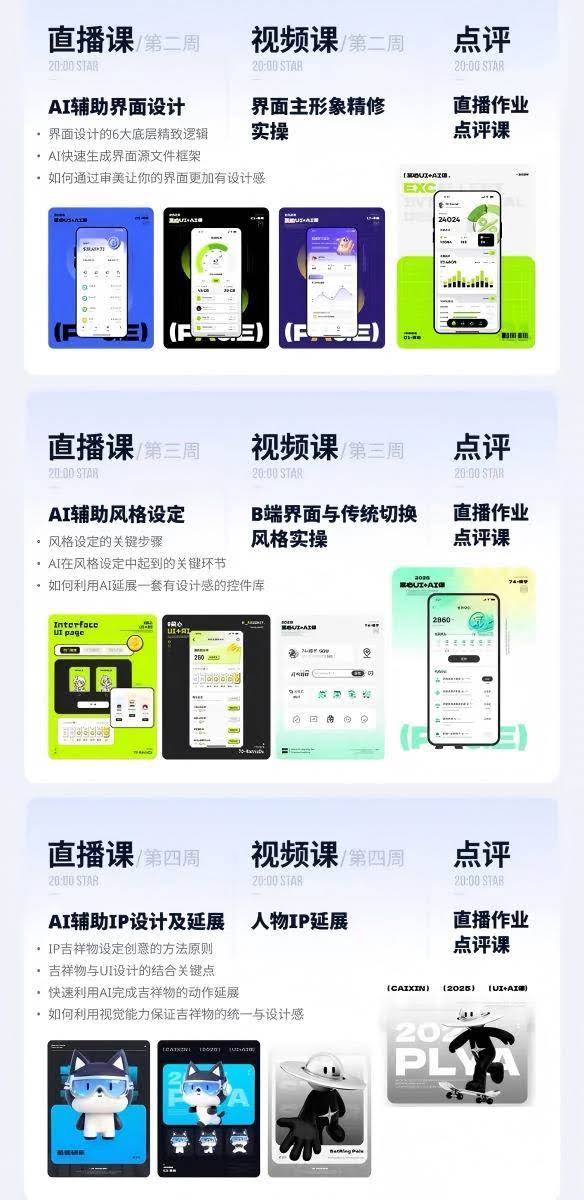
Week 2 | AI Interface Design Refinement
- Live: AI-assisted interface design
Six underlying refinement logics of interface design
AI quickly generates interface source-file frameworks
Aesthetic upgrades that raise design quality - Video: Hands-on refinement of the main interface visual
- Bonus: Week 2 live homework review
Week 3 | AI Visual Style Setting & B-end Interface
- Live: AI-assisted style setting
Core steps of style setting
AI's key role in locking the style
AI extends a whole set of tasteful component libraries - Video: B-end interface and traditional-style switch hands-on
- Bonus: Week 3 live homework review
Week 4 | AI Mascot IP Full-Process Design
- Live: AI-assisted IP design and extension
Principles for creative IP mascot design
Key points of combining mascots with UI design
AI quickly generates multi-pose mascot extensions
Unify mascot visual style and design quality - Video: Character IP extension hands-on
Bonus recording: short tutorial on dynamic mascot generation - Bonus: Week 4 live homework review
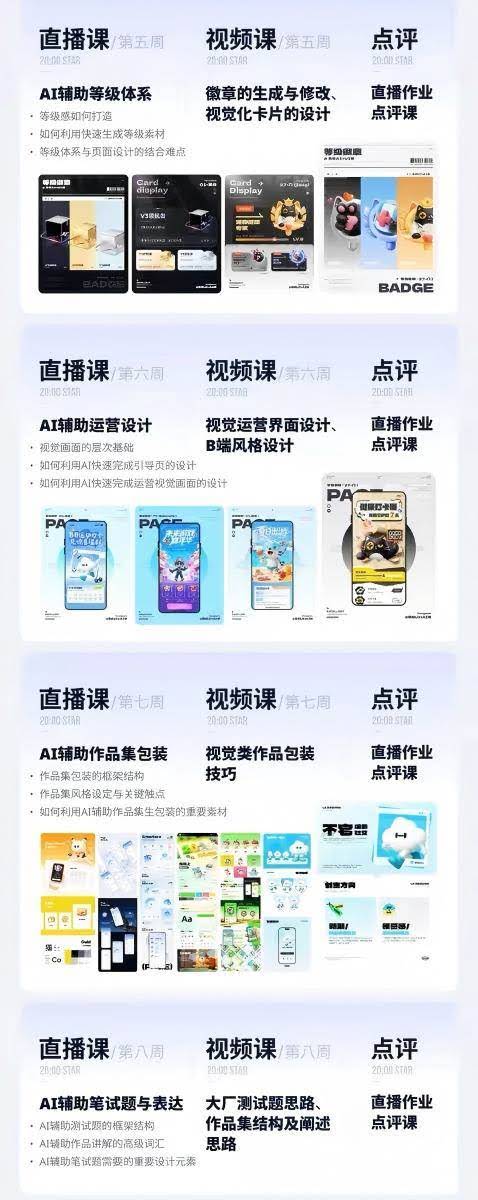
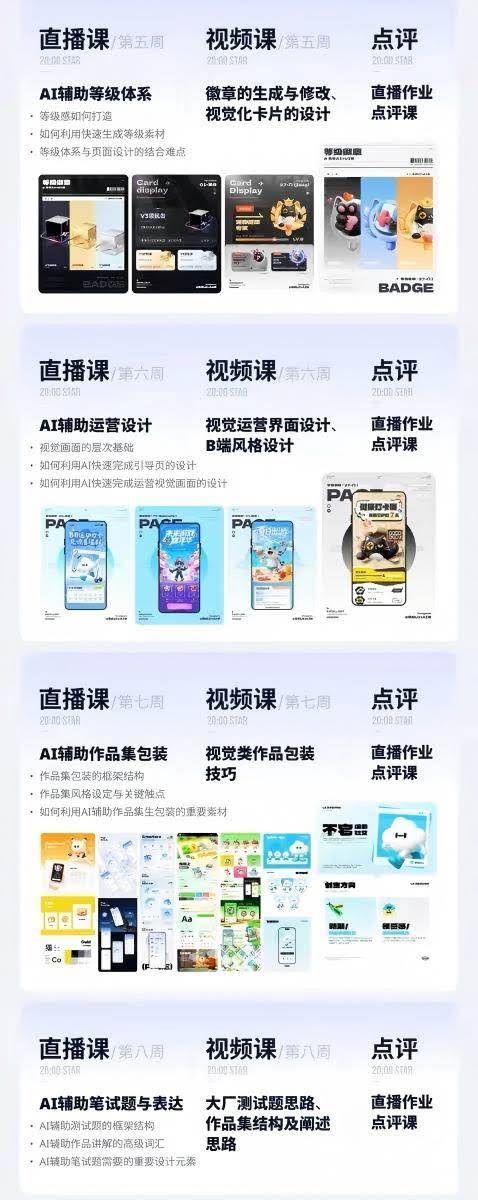
Week 5 | Badge and Level Visual System Design
- Live: AI-assisted level system
Build visual level atmosphere
AI batch-generates level assets fast
Hard points of fusing the level system into pages - Video: Badge generation and editing, visual card design
- Bonus: Week 5 live homework review
Week 6 | AI Campaign Visuals and Event Interfaces
- Live: AI-assisted campaign design
Theory of visual hierarchy
AI quickly builds onboarding pages
AI quickly outputs a full set of campaign visuals - Video: Visual campaign interface design, B-end style design
- Bonus: Week 6 live homework review
Week 7 | AI Portfolio Packaging
- Live: AI-assisted portfolio packaging
Complete portfolio framework
Portfolio style setting and key visual touchpoints
AI produces supporting portfolio assets - Video: Visual portfolio packaging tips
Bonus recording: non-visual portfolio packaging tutorial - Bonus: Week 7 live homework review
Week 8 | Big-tech UI Written Test & Portfolio Presentation
- Live: AI-assisted written-test questions and expression
Complete framework for AI-assisted written tests
High-level professional vocab for presenting work
Must-have design elements for test work - Video: Big-tech test approaches, portfolio structure and presentation
- Bonus: Week 8 live homework review
Week 9 | UX Optimization and Competitor Analysis
- Live: Methods and techniques of experience optimization
Core value of experience-optimization design
Must-know optimization tricks for UI designers
Tear-down of real big-tech project optimization cases - Video: Experience maps and competitor analysis
Build basic business understanding
Complete deliverables of competitor analysis
Tools and hands-on methods for UX maps - Bonus: Week 9 live homework review
Week 10 | Interaction Design & UX Designer Job Portfolio
- Live: Sorting out core interaction methods
Basic theory of interaction design
5 core methods of interaction structuring
Full hands-on interactive prototype of the core product flow - Video: Portfolio content planning for UX designers
Categorize UX project proposal approaches
Complete method for building a UX portfolio
Portfolio content that boosts your job chances - Bonus: Week 10 live homework review
New bonus sessions: ZCOOL homepage-featured hot-case motion class
Full-process motion teaching on three complete commercial cases:
- Sports-event UI motion (mini-game app interface motion)
- Brand flat motion for 'Movie Crew x Kitty Mansion'
- IP character motion for 'Ostrich Badminton Brand IP · Kitty Mansion'
Netdisk video file list (mapped to the course)
- 1 AI-assisted icon design
- 02 Quick drafting for line/solid icons (fine-cut recorded)
- 3 Week 1 homework review
- 4 Week 1 homework review (71-150)
- 5 AI-assisted interface design (incl. homework assignment)
- 6 Hands-on refinement of the main interface visual (fine-cut recorded)
- 7 Week 2 homework review (71-150)
- 8 Week 2 homework review (1-70)
- 9 AI-assisted style setting (incl. homework assignment)
- 12 AI-assisted IP design and extension (incl. homework)
- 13 Character IP extension (fine-cut recorded)
- 14 Week 4 homework review
- 15 Dynamic mascot generation (short recorded)
- 16 AI-assisted badge style setting (incl. homework)
- 17 AI-assisted badge design system
- 18 Week 5 homework review
- 19 AI-assisted campaign visual design
- 20 Visual campaign interface design
- 21 B-end style design
- 22 Week 6 homework review (1-150)
- 23 Non-visual portfolio packaging (incl. homework)
- 24 Visual portfolio packaging tips (fine-cut recorded)
- 25 Week 7 homework review (1-150)
- 26 AI-assisted written-test questions and expression
- 27 Portfolio structure and presentation approach (fine-cut recorded)
Supporting Study Materials
This course comes with a materials pack. Members receive the access link by email after requesting the course.
Related Courses

Family Comedy Short-Drama Creation Course: Benchmark Hot Accounts, AI-Assisted, Fast Start for Total Beginners, Grow Followers and Drive Product Sales

Amazon AI Automation Practical Course: AI Operating Mindset, Setting Up the Codex Environment, Risk-Control Checks and Automated Listing Copy

AI E-Commerce Data Tool Development Course: Learn Codex+BI From Zero, Build a Multi-Store Integrated Visualization Dashboard


Advanced AI Prompt Application: 15 Lessons | Universal Instruction Thinking + Multiple Output Modes + Full Industry Commercial Cases

AI Video Creation Crash Course: From Great-Case Breakdown to Five Core Modules, Fast-Track AI Video Skills for Total Beginners

AI Commercial Practice System Course: In-Depth SD Mastery + Advanced Flux Hands-On + Comfyui Workflow Building, Full Commercial Design Project Training

[National-Day Pick] AI Automation Game, 1k+ RMB a Day, Simple to Operate, Stable for Three Years! [Revealed]



