


-
Solo Business Courses
-
 Others
-
Overseas Tutorials
-
Photography & Editing
-
Community & Private Domain
-
Self-Media Writing & Copywriting
-
Side Income Projects
-
E-commerce
-
Short Video & Live Streaming
-
Artificial Intelligence (AI)
-
Software & Tools
-
Operating Systems
-
Plugins & Scripts
-
MacOS Software
-
Android Software
-
Windows Software


2026 AI writing monetization full chain: lesson plans x PPT x homework design x DeepSeek prompts x Doubao WPS AI x Taobao order taking x Xianyu shop opening x making money through AI
-
Game Gold-Farming Money-Making Plan: Earn 1k+ Daily, a Stable 3-Year Project Anyone Can Do in Spare Time [Revealed]
Study material — included with membership Get Membership -
Hot-game fully-automated earning: 500+ a day, no experience, simple operation - the steadiest long-term game-earning side hustle (revealed)
Study material — included with membership Get Membership -
FlyingMouse earns merit this time! Don't panic at Windows format problems — the open-source FlyingMouse format conversion tool helps, a popular GitHub gem
Study material — included with membership Get Membership -
Douyin Product-Selling Coaching Bootcamp: No On-Camera Appearance Needed, Newbies Can Produce Selling Short Videos by Following the Steps
Study material — included with membership Get Membership -
First-release game gold-farming money plan: 1K+ a day, ordinary people in spare time
Study material — included with membership Get Membership






-
FlyingMouse earns merit this time! Don't panic at Windows format problems — the open-source FlyingMouse format conversion tool helps, a popular GitHub gem
Study material — included with membership Get Membership -
LuDaShi v6.1024.4105.1121 Slim Single File
Study material — included with membership Get Membership -
2D Cartoon Animation Software Moho Pro v14.3
Study material — included with membership Get Membership -
Video Editor Aiseesoft Filmai v1.0.18
Study material — included with membership Get Membership -
To-Do Microsoft To Do v2.147 Free
Study material — included with membership Get Membership -
PR/AE/DaVinci/FCPX video Plugin Nobe OmniScope Win1.11.15 / Mac1.10.138
Study material — included with membership Get Membership







1. Lesson plans (Yangyang)
(1) Introduction
1. What is a lesson plan?
A lesson plan, whose full name is teaching design plan, is a teaching plan and implementation plan designed in advance by teachers to smoothly carry out teaching activities.
It can help teachers clarify their thinking, define what each lesson should teach and how to teach it, and how to help students better understand and master knowledge.
Lesson plans are mainly used in the following scenarios: teachers participating in lesson plan competitions, conducting teaching demonstrations, attending recruitment interviews, and daily teaching, etc.
The main customer groups include: primary school teachers, middle school teachers, university lecturers, novice teachers (especially at the interview stage), tutoring and training class teachers, vocational training lecturers, and special education teachers.
2. Why make lesson plans?
Teachers have no time to write them, novice teachers do not know how to write them when participating in activities, and market demand is huge!
It is relatively simple; after learning the method, you can make money quickly, which suits beginners.
3. What does a lesson plan include?
1. Class period: refers to the time unit of one teaching activity arranged in the school timetable.
2. Teaching time: the actual teaching duration of a single lesson plan used in class.
3. Subject (course, major): the disciplinary scope in which teachers carry out teaching activities in a specific subject area, such as mathematics, physics, chemistry, literature, history, computer science, etc.
4. Learner analysis: a comprehensive understanding and analysis of students' knowledge base, learning ability, interests, learning habits, learning styles, and other aspects.
5. Teaching content: clearly list the knowledge points, concepts, theories, and other content to be explained in this lesson.
6. Teaching objectives: teaching objectives are the core of the lesson plan, clarifying the requirements students should meet in terms of knowledge, ability, and emotional attitudes through this lesson.
7. Teaching focus: the core content of this lesson, the knowledge or skills students need to master with emphasis.
8. Teaching difficulties: the difficulties students may encounter in the learning process or content that is not easy to understand.
9. Teaching methods: methods used by teachers in the teaching process, such as lecture method, discussion method, cooperative learning method, gamified teaching method, etc.
10. Teaching process: the teaching process is the main part of the lesson plan, describing in detail each link of the teaching activities.
It includes the following parts:
Introduction: introduce the new lesson through stories, questions, scenarios, etc., to stimulate students' interest in learning.
New lesson presentation: explain new knowledge in logical order, guiding students to understand and master it.
Class practice: consolidate new knowledge through practice and test students' learning outcomes.
Class summary: summarize the key content of this lesson and help students organize the knowledge system.
Assign homework: assign after-class homework to consolidate the learned knowledge and expand learning content.
11. Teaching resources: textbooks, teaching aids, multimedia resources, etc. needed during the teaching process.
12. Teaching reflection: the teacher's review and summary of the teaching process after class, including successes, shortcomings, and improvement measures.
13. Board design: the teaching content presented by the teacher on the blackboard to help students better understand and remember.
14. Teaching evaluation: methods and standards for evaluating students' classroom performance, homework completion, etc. Including: classroom questioning, group discussion performance, homework evaluation, tests or quizzes, etc.
15. After-class extension
After-class learning resources or activities provided to students to help them further consolidate and expand knowledge.
(Note: not every lesson plan needs to include all the above content; write according to customer needs)
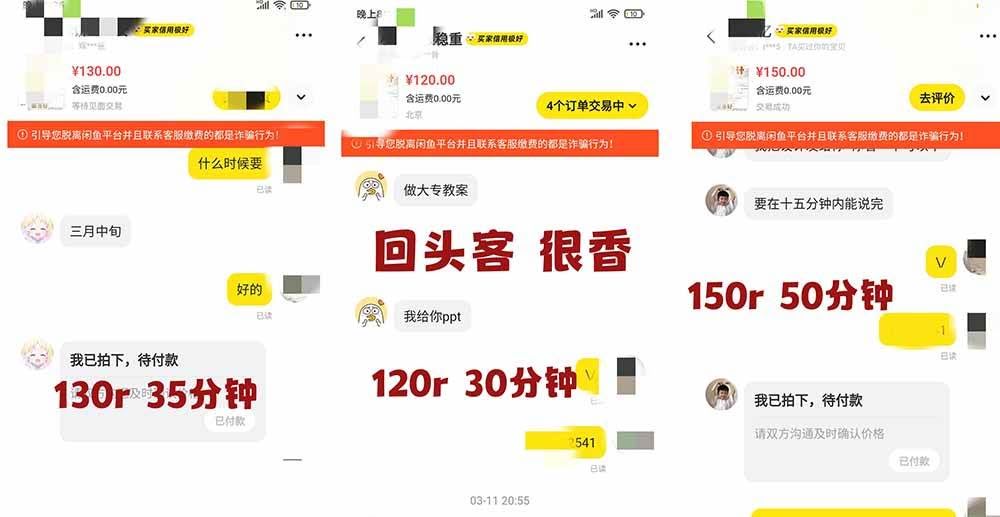
4. Deal showcase
5. Who is this tutorial suitable for?
AI beginners who want to make money through AI and are diligent.
This tutorial covers 80% of lesson plan writing. For the remaining 20%, after learning the techniques, you can apply them by analogy and handle them as well.

Course outline
Part 1: Full process of AI lesson plan writing (Yangyang)
1. Basic understanding of lesson plans
- Lesson plan introduction
What is a lesson plan
Applicable scenarios and target customer groups for lesson plans
Market demand and advantages of writing lesson plans
Detailed explanation of the 15 core modules of a complete lesson plan
Showcase of real paid order cases
Suitable audience for the course - Three practical scenarios for beginner lesson plans
Scenario 1: Customer provides no template (universal template method) - General universal template framework
- "No-brainer content" DeepSeek batch generation method, prompt templates, practical demonstration
- Dedicated prompts for the core module "teaching process", requirements for tiered classroom activity design
- Final draft formatting, text optimization standards, key points to avoid pitfalls
Scenario 2: Customer provides their own template (key practice) - Template breakdown and analysis method (distinguish no-brainer modules + core teaching process table module)
- Customized prompt writing adapted to customer templates, techniques for embedding template requirements
- Breakdown and writing logic for table-based "teaching process", tiered prompt templates
- Techniques for finely expanding teaching content, practical details for classroom teacher-student activities
- Final draft formatting, unified format standards
Scenario 3: Customer manuscript revision and customization - How to feed raw manuscript materials
- Customized prompt templates (using an art lesson plan as an example)
- Proofreading standards for the revised final draft
- General optimization tips for lesson plan delivery
- Course homework: Grade 4 Volume 1 'The Cricket's Home' 4000-word complete instructional design
Hard requirements for the assignment
Self-check checklist before submission
Assignment submission channels, two-submission rule, file naming conventions
'AI Lesson Plan Assignment Problem Reference Manual'
Part Two: Full workflow for AI-generated PPT courseware (Nana)
I. Basic understanding of PPT
- Introduction to PPT software tools (Office PowerPoint, WPS)
- Standard structure of a complete PPT: cover, table of contents, section pages, content pages, back cover
- Design key points for each page type and demonstration examples
II. Generating PPT outlines with DeepSeek (core step) - A 3-step outline workflow that beginners can easily follow
DeepSeek software entry, deep thinking mode settings
Two universal prompts: direct generation without a lesson plan, generation from an uploaded lesson plan
Collection of multi-round outline revision instructions, verification and optimization methods
Supporting assignment 1: Independently generate a complete PPT outline - Advanced refined outline generation method
Techniques for setting the teacher identity upfront
Two advanced prompting approaches (plain text requirements / uploaded lesson plan materials)
Layered optimization instructions for outline content, pacing, and interaction
How to save Markdown outlines
III. One-click generation of finished PPTs with mainstream AI tools - AIPPT tool: import Markdown outline to generate, template selection
- WPS AI PPT: three generation entry points (document/outline/text), member feature introduction
- Doubao PPT generation (top recommendation for beginners)
PC/mobile operation entry points
Four prompt approaches: one-sentence quick generation, lesson plan upload generation, advanced standardized template, outline combined with lesson plan generation
Multi-round revision instructions for PPT content, layout, and style
PPT export formats (PPTX/PDF)
Supporting assignment 2: Independently produce a complete PPT courseware
IV. Manual fine-grained layout optimization in WPS (delivery enhancement) - Full cover optimization workflow (searching images in the material library, AI image editing, layout arrangement, before-and-after comparison)
- Method for designing a unified background throughout the deck
- Standardized beautification of page titles (unified title box)
- One-click beautification of image-text layouts (hands-on with the Beautify Assistant feature)
- Optional extension assignment 3: Hands-on cover optimization + unified background design
5. Visual teaching chart creation - Metaso AI data retrieval + automatic chart generation (screenshot import to PPT)
- WPS built-in chart / dynamic chart insertion operations
- Recommended websites for companion material templates
Supporting Study Materials
This course comes with a materials pack. Members receive the access link by email after requesting the course.
Related Courses

Family Comedy Short-Drama Creation Course: Benchmark Hot Accounts, AI-Assisted, Fast Start for Total Beginners, Grow Followers and Drive Product Sales

Amazon AI Automation Practical Course: AI Operating Mindset, Setting Up the Codex Environment, Risk-Control Checks and Automated Listing Copy

AI E-Commerce Data Tool Development Course: Learn Codex+BI From Zero, Build a Multi-Store Integrated Visualization Dashboard


Advanced AI Prompt Application: 15 Lessons | Universal Instruction Thinking + Multiple Output Modes + Full Industry Commercial Cases

AI Video Creation Crash Course: From Great-Case Breakdown to Five Core Modules, Fast-Track AI Video Skills for Total Beginners

AI Commercial Practice System Course: In-Depth SD Mastery + Advanced Flux Hands-On + Comfyui Workflow Building, Full Commercial Design Project Training

[National-Day Pick] AI Automation Game, 1k+ RMB a Day, Simple to Operate, Stable for Three Years! [Revealed]



