


-
Solo Business Courses
-
 Others
-
Overseas Tutorials
-
Photography & Editing
-
Community & Private Domain
-
Self-Media Writing & Copywriting
-
Side Income Projects
-
E-commerce
-
Short Video & Live Streaming
-
Artificial Intelligence (AI)
-
Software & Tools
-
Operating Systems
-
Plugins & Scripts
-
MacOS Software
-
Android Software
-
Windows Software






Doubao No-Watermark Downloader Finally Here-Updated! Supports Doubao Images/Videos, 15s Video Config, Local Account Management & Batch Download, Browser Extension
-
Game Gold-Farming Money-Making Plan: Earn 1k+ Daily, a Stable 3-Year Project Anyone Can Do in Spare Time [Revealed]
Study material — included with membership Get Membership -
Hot-game fully-automated earning: 500+ a day, no experience, simple operation - the steadiest long-term game-earning side hustle (revealed)
Study material — included with membership Get Membership -
FlyingMouse earns merit this time! Don't panic at Windows format problems — the open-source FlyingMouse format conversion tool helps, a popular GitHub gem
Study material — included with membership Get Membership -
Douyin Product-Selling Coaching Bootcamp: No On-Camera Appearance Needed, Newbies Can Produce Selling Short Videos by Following the Steps
Study material — included with membership Get Membership -
First-release game gold-farming money plan: 1K+ a day, ordinary people in spare time
Study material — included with membership Get Membership






-
FlyingMouse earns merit this time! Don't panic at Windows format problems — the open-source FlyingMouse format conversion tool helps, a popular GitHub gem
Study material — included with membership Get Membership -
LuDaShi v6.1024.4105.1121 Slim Single File
Study material — included with membership Get Membership -
2D Cartoon Animation Software Moho Pro v14.3
Study material — included with membership Get Membership -
Video Editor Aiseesoft Filmai v1.0.18
Study material — included with membership Get Membership -
To-Do Microsoft To Do v2.147 Free
Study material — included with membership Get Membership -
PR/AE/DaVinci/FCPX video Plugin Nobe OmniScope Win1.11.15 / Mac1.10.138
Study material — included with membership Get Membership






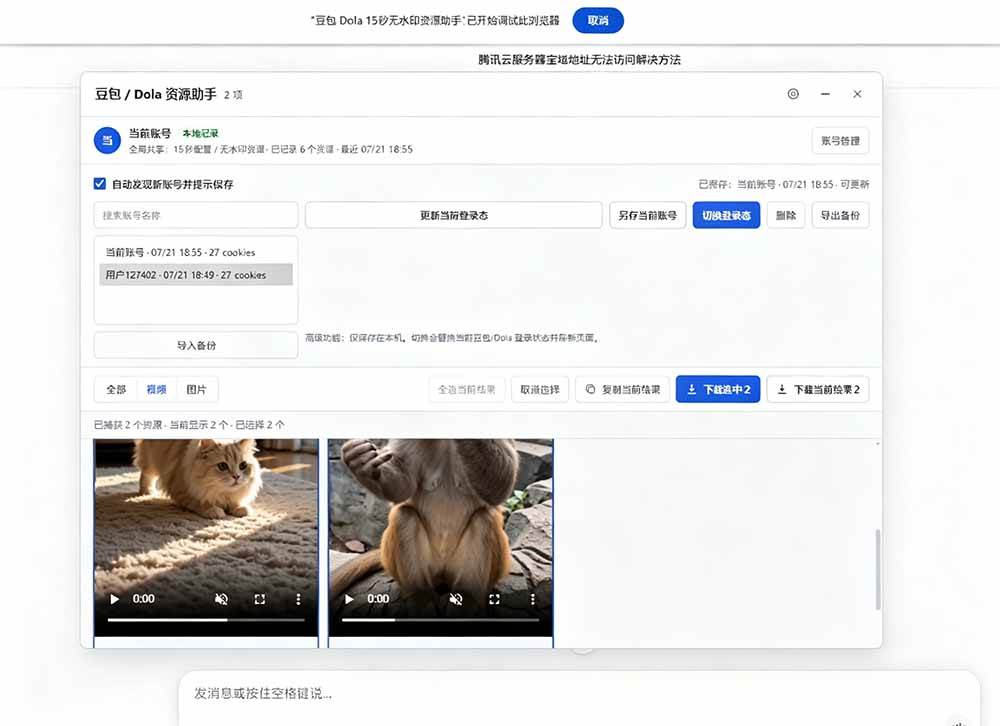
Doubao watermark-removal plugins and desktop software both stopped working; many people asked for updates, and I saw a lot of people selling it online, so I brought this plugin over for everyone-permanently free to use. It works with a browser to download Doubao videos and images without watermarks; no software download needed, the browser parses it, latest technology.
Personally tested, working.

Software features
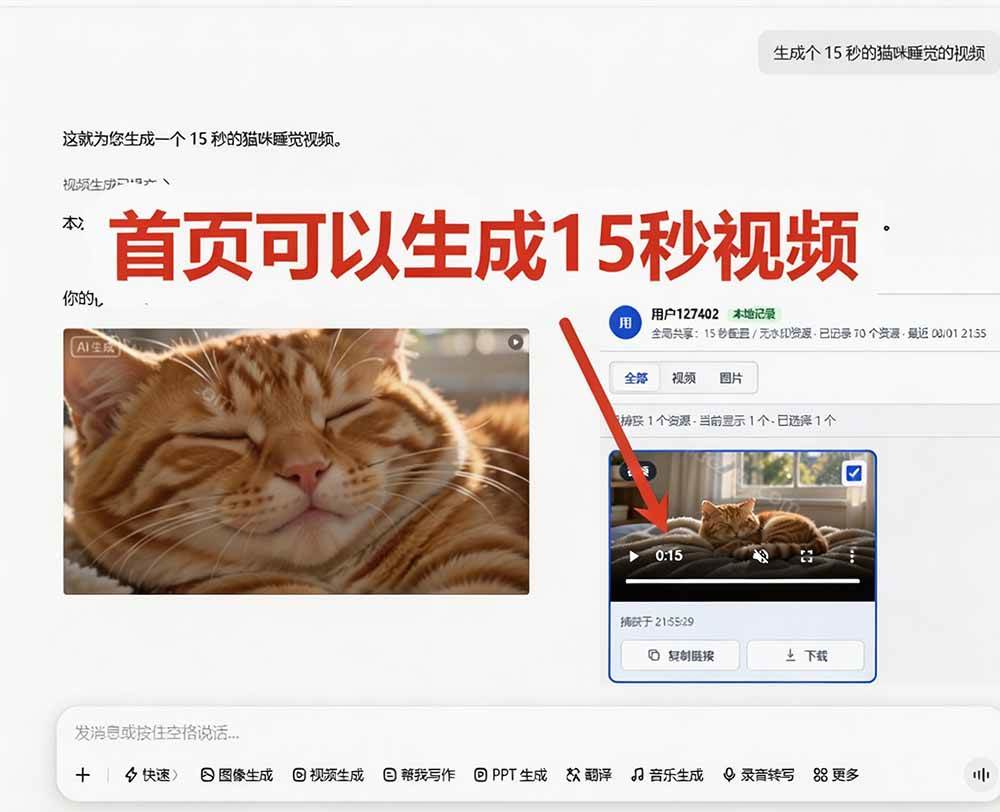
Supports Doubao images/videos, free unlimited, latest working, dated 2026.7.21.
Resource panel: shows a floating downloader on Doubao / Dola pages.
Video preview: after a video is captured, preview-play it right inside the panel.
Image preview: thumbnails shown after an image is captured.
Batch operations: single download, tick-to-download, download current results.
Resource filter: all, video, image filter.
Movable window: drag title bar to move window; double-click title bar to recenter.
Draggable floating button: after minimizing, an icon button shows; drag it anywhere on the page.
Extension icon trigger: click the browser extension icon to open the downloader panel.
Feature switches:
Enable extension: master switch; off means target APIs pass through directly.
15s config: controls injection of 15-second video config.
No-watermark resource: controls extraction and display of no-watermark resources.
Night mode: switch the resource-helper panel to dark theme; setting persists after refresh.
Local account management:
Auto-detect current Doubao account.
Auto-discover new accounts and prompt to save.
Saved accounts won't be re-saved on re-login.
Supports updating current-account login state.
Supports switching between saved accounts.
Supports searching and filtering saved accounts by account name.
Supports saving multiple accounts; list is scrollable.
Backup & restore:
Supports exporting local login state as JSON backup.
Supports importing backup to restore account list.
Persistent settings: switch states and account login state saved to browser local storage; enabled expanded storage capacity to fit multi-account backup.





Tutorial
How to install a .zip file?
In the browser address bar, enter chrome://extensions, tick Developer mode.
Drag the zip in directly; refresh the Doubao web page and start using.
Download link
Latest 2026.7.21, no bug encountered.

Update: 2026.8.1 22:08-videos downloaded now have watermarks again.
*Note: for introduction only, no income promise; results vary with your own effort.*
Supporting Study Materials
This course comes with a materials pack. Members receive the access link by email after requesting the course.
Related Courses

WorkBuddy zero-basics hands-on training: even non-programmers can follow the manual steps, learn agents systematically by doing

Higgsfield cinematic animation course: one-stop creation platform, complete animation production-flow teaching

The same dance with 6 outfits switching in order: I turned an outfit-change video into a Skill

An eye-catching domestic Markdown editor: local offline high-performance note tool, free and no login required

Domestic Markdown editor: local offline high-performance knowledge-note tool, free and no login required

WorkBuddy practical blue paper: user manual and practice guide, complete combined image-text edition

Jimeng challenges a 180-second long video: one-click a 3-minute movie? Full production flow shared in detail

Super handy! Douyin video downloader, supports batch download of user works, favorites and likes lists, open-source free Better-douyin-R

Nearly 200K stars on GitHub - Harness now runs by double-click: the Harness full-platform desktop edition

Nearly 200K stars on GitHub - Harness now runs by double-click: the Harness full-platform desktop edition DSH Desktop

