


-
Solo Business Courses
-
 Others
-
Overseas Tutorials
-
Photography & Editing
-
Community & Private Domain
-
Self-Media Writing & Copywriting
-
Side Income Projects
-
E-commerce
-
Short Video & Live Streaming
-
Artificial Intelligence (AI)
-
Software & Tools
-
Operating Systems
-
Plugins & Scripts
-
MacOS Software
-
Android Software
-
Windows Software

Stop Buying Random Study Guides for Your Child: Synced with the National K-12 Smart Platform, One-Click AI Generates Illustrated Study Materials and Test Papers
-
Game Gold-Farming Money-Making Plan: Earn 1k+ Daily, a Stable 3-Year Project Anyone Can Do in Spare Time [Revealed]
Study material — included with membership Get Membership -
Hot-game fully-automated earning: 500+ a day, no experience, simple operation - the steadiest long-term game-earning side hustle (revealed)
Study material — included with membership Get Membership -
FlyingMouse earns merit this time! Don't panic at Windows format problems — the open-source FlyingMouse format conversion tool helps, a popular GitHub gem
Study material — included with membership Get Membership -
Douyin Product-Selling Coaching Bootcamp: No On-Camera Appearance Needed, Newbies Can Produce Selling Short Videos by Following the Steps
Study material — included with membership Get Membership -
First-release game gold-farming money plan: 1K+ a day, ordinary people in spare time
Study material — included with membership Get Membership






-
FlyingMouse earns merit this time! Don't panic at Windows format problems — the open-source FlyingMouse format conversion tool helps, a popular GitHub gem
Study material — included with membership Get Membership -
LuDaShi v6.1024.4105.1121 Slim Single File
Study material — included with membership Get Membership -
2D Cartoon Animation Software Moho Pro v14.3
Study material — included with membership Get Membership -
Video Editor Aiseesoft Filmai v1.0.18
Study material — included with membership Get Membership -
To-Do Microsoft To Do v2.147 Free
Study material — included with membership Get Membership -
PR/AE/DaVinci/FCPX video Plugin Nobe OmniScope Win1.11.15 / Mac1.10.138
Study material — included with membership Get Membership






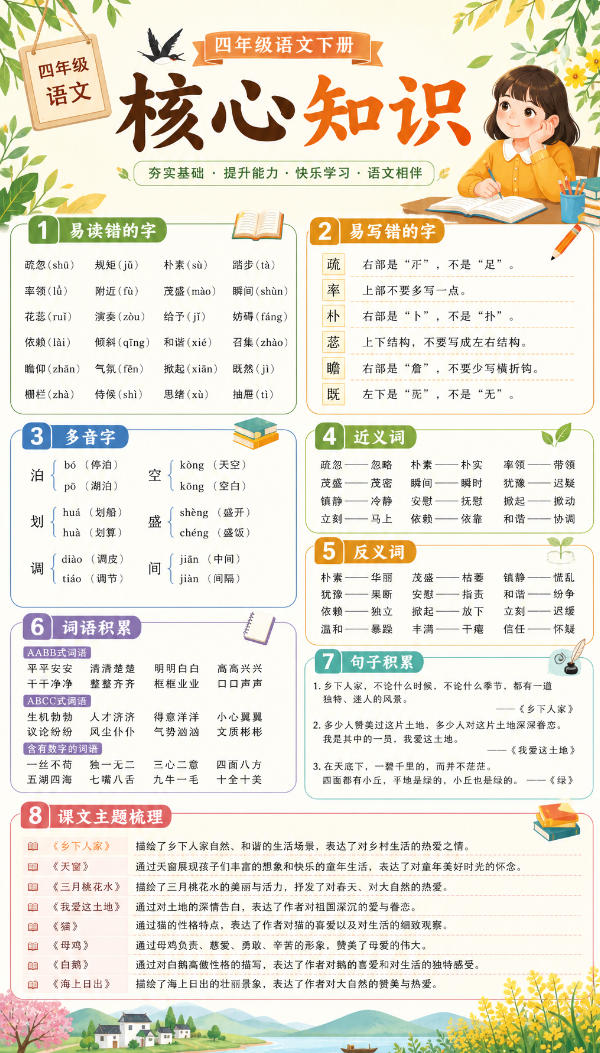
Finding matching study guides for your child often means buying a pile that doesn't align with the textbook; teachers and parents who want to make review materials spend ages on layout. This "AI Study Material Workbench" directly syncs textbooks from the National K-12 Smart Education Platform: pick subject and grade, AI auto-generates illustrated study materials, and can also produce test papers with header and answer sheet; export as a single image or multi-page PDF/Word/PPT as you like.
Software Features
Synced with the National K-12 Smart Education Platform: textbook pinned to edition/grade/volume (unified-edition etc.), generated content strictly aligns with your textbook
Two creation modes: AI creates fresh based on curriculum standards, or upload your own materials to adapt—both routes work
Dual form: study materials explaining knowledge points, or exam papers split into questions with header and answer sheet
Single image / multi-page doc: single image suits classroom sharing; multi-page doc exports to PDF, Word or PPT, easy to archive and print
15 style templates + 6 color schemes: morning reading, dictation sheets, knowledge stickers, oral-calculation slips, daily practice…change visuals only, not content
Green portable version, double-click to run: unzip and run, custom save location, free page count and size
How to Use
Step 1: Download and unzip, get the _internal folder and "AI Study Material Workbench.exe", double-click to run, no install needed.
Step 2: Choose creation mode. First step: pick content source (new creation / upload existing materials to adapt), second step: choose output form (study material / test paper), then choose output method (single image / multi-page doc; multi-page can export to PDF, Word or PPT).
Step 3: Fill in study material content. Pick subject and stage; the title auto-fills by subject and can be edited; write custom prompts if needed (e.g. "focus on similar-looking characters, include 5 practice questions"); textbook edition chooses unified-edition; can click "Open electronic textbook" to compare, choose upper/lower volume.
Step 4: Set page specs. Choose page count, size (9:16/16:9/3:4/1:1, cover included), pick save location and click generate; multi-page docs export directly to PDF/Word or PPT.
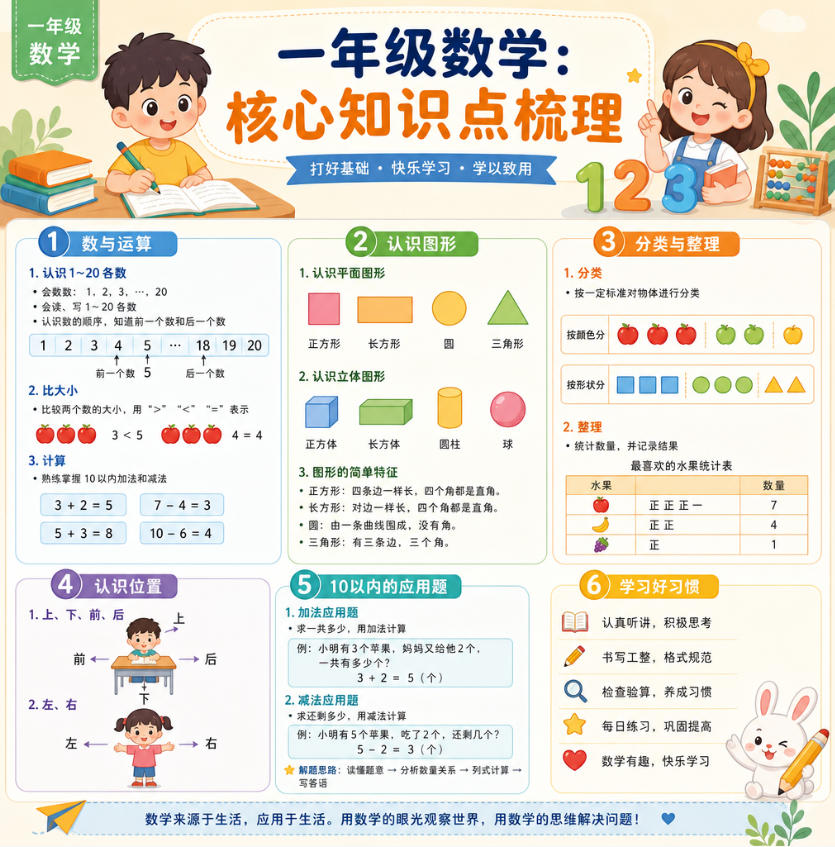
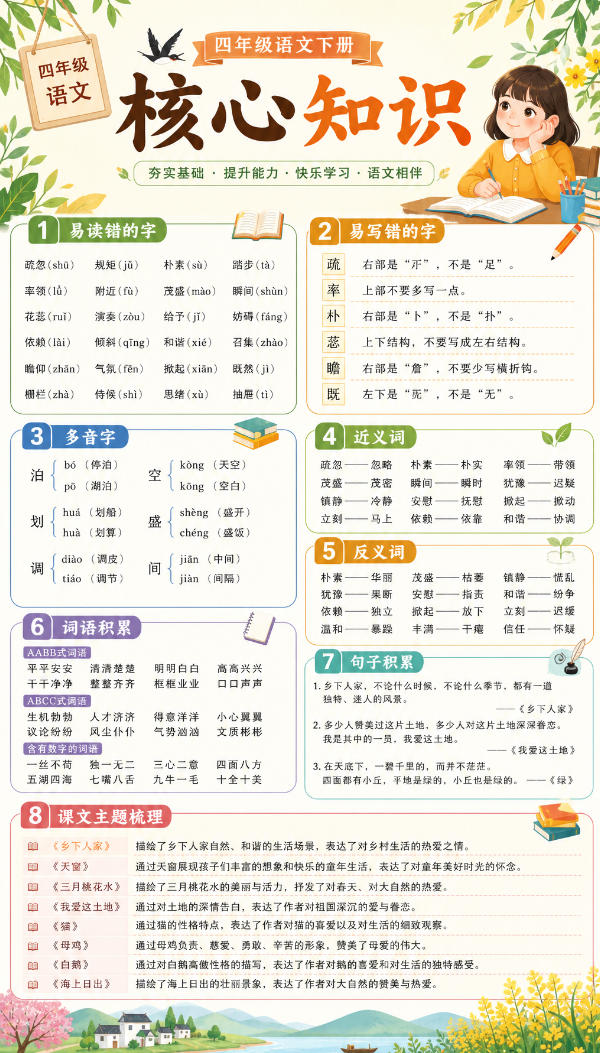
Generated materials are laid out per the style template and are ready-to-use. Below are two actual math outputs:
Supporting Study Materials
This course comes with a materials pack. Members receive the access link by email after requesting the course.
Related Courses

Family Comedy Short-Drama Creation Course: Benchmark Hot Accounts, AI-Assisted, Fast Start for Total Beginners, Grow Followers and Drive Product Sales

Amazon AI Automation Practical Course: AI Operating Mindset, Setting Up the Codex Environment, Risk-Control Checks and Automated Listing Copy

AI E-Commerce Data Tool Development Course: Learn Codex+BI From Zero, Build a Multi-Store Integrated Visualization Dashboard


Advanced AI Prompt Application: 15 Lessons | Universal Instruction Thinking + Multiple Output Modes + Full Industry Commercial Cases

AI Video Creation Crash Course: From Great-Case Breakdown to Five Core Modules, Fast-Track AI Video Skills for Total Beginners

AI Commercial Practice System Course: In-Depth SD Mastery + Advanced Flux Hands-On + Comfyui Workflow Building, Full Commercial Design Project Training

[National-Day Pick] AI Automation Game, 1k+ RMB a Day, Simple to Operate, Stable for Three Years! [Revealed]



