


-
Solo Business Courses
-
 Others
-
Overseas Tutorials
-
Photography & Editing
-
Community & Private Domain
-
Self-Media Writing & Copywriting
-
Side Income Projects
-
E-commerce
-
Short Video & Live Streaming
-
Artificial Intelligence (AI)
-
Software & Tools
-
Operating Systems
-
Plugins & Scripts
-
MacOS Software
-
Android Software
-
Windows Software
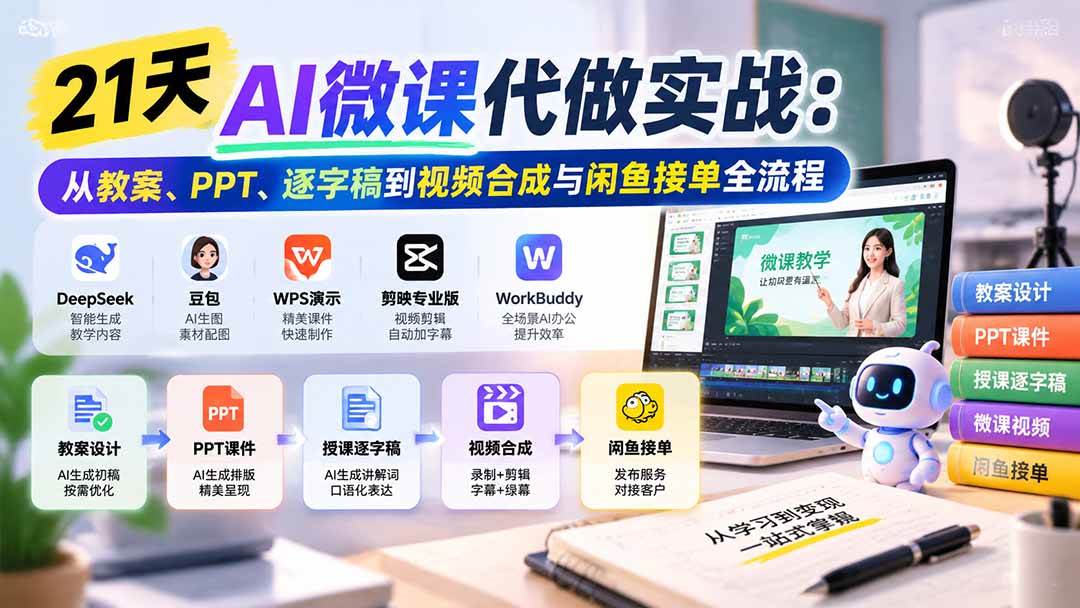
21-Day AI Micro-Course Production in Practice: From Lesson Plans, PPTs, and Word-for-Word Scripts to Video Assembly and Xianyu Order Taking
-
Game Gold-Farming Money-Making Plan: Earn 1k+ Daily, a Stable 3-Year Project Anyone Can Do in Spare Time [Revealed]
Study material — included with membership Get Membership -
Hot-game fully-automated earning: 500+ a day, no experience, simple operation - the steadiest long-term game-earning side hustle (revealed)
Study material — included with membership Get Membership -
FlyingMouse earns merit this time! Don't panic at Windows format problems — the open-source FlyingMouse format conversion tool helps, a popular GitHub gem
Study material — included with membership Get Membership -
Douyin Product-Selling Coaching Bootcamp: No On-Camera Appearance Needed, Newbies Can Produce Selling Short Videos by Following the Steps
Study material — included with membership Get Membership -
First-release game gold-farming money plan: 1K+ a day, ordinary people in spare time
Study material — included with membership Get Membership






-
FlyingMouse earns merit this time! Don't panic at Windows format problems — the open-source FlyingMouse format conversion tool helps, a popular GitHub gem
Study material — included with membership Get Membership -
LuDaShi v6.1024.4105.1121 Slim Single File
Study material — included with membership Get Membership -
2D Cartoon Animation Software Moho Pro v14.3
Study material — included with membership Get Membership -
Video Editor Aiseesoft Filmai v1.0.18
Study material — included with membership Get Membership -
To-Do Microsoft To Do v2.147 Free
Study material — included with membership Get Membership -
PR/AE/DaVinci/FCPX video Plugin Nobe OmniScope Win1.11.15 / Mac1.10.138
Study material — included with membership Get Membership







Part One: Course Introduction
"AI Micro-Course Production" is an AI teaching-content creation and hands-on order-taking course for zero-basis students, centered on instructional design, PPT courseware, lecture scripts, micro-course video editing, learning task sheets, and taking orders on platforms. Starting from installing and using tools like DeepSeek, Doubao, WPS Presentation, CapCut Pro, and WorkBuddy, it gradually explains how to use AI to analyze teaching needs, write lesson plans, adapt to client-provided templates, refine the teaching process, build matching courseware, generate conversational lecture scripts, and complete micro-course videos through recording, green-screen keying, compositing, and subtitles. It also covers designing learning task sheets, organizing deliverables, quality checks, and the basics of taking orders on Xianyu and Taobao - helping students build a complete workflow from tool onboarding to content production and service delivery. It emphasizes combining AI assistance with human review, and suits students who want to learn education-focused AI, speed up content production, or explore lesson-plan and micro-course services.
Part Two: Who This Is For
- Zero-basis beginners who want to learn AI micro-course production.
- Teachers who want to speed up lesson prep and courseware.
- Students who want to learn lesson-plan writing and scripts.
- Content creators who want to master PPT, screen recording, and video editing.
- People who want to try writing lesson plans and producing micro-courses for clients.
Part Three: What You Will Gain
- Master the basics and collaboration of common AI tools.
- Learn to write and optimize lesson plans to teaching requirements.
- Be able to make matching PPTs and lecture scripts.
- Master micro-course recording, green-screen keying, and video compositing.
- Understand learning task sheets, final delivery, and the basics of taking orders on platforms.
Part Four: "AI Micro-Course Production" Catalog
Module One: Opening Primer
1. What You'll Gain After 21 Days
2. Tool Prep
3. Today's Check-In Task
Module Two: Instructional Design
1. Lesson Plans
(1) Introduction
1) What is a lesson plan?
2) Why make a lesson plan?
3) What does a lesson plan include?
4) Winning Work Samples
5) Who is this tutorial for?
Case A: The client provides no template
1) Universal template
2) Writing the "no-brainer content"
3) Writing the "teaching process"
4) Final draft
Case B: The client provides a template
1) Analyzing the lesson-plan template
2) Writing the "no-brainer content"
3) Writing the teaching process
4) Final draft
Case C: Revising to client requirements
1) Original draft
2) Revised draft
Quick Tips
Closing Notes
Special Notes on AI Micro-Course Lesson Plans
1) Core differences between AI micro-courses and traditional lesson plans
2) Requirements for the teaching-process design in AI micro-course lesson plans
3) Prompts for AI micro-course lesson plans
Homework Requirements
[Bonus Module] WorkBuddy Speed-Up (Nana)
1. What Is WorkBuddy (First, Let's Meet It)
2. Demo: Invoking the "Prep-Word Lesson-Plan Generator" Skill in One Sentence
3. Manual vs. WorkBuddy Speed-Up
4. Follow Along (Three Steps)
5. Today's Little Assignment
Module Three: PPT Courseware (Nana)
1. The Main Role of Micro-Course PPTs
2. PPT Introduction
1) PPT Software Notes
2) Micro-Course PPT Structure
3) Key Points of Each Part
3. Operation Steps
1) Use DeepSeek to Generate a PPT Outline
2) Turn the Outline into PPT Images
3) Generate an Editable PPT
Homework
Module Four: Generating Lecture Scripts with AI
1. Introduction
1) What is a lecture script?
2) Why make a lecture script?
3) What does a script include?
4) Who is this tutorial for?
2. Beginner Script Practice
Case A: The client provides no template (universal script)
1) Universal structure
2) Writing the "skeleton draft"
3) "Adding flesh" to fill out the skeleton
4) "Connecting and polishing" - smoothing the seams
5) Final-draft checklist
Case B: The client provides a lesson plan and wants a script
1) Analyzing the lesson-plan structure
2) Prompt template
3) Notes
Case C: The client requests a specific style or length
1) Common special-requirements table
2) Adjusting the prompt template
3. Quick Tips
4. Closing Notes
5. Special Notes on AI Micro-Course Scripts
1) Differences between AI micro-course scripts and traditional scripts
2) Key writing points for AI micro-course scripts
3) AI micro-course script prompt template
6. Submit Homework
Module Five: Video Recording, Editing, and Compositing (Nana)
1. Sending the Recording Guide to the Teacher, and Recording the PPT Playback
(1) First, Understand the Overall Flow
(2) Step 1: Send the Script to the Teacher
(3) Step 2: Send the "Recording Notes" to the Client
(4) Step 3: Record the PPT Playback
2. Video Compositing: Keying + Overlay + Subtitles
(1) Prep Work
(2) Step 1: Import to CapCut and Green-Screen Key
(3) Step 2: Sync and Align the Footage
(4) Step 3: Add Subtitles (If Needed)
(5) Step 4: Export the Video
(6) Quality-Check List
Pitfall Warnings
(7) Asset Pack (If the Client Wants One)
Homework
Module Six: Learning Task Sheets (If Needed) (Nana)
1. Completing the Deliverables: The Learning Task Sheet
(1) What Is a Learning Task Sheet
(2) Generating One with AI
(3) Checklist
Pitfall Warnings
Homework
Module Seven: Taking Orders on Xianyu and Taobao (Yangyang)
(1) Xianyu Introduction
(2) Store Setup Flow
1. Filling in Profile
2. Listing a Product
3. Store Operations
4. Driving Traffic via WeChat
5. Getting Orders
6. YuxiaoPu
7. Key Operating Actions
Supporting Study Materials
This course comes with a materials pack. Members receive the access link by email after requesting the course.
Related Courses

Family Comedy Short-Drama Creation Course: Benchmark Hot Accounts, AI-Assisted, Fast Start for Total Beginners, Grow Followers and Drive Product Sales

Amazon AI Automation Practical Course: AI Operating Mindset, Setting Up the Codex Environment, Risk-Control Checks and Automated Listing Copy

AI E-Commerce Data Tool Development Course: Learn Codex+BI From Zero, Build a Multi-Store Integrated Visualization Dashboard


Advanced AI Prompt Application: 15 Lessons | Universal Instruction Thinking + Multiple Output Modes + Full Industry Commercial Cases

AI Video Creation Crash Course: From Great-Case Breakdown to Five Core Modules, Fast-Track AI Video Skills for Total Beginners

AI Commercial Practice System Course: In-Depth SD Mastery + Advanced Flux Hands-On + Comfyui Workflow Building, Full Commercial Design Project Training

[National-Day Pick] AI Automation Game, 1k+ RMB a Day, Simple to Operate, Stable for Three Years! [Revealed]



