


-
Solo Business Courses
-
 Others
-
Overseas Tutorials
-
Photography & Editing
-
Community & Private Domain
-
Self-Media Writing & Copywriting
-
Side Income Projects
-
E-commerce
-
Short Video & Live Streaming
-
Artificial Intelligence (AI)
-
Software & Tools
-
Operating Systems
-
Plugins & Scripts
-
MacOS Software
-
Android Software
-
Windows Software

Douyin batch video download tool, one-click download of HD watermark-free videos, ready to use out of the box
-
Game Gold-Farming Money-Making Plan: Earn 1k+ Daily, a Stable 3-Year Project Anyone Can Do in Spare Time [Revealed]
Study material — included with membership Get Membership -
Hot-game fully-automated earning: 500+ a day, no experience, simple operation - the steadiest long-term game-earning side hustle (revealed)
Study material — included with membership Get Membership -
FlyingMouse earns merit this time! Don't panic at Windows format problems — the open-source FlyingMouse format conversion tool helps, a popular GitHub gem
Study material — included with membership Get Membership -
Douyin Product-Selling Coaching Bootcamp: No On-Camera Appearance Needed, Newbies Can Produce Selling Short Videos by Following the Steps
Study material — included with membership Get Membership -
First-release game gold-farming money plan: 1K+ a day, ordinary people in spare time
Study material — included with membership Get Membership





-
FlyingMouse earns merit this time! Don't panic at Windows format problems — the open-source FlyingMouse format conversion tool helps, a popular GitHub gem
Study material — included with membership Get Membership -
LuDaShi v6.1024.4105.1121 Slim Single File
Study material — included with membership Get Membership -
2D Cartoon Animation Software Moho Pro v14.3
Study material — included with membership Get Membership -
Video Editor Aiseesoft Filmai v1.0.18
Study material — included with membership Get Membership -
To-Do Microsoft To Do v2.147 Free
Study material — included with membership Get Membership -
PR/AE/DaVinci/FCPX video Plugin Nobe OmniScope Win1.11.15 / Mac1.10.138
Study material — included with membership Get Membership






Want to save videos, image-text posts, or background music from Douyin, but everything downloads with watermarks, and saving them one by one manually is too slow? This "Douyin Downloader" is a Douyin works downloader: paste a link or profile address and batch download HD watermark-free content with one click. Videos, image-text posts, and background audio are all covered, with no configuration needed and ready to use out of the box.
Software Features
One-click HD watermark-free download: full coverage of videos, image-text posts, and background audio
Zero-config, ready to use: no Cookie hassle, no complex settings, open and download
Whole-profile batch download: paste one profile link and use "Batch download profile (all)" to grab all works at once
Smart parsing routes: auto detection, plus a route health check, using whichever line works
Image gallery saved in original format: webp output as-is, pixel-level lossless quality
Skip downloaded + re-parse direct links: automatic deduplication during batch download, no repeated use of storage space
Software Screenshots

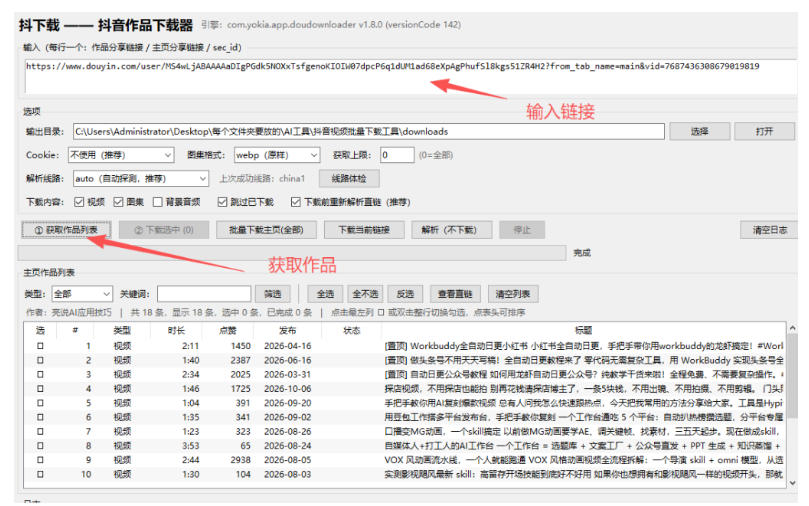
—Main interface: paste link → get works list → select → batch download, progress at a glance—
How to use the software
Step 1: After downloading, open the "Douyin Downloader" software and paste the work share link or profile share link into the input box.
Step 2: Set the output directory; keep other settings as default (Cookie set to "Do not use", image gallery format set to "webp as-is", fetch limit 0 means all).
Step 3: Click "Get works list" to fetch works, select the desired videos/image-text posts, click "Download selected" or "Batch download profile (all)", and wait for the progress to finish.
Supporting Study Materials
This course comes with a materials pack. Members receive the access link by email after requesting the course.
Related Courses

Xiaohongshu IP Gold-Mining Bootcamp: Master Topic Selection, Copywriting, Shooting & Editing, and Viral Operations with Private-Domain Monetization



Douyin Emotional-Card GIF Practical Course: Phone Production + Livestream Tactics, Unlock GIF Traffic Monetization

Kuaishou Good-Stuff Practical Course: Product Selection & Operations + Site-Wide Promotion + Re-Creation Editing for Affiliate Sales



Bilibili short-video product-promo dividend: free teaching plus managed operation, two playbooks, single-account seven-day income 1200-3600

Xiaohongshu electronic-resource category opening tutorial: targeted-access rules, qualification materials and the self-recommendation submission flow

Game Gold-Farming Money-Making Plan: Earn 1k+ Daily, a Stable 3-Year Project Anyone Can Do in Spare Time [Revealed]

