


-
Solo Business Courses
-
 Others
-
Overseas Tutorials
-
Photography & Editing
-
Community & Private Domain
-
Self-Media Writing & Copywriting
-
Side Income Projects
-
E-commerce
-
Short Video & Live Streaming
-
Artificial Intelligence (AI)
-
Software & Tools
-
Operating Systems
-
Plugins & Scripts
-
MacOS Software
-
Android Software
-
Windows Software
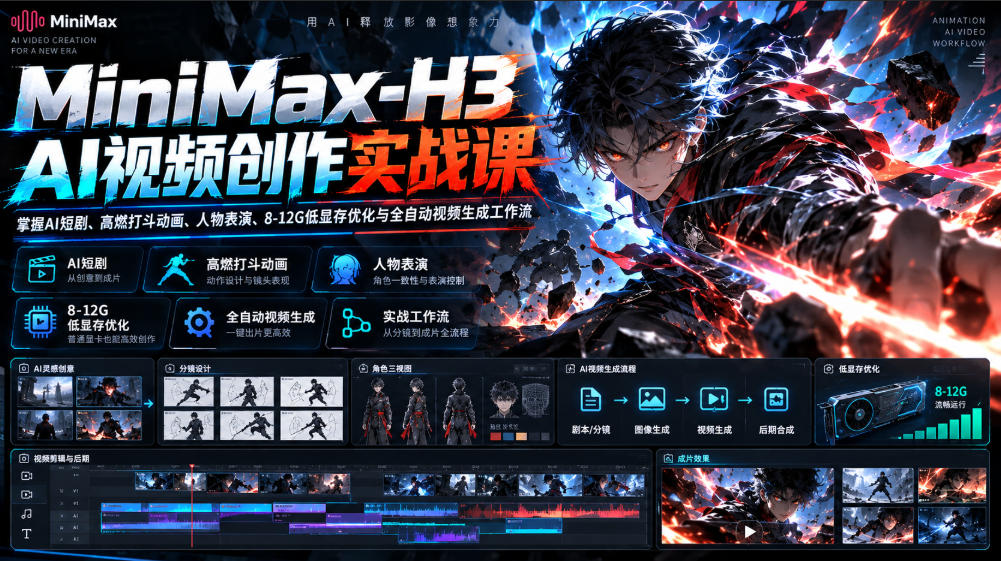
MiniMax-H3 AI Video Creation Practical Course, master AI short dramas, high-energy fight animations, character performances, 8-12G low-VRAM optimization, and fully automatic video generation workflows
-
Game Gold-Farming Money-Making Plan: Earn 1k+ Daily, a Stable 3-Year Project Anyone Can Do in Spare Time [Revealed]
Study material — included with membership Get Membership -
Hot-game fully-automated earning: 500+ a day, no experience, simple operation - the steadiest long-term game-earning side hustle (revealed)
Study material — included with membership Get Membership -
FlyingMouse earns merit this time! Don't panic at Windows format problems — the open-source FlyingMouse format conversion tool helps, a popular GitHub gem
Study material — included with membership Get Membership -
Douyin Product-Selling Coaching Bootcamp: No On-Camera Appearance Needed, Newbies Can Produce Selling Short Videos by Following the Steps
Study material — included with membership Get Membership -
First-release game gold-farming money plan: 1K+ a day, ordinary people in spare time
Study material — included with membership Get Membership






-
FlyingMouse earns merit this time! Don't panic at Windows format problems — the open-source FlyingMouse format conversion tool helps, a popular GitHub gem
Study material — included with membership Get Membership -
LuDaShi v6.1024.4105.1121 Slim Single File
Study material — included with membership Get Membership -
2D Cartoon Animation Software Moho Pro v14.3
Study material — included with membership Get Membership -
Video Editor Aiseesoft Filmai v1.0.18
Study material — included with membership Get Membership -
To-Do Microsoft To Do v2.147 Free
Study material — included with membership Get Membership -
PR/AE/DaVinci/FCPX video Plugin Nobe OmniScope Win1.11.15 / Mac1.10.138
Study material — included with membership Get Membership






"MiniMax-H3 AI Video Creation Practical Course" is a set of **hands-on AI video generation and automated workflow tutorials** designed specifically for AI video beginners, animation creators, short drama production staff, and AI technology enthusiasts.
The course has 11 lessons in total, centered on MiniMax-H3 video generation technology, and systematically explains core content such as AI motion effect production, AI short drama creation, high-dynamic fight animation, character dialogue performance, low-VRAM model operation, generation acceleration optimization, and local and cloud automated workflow setup.
The course starts with zero-basis environment configuration and combines model installation, one-click integration packages, prompt templates, and SKILL automation skills to help students gradually understand the complete AI video production process from material generation to the final finished film.
Aiming at problems such as insufficient VRAM on ordinary computers, slow AI video generation speed, and cumbersome operation processes, the course focuses on **8-12GB low-VRAM optimization solutions, model acceleration techniques, and automated operation methods**, enabling more creators to explore local AI video production according to their own device conditions.
At the same time, through cases such as high-energy fight animations, character action design, character emotional performance, camera movement, and high-definition image output, it helps students master production ideas for different types of AI videos.
The course also covers Stable Diffusion related gameplay, the AIFISHER local canvas, and automatic invocation methods for local and cloud workflows, helping students reduce repetitive operations and improve video creation efficiency.
**From zero-basis deployment to AI video generation, from high-dynamic fights to character plot performances, and then to automated workflows and short film production, systematically learn the core methods of AI video production.**
##Course Core Content
###Module 1: MiniMax-H3 Basics and Environment Deployment
Learn the basic understanding of MiniMax-H3 related models, runtime environment configuration, and how to use integration packages, and understand the basic operation process of local AI video generation.
**Learning Focus:**
-Basic understanding of MiniMax-H3
-AI video generation environment configuration
-Model installation and operation
-One-click integration package usage
-Basic parameters and operation process
-Handling common zero-basis problems
###Module 2: AI Motion Effect Production and Automated Generation
Centered on AI dynamic effect production, learn to use MiniMax-H3 and automated SKILL templates to assist in generating video motion effects.
Through hands-on cases, understand how to integrate repetitive production steps into automated processes and reduce manual processing time.
**Learning Focus:**
-AI motion effect production methods
-Dynamic image generation
-SKILL automation template usage
-Automatic execution of video generation tasks
-Automated workflow configuration
###Module 3: Full Process Production of AI Short Dramas and Short Films
From image conception to video generation, learn the basic process of AI short drama production.
Combined with the prompt templates provided by the course, understand how to design images, organize shots, generate video clips, and integrate different materials into a complete short film.
**Learning Focus:**
-AI short drama production workflow
-Video visual design
-Prompt template usage
-Character and scene generation approaches
-Shot planning and video transitions
-From image generation to finished short film
###Module 4: High-energy fight animation and motion control
For anime battles, character duels, and high-dynamic action scenes, learn methods for generating AI fight animations.
Focus on understanding motion performance, camera movement, fight rhythm, and high-definition output to help students explore AI action videos with greater visual impact.
**Learning Focus:**
-High-dynamic fight animation production
-Character motion prompt design
-Combat scene camera movement
-Motion continuity optimization
-High-energy visual effects production
-HD fight video output
###Module 5: AI character dramatic scenes and emotional performance
In addition to intense action scenes, character emotions and natural performance are also important parts of AI short dramas.
This module focuses on MiniMax-H3 character dramatic scene production, learning how to improve character expressions, movements, and plot scene performance through prompt and workflow design.
**Learning Focus:**
-AI character dramatic scene production
-Character emotion and expression design
-Character movement performance
-Plot shot design
-Natural character performance optimization
-AI short drama character performance case studies
###Module 6: 8-12GB low VRAM operation and model acceleration
For mainstream consumer graphics cards, the course specifically introduces low VRAM operation and generation efficiency optimization methods.
Combining 12GB VRAM operation case studies, one-click integrated packages, and model optimization solutions, learn how to adjust workflows according to device conditions to reduce VRAM usage and improve generation efficiency.
**Learning Focus:**
-8-12GB low VRAM operation solutions
-12GB VRAM model configuration
-One-click integrated package deployment
-AI video generation acceleration
-VRAM usage optimization
-Generation parameters and runtime efficiency adjustment
The 350%, 530%, and other acceleration figures mentioned in the course are specific demonstration scenarios; actual results will be affected by factors such as graphics card performance, model version, parameters, and runtime environment.
###Module 7: Stable Diffusion and local AI creation
Combining free version Stable Diffusion related methods, learn to use local AI tools for video material production, and understand how to pair different models and workflows.
**Learning Focus:**
-Stable Diffusion related applications
-Local AI model usage
-Video material generation
-Supporting templates and material usage
- Local AI creation workflow
### Module 8: AIFISHER Canvas and Fully Automated Workflow
Learn how to use the AIFISHER local canvas, understand how to organize AI tasks visually, and explore coordinated calls between local and cloud model workflows.
**Learning Focus:**
- Introduction to the AIFISHER local canvas
- Visual workflow configuration
- Local model invocation
- Cloud model workflow invocation
- Coordination of open-source and closed-source tools
- One-click automated task execution
##Course Features
**Section 1.11 hands-on course covering core AI video scenarios**
Covers AI motion effects, short dramas, fight animations, character performance, low-VRAM optimization, and automated video generation.
**2. Focus on low-VRAM running solutions**
Provides configuration and optimization ideas for devices with 8-12GB VRAM, lowering the hardware barrier to local AI video creation.
**3. Bundled integration package, prompts, and SKILL templates**
Combined with the tools and templates provided in the course, helps learners get familiar with video generation and automated operation workflows faster.
**4. Dual-scenario teaching: fight animations and character drama**
Includes both high-dynamic combat scenes and character emotion and plot performance, suitable for various AI short drama and animation creation needs.
**5. Combining local and cloud workflows**
Learn to organize automated tasks through tools such as AIFISHER and explore collaborative applications between different AI models.
**6. From model deployment to finished video**
The course covers not only generation technology but also the short film production process, helping learners build a complete AI video creation approach.
##Suitable Learners
1. **AI video beginners with zero experience:** Those who want to learn MiniMax-H3 model installation, video generation, and basic operations.
2. **AI short drama and comic drama creators
3. **Animation and action video enthusiasts:** Those who want to create high-energy fight scenes, character duels, and dynamic visual effects.
4. **Low-VRAM device users:** Those who want to explore methods for running AI video models on 8-12GB VRAM.
5. **Self-media and short video creators
6. **AI automated workflow learners:** Those who want to master SKILL templates, local canvas, and automated model invocation methods.
##What Will You Gain After Completing the Course?
Through the systematic study of 11 lessons, you will gradually learn the installation and operation methods of MiniMax-H3 video generation related tools, and master the basic operational approaches for AI motion effects, high-dynamic fight animations, character drama, and short drama production.
You will learn how to use prompt templates to control visual presentation, and understand video creation essentials such as character actions, character emotions, camera movement, and high-definition output.
At the same time, through content such as 8-12GB low-VRAM optimization, model acceleration, one-click integration packages, and automated SKILL templates, you will further understand how to set up a local AI video generation environment according to device conditions, and explore collaborative applications of the AIFISHER canvas and local and cloud workflows.
**From MiniMax-H3 model deployment to high-energy fight animations, from AI character performance to finished short dramas, and on to low-VRAM acceleration and automated video workflows, 11 hands-on tutorials guide you through systematic learning of AI video creation technology and gradually build an efficient, reusable AI video production process.**
Course Content
01 - Master AI motion effects completely in 6 minutes! Say goodbye to editing_MINIMAX-H3 + fully automatic operation [includes SKILL template]
02-[MINIMAX-H3] Free!!! AI short film full workflow detailed explanation + full prompt templates + runs on minimum 12G VRAM
03-[MINIMAX-H3] High-dynamic fight animation detailed explanation_with complete prompt templates_runs smoothly on 8-12G low VRAM
04-[MINIMAX-H3] 530% speedup one-click integrated package_12G VRAM 10 seconds only takes 300 seconds!!!!!
05-[MINIMAX-H3] Another 350% speedup_12G VRAM 10 seconds only takes 450 seconds!!!!!
06-[MINIMAX-H3] 8-12GB ultra-low VRAM optimization_extreme acceleration optimization 100%!!!
07 - Free version SD__I have prepared the most complete MiniMax-H3 gameplay [includes full set of template materials_minimum 12GB to play]
08 - The strongest dialogue drama teaching on the entire internet??? MiniMaxH3 can finally act, no longer cheesy!!! [August workflow recommendation series]
09 - [Free and open source] AIFISHER local canvas fully automatic one-click invocation of local and cloud workflows, perfect combination of open source + closed source
10 - [MINIMAX-H3] Fight scenes evolve again! High-dynamic ultra-fast HD fully automatic output | runnable on 12G | includes integration package + prompt templates
11 - Zero cost! Full AI short film process_from visuals to finished film teaching [includes step-by-step configuration]
Supporting Study Materials
This course comes with a materials pack. Members receive the access link by email after requesting the course.
Related Courses

Family Comedy Short-Drama Creation Course: Benchmark Hot Accounts, AI-Assisted, Fast Start for Total Beginners, Grow Followers and Drive Product Sales

Amazon AI Automation Practical Course: AI Operating Mindset, Setting Up the Codex Environment, Risk-Control Checks and Automated Listing Copy

AI E-Commerce Data Tool Development Course: Learn Codex+BI From Zero, Build a Multi-Store Integrated Visualization Dashboard


Advanced AI Prompt Application: 15 Lessons | Universal Instruction Thinking + Multiple Output Modes + Full Industry Commercial Cases

AI Video Creation Crash Course: From Great-Case Breakdown to Five Core Modules, Fast-Track AI Video Skills for Total Beginners

AI Commercial Practice System Course: In-Depth SD Mastery + Advanced Flux Hands-On + Comfyui Workflow Building, Full Commercial Design Project Training

[National-Day Pick] AI Automation Game, 1k+ RMB a Day, Simple to Operate, Stable for Three Years! [Revealed]



