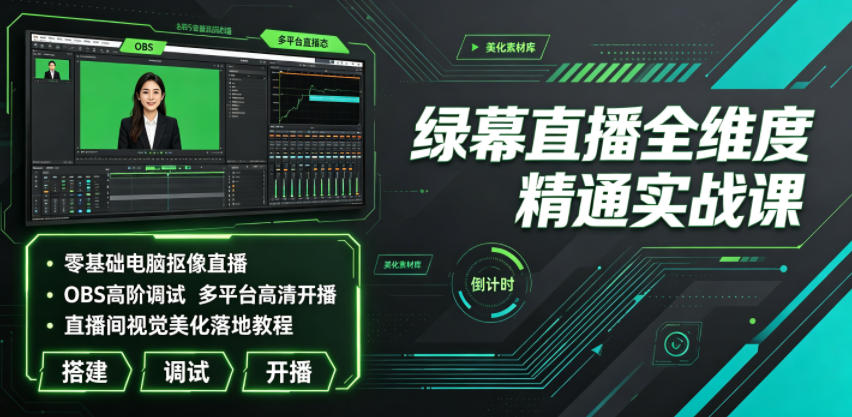
그린스크린 라이브 전차원 마스터 실전 강의|무기준 PC 크로마키 방송, OBS 고급 튜닝, 다플랫폼 HD 방송, 라이브룸 시각 미화 실습
-

선착순 게임 노가다 돈벌기 계획, 일 1k+, 일반인 한가한 시간에 가능! (공개)
회원 참고 학습 자료 멤버십 가입












Course Introduction
Today the live industry grows ever more competitive. Ordinary phone real-scene streaming looks flat, with fixed scenes and rough visuals, making it hard to retain viewers and lift live-room dwell time and conversion. Most live beginners and small-to-mid streamers face many practical problems: they don't understand 그린스크린 setup logic, can't pair gear or tune lighting, and get blurry keyed pictures with bad edges; they're unfamiliar with live helper software and can't install/debug OBS, 우타 컴패니언 or 라이브 컴패니언, getting frequent stutter and fuzzy quality; they can't customize live scenes, dynamic materials, scrolling captions or effect stickers, so the room looks plain; multi-platform streaming is messy and they can't do multi-scene broadcast or screen-cast streaming; audio is noisy with background hum and out of sync with video, hurting the viewing experience; they don't know the full PC streaming features of 웨이신 채널 and 더우인 - interaction, selling, lucky draw, preview; and they can't fix phone screen-cast connection failures or device compatibility errors, so streams keep crashing.
This full-dimension 그린스크린 streaming bootcamp is built for zero-basis live practitioners. From early gear prep, environment setup and software deployment, to advanced fine OBS tuning, precise 그린스크린 keying, live-room visual beautification and multi-platform HD broadcast, it covers everything, hand-in-hand teaching you to build a professional-grade live room, easily beating ordinary real-scene streaming and seizing platform traffic dividends.
Course Content
01. Intro course: preview of the advanced PC 그린스크린 streaming build course
02. 1. The 4 core advantages of PC 그린스크린 streaming
03. 2. PC 그린스크린 streaming equipment checklist
04. 3. Full guide to choosing a live-room green screen and 크로마키 techniques
05. 4. Full guide to lighting for PC 그린스크린 streaming
06. 5. Microphone setup for PC 그린스크린 streaming
07. 1. OBS software download and interface familiarization
08. 2. 우타 컴패니언 install/download and interface
09. 3. 라이브 컴패니언 install/download and interface
10. 4. iTunes software install/download
11. 1. How to add a background in OBS
12. 2. How to add a person 크로마키 effect in OBS
13. 3. How to add video materials in OBS
14. 4. How to add scrolling text in OBS
15. 5. How to add phone screen-cast in OBS
16. 6. How to set audio effects in OBS
17. 7. How to set streaming resolution in OBS
18. 8. How to quickly switch live scenes in OBS
19. 9. How to achieve multi-platform streaming in OBS
20. 10. How to achieve 3-screen simultaneous broadcast in OBS
21. 11. How to add non-system fonts in OBS
22. 12. How to add a clock effect in OBS
23. 13. How to remove microphone background noise in OBS
24. 14. How to set OBS to avoid streaming lag
25. 15. OBS 더우인 HD lag-free streaming settings
26. 16. How to make video stickers
27. 17. How to make image stickers
28. 18. What to do if an iPhone can't connect to 우타 컴패니언 signal
29. 19. What to do if an Android phone can't connect to 우타 컴패니언 signal
30. 20. PC 웨이신 채널 streaming: the video source
31. 21. PC 웨이신 채널 streaming: beautification + effects settings
32. 22. PC 웨이신 채널 streaming: hot list and interactive messages
33. 23. PC 웨이신 채널 streaming: the co-host feature
34. 24. PC 웨이신 채널 streaming: product management
35. 25. PC 웨이신 채널 streaming: lucky draw + gift wish + playlist
36. 26. PC 웨이신 채널 streaming: live preview
37. 27. PC 웨이신 채널 streaming: content display
38. 28. PC 웨이신 채널 streaming: audio settings
39. 29. 텐센트 미팅 can also use OBS virtual 크로마키 streaming
40. 1. Massive material library sharing
41. 2. Two sets of custom label stickers, backgrounds and title materials
42. 3. Live Q&A on course and practical details
43. 4. Shared toolkits + material packs used in the course
44. 5. Live-room build examples across industries
45. Bonus lesson 1: pre-build preparation for live streaming
Suitable For
✅ Zero-basis live newcomers who can't build a PC live scene and don't know 그린스크린 keying or software tuning
✅ Streamers whose real-scene picture is flat and rough, wanting to upgrade to professional 그린스크린 and lift room quality
✅ Operators whose streams stutter, look fuzzy and sound noisy, who can't optimize streaming parameters
✅ Commerce bloggers who can't make live materials or visual beautification, whose room has no character and can't retain viewers
✅ Senior streamers wanting multi-platform simultaneous broadcast and three-screen broadcast to amplify traffic
✅ Office workers needing online meeting/webinar live scenes who want to master virtual 크로마키 tech
What You'll Learn
1. Master the full 그린스크린 hardware build logic; skillfully choose green screen, lighting and audio gear for clean HD keying.
2. Master installation and fine tuning of OBS, 우타 컴패니언, 라이브 컴패니언 and other live software.
3. Master core live skills: person keying, scene replacement, material overlay, caption effects, screen-cast linkage.
4. Learn anti-lag, HD quality and noise-reduction audio optimization to fully fix live crashes.
5. Independently produce original live stickers, backgrounds and titles to build a distinctive high-looking live room.
6. Master full-flow HD multi-platform PC streaming, multi-screen broadcast and interactive selling on 더우인 and 웨이신 채널.
7. Independently troubleshoot common live faults: phone screen-cast, software adaptation, device connection.
8. Master extended virtual 크로마키 plays for streaming, meetings and webinars, reusing the skill.
학습 보조 자료
이 강의에는 자료 팩이 포함됩니다. 회원은 신청 후 이메일로 접속 링크를 받습니다.
관련 강의