


-
Solo Business Courses
-
 Others
-
Overseas Tutorials
-
Photography & Editing
-
Community & Private Domain
-
Self-Media Writing & Copywriting
-
Side Income Projects
-
E-commerce
-
Short Video & Live Streaming
-
Artificial Intelligence (AI)
-
Software & Tools
-
Operating Systems
-
Plugins & Scripts
-
MacOS Software
-
Android Software
-
Windows Software

Cross-Platform AI Video Subtitle Extraction & Translation Tool Qingwu Subtitle v0.9.13 Free Open Source Win/Mac
-
Game Gold-Farming Money-Making Plan: Earn 1k+ Daily, a Stable 3-Year Project Anyone Can Do in Spare Time [Revealed]
Study material — included with membership Get Membership -
Hot-game fully-automated earning: 500+ a day, no experience, simple operation - the steadiest long-term game-earning side hustle (revealed)
Study material — included with membership Get Membership -
FlyingMouse earns merit this time! Don't panic at Windows format problems — the open-source FlyingMouse format conversion tool helps, a popular GitHub gem
Study material — included with membership Get Membership -
Douyin Product-Selling Coaching Bootcamp: No On-Camera Appearance Needed, Newbies Can Produce Selling Short Videos by Following the Steps
Study material — included with membership Get Membership -
First-release game gold-farming money plan: 1K+ a day, ordinary people in spare time
Study material — included with membership Get Membership






-
FlyingMouse earns merit this time! Don't panic at Windows format problems — the open-source FlyingMouse format conversion tool helps, a popular GitHub gem
Study material — included with membership Get Membership -
LuDaShi v6.1024.4105.1121 Slim Single File
Study material — included with membership Get Membership -
2D Cartoon Animation Software Moho Pro v14.3
Study material — included with membership Get Membership -
Video Editor Aiseesoft Filmai v1.0.18
Study material — included with membership Get Membership -
To-Do Microsoft To Do v2.147 Free
Study material — included with membership Get Membership -
PR/AE/DaVinci/FCPX video Plugin Nobe OmniScope Win1.11.15 / Mac1.10.138
Study material — included with membership Get Membership





Qingwu Subtitle is a free, easy-to-use AI subtitle smart extraction and translation software. Using advanced automatic recognition technology, it precisely captures audio content from video files and quickly converts it into subtitles in the corresponding language. The tool supports up to 99 languages including Chinese, English, Japanese, and Korean, and is compatible with Windows and macOS (including M-series and Intel processors).
Although many subtitle-extraction apps and online services exist, they often have usage-time limits or other complex restrictions. Qingwu Subtitle offers an unlimited, user-friendly choice for users who need to add subtitles to English, Japanese, and other foreign-language videos.
Core Features
- Multi-model support: Uses multiple intelligent models to extract subtitles and automatically sync them with video dialogue.
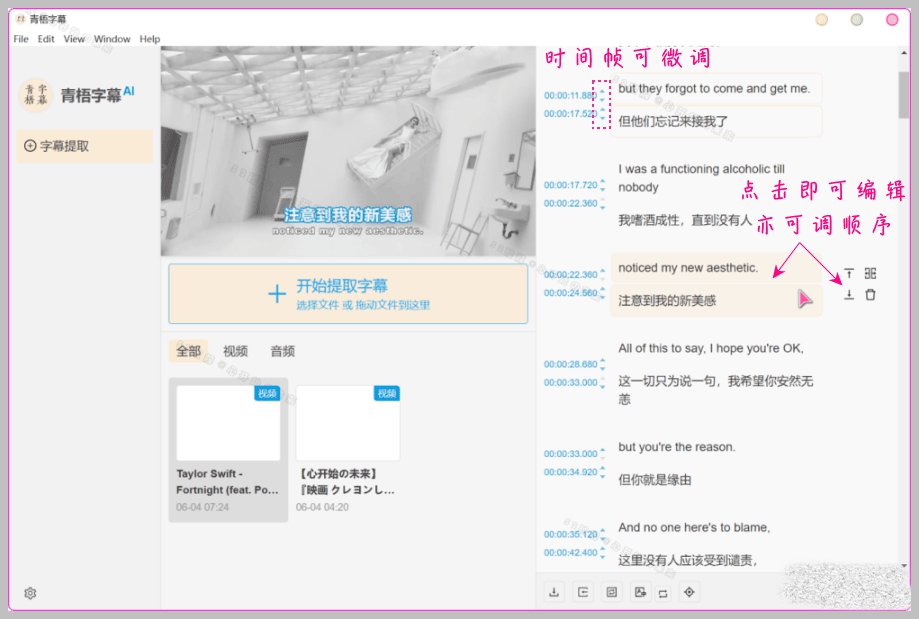
- Subtitle editing: Extracted subtitles can be freely edited and proofread for customized modifications.
- Multiple translation connections: Supports connecting to various translation services for easy cross-language subtitle conversion.
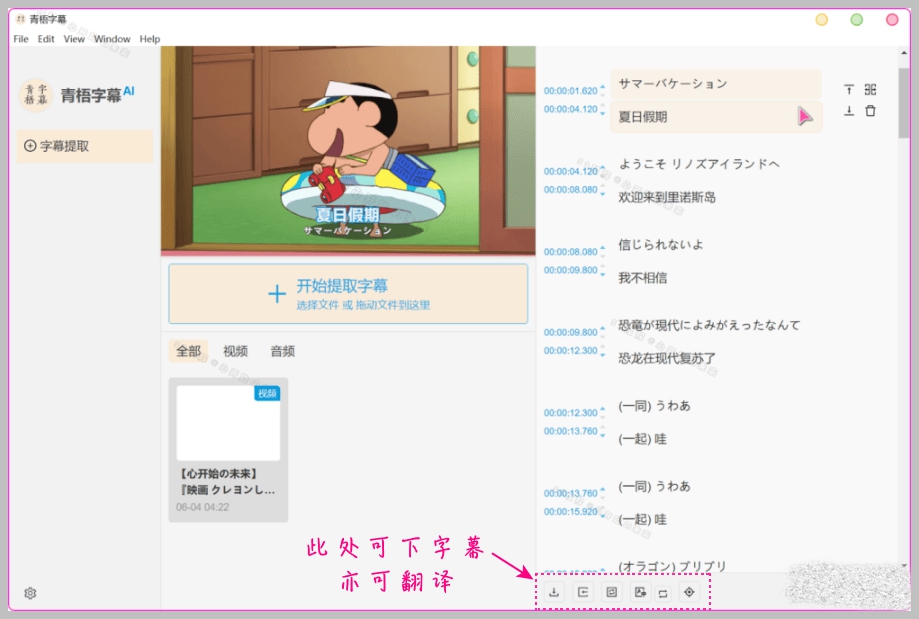
- Broad format compatibility: Supports downloading single-language or bilingual subtitles in srt, vtt, lrc, and other formats, usable in various video editors or directly in video players.
Usage Guide
- Basic operation guide: Simple tutorial
- How to apply for a translation API: Translation service
- Offline speech recognition tool: Offline speech recognition
- Using NVIDIA GPU acceleration: Installation guide
Installation & Use
Install the installer version following on-screen prompts. For the portable version, just unzip and double-click the exe. Mac users choose the version based on their processor. The software menu bar usually needs no extra settings - you can ignore it.
Workflow
- Click the "+" button to select the video file to import.
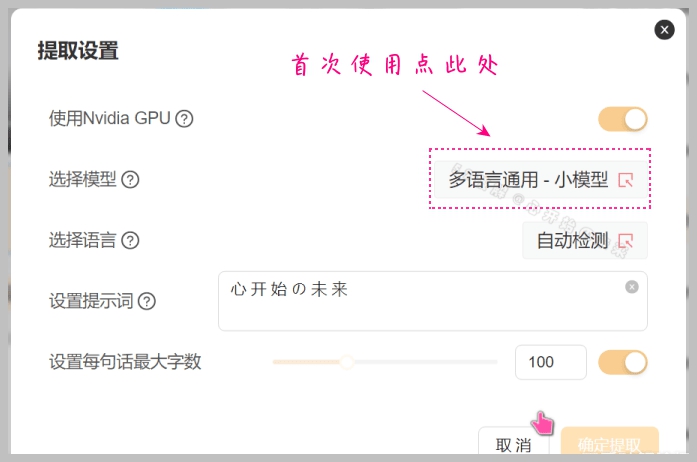
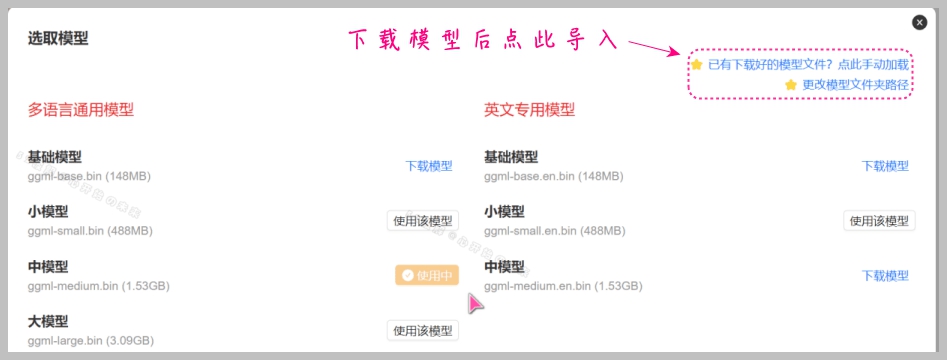
- In the popup, choose a model (if not pre-downloaded, follow the prompts or download it yourself).
- Select the language or set auto-detect, then save the config.
- Wait for the software to finish subtitle recognition and output.
Subtitle Translation
You need to apply for an API yourself - common practice for most translation software. Alternatively, download the original-audio subtitle file, use an online translation service to translate it, then merge the translated text back with the video.
Additional Information
The software has successfully extracted subtitles from English and Japanese short videos. Long-video context analysis may have occasional errors - a common issue with whisper-based models. If needed, proper video cutting can improve extraction accuracy. Try the other features yourself to learn more.
FAQ
- Why does a subtitle-extraction failure prompt appear?
- If your computer has no Nvidia GPU, make sure "Use Nvidia GPU" is off during extraction. If you need to enable it, you must install the CUDA toolkit; otherwise keep it off.
- Confirm the software correctly loaded the required model. If the model isn't loaded or recognized properly, extraction may fail.
- Check whether your system environment and CPU are strong enough to support extraction. For low-spec entry machines, hardware upgrades may be needed.
- If none of the above works, delete all cache data and restart the software. For example, cache may be at: C:\Users\[your username]\AppData\Roaming\qingwu-zimu
- How do I choose the right model?
- Model size directly affects extraction/recognition time, which depends on many factors: CPU and GPU configuration, the model itself, video length, etc.
- For everyday use, choosing a small-to-medium model under 2GB is usually enough.
- If you have high requirements for English translation accuracy, choose a model optimized for English.
- The general model supports up to 99 languages including Chinese, English, Japanese, and Korean. If a model isn't recognized, try a different model file or clear the cache and re-import.
- About antivirus false positives: This is common, but rest assured - it's usually a false positive. If you're worried about security, run it in a virtual environment. If in doubt, don't download or use it. For security-check results, see our links: [portable package](#) and [installer package](#).
Software Interface Notes
Settings interface: (no model by default; you need to import one yourself)


Extraction interface: (Natural Speech extraction with translation connected)

Result interface: (a download button appears in the lower right to extract; subtitles also auto-track. The screenshot uses Baidu machine translation.)
English MV:

Movie trailer:

Related Courses

Super local toolbox! Built-in screen recording, audio/video cutting & merging, video compression & extraction, forever free - Kedou Video Converter

100% perfect free tool! One-stop multi-function PDF software: PDF convert, compress, edit etc., minimal, no ads, so nice - JOPDF

Open-Source Desktop Remote Tool, Beats Paid Versions! Free for Personal and Commercial Use Unlimited, Cross-Platform, HopToDesk Remote Control

Latest K-12 Textbook Downloader: Whole-Grade Resource Download, Courseware, Video, Audio in One Click

HuyanBao: free blue-light eye-care app with pet break reminders

Windows Can Have a Desktop Dynamic Island Too! A Modern System Control Center — Give Your PC a Black Notch, PyIsland

3D Simulated Comic Drama Production: Seedance2.0 Full-Process Practical Course - From Zero to One High-Quality Comic Drama Creation

Win/Mac Dual Support! Latest Permanent Lifetime Version, Supports Old Photo Restoration, Image Sharpening and Lossless Upscaling Tool, Aiarty Image Enhancer

Online Video Course: Github Open-Source Bilibili Video Download Tool! Supports 8K and Dolby Vision Bilibili Video Batch Download Tool, Easy to Use Bilidown


