


-
Solo Business Courses
-
 Others
-
Overseas Tutorials
-
Photography & Editing
-
Community & Private Domain
-
Self-Media Writing & Copywriting
-
Side Income Projects
-
E-commerce
-
Short Video & Live Streaming
-
Artificial Intelligence (AI)
-
Software & Tools
-
Operating Systems
-
Plugins & Scripts
-
MacOS Software
-
Android Software
-
Windows Software
Microsoft Magnifier (Presentation Aid) Tool Sysinternals ZoomIt v10.0 [R4847]
-
Game Gold-Farming Money-Making Plan: Earn 1k+ Daily, a Stable 3-Year Project Anyone Can Do in Spare Time [Revealed]
Study material — included with membership Get Membership -
Hot-game fully-automated earning: 500+ a day, no experience, simple operation - the steadiest long-term game-earning side hustle (revealed)
Study material — included with membership Get Membership -
FlyingMouse earns merit this time! Don't panic at Windows format problems — the open-source FlyingMouse format conversion tool helps, a popular GitHub gem
Study material — included with membership Get Membership -
Douyin Product-Selling Coaching Bootcamp: No On-Camera Appearance Needed, Newbies Can Produce Selling Short Videos by Following the Steps
Study material — included with membership Get Membership -
First-release game gold-farming money plan: 1K+ a day, ordinary people in spare time
Study material — included with membership Get Membership






-
FlyingMouse earns merit this time! Don't panic at Windows format problems — the open-source FlyingMouse format conversion tool helps, a popular GitHub gem
Study material — included with membership Get Membership -
LuDaShi v6.1024.4105.1121 Slim Single File
Study material — included with membership Get Membership -
2D Cartoon Animation Software Moho Pro v14.3
Study material — included with membership Get Membership -
Video Editor Aiseesoft Filmai v1.0.18
Study material — included with membership Get Membership -
To-Do Microsoft To Do v2.147 Free
Study material — included with membership Get Membership -
PR/AE/DaVinci/FCPX video Plugin Nobe OmniScope Win1.11.15 / Mac1.10.138
Study material — included with membership Get Membership





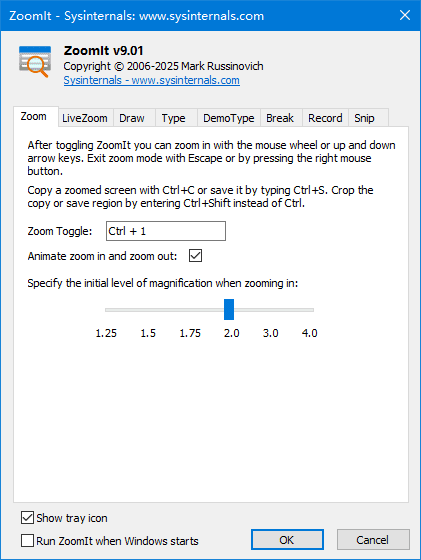
When presenting, do you always worry the audience can't see details, or want to highlight key points but have no way? Try ZoomIt! It was originally developed by Sysinternals and later acquired by Microsoft, becoming an official practical presentation-assist tool - many people affectionately call it the "Microsoft magnifier." Its features are abundant and practical, elevating your presentation several notches - whether teaching, expert keynotes, or tech sharing, it delivers.

What Are ZoomIt's Core Features?
Let's see what this "Swiss Army knife" can do:
1. One-Click Zoom, No Details Hidden
Its signature feature is screen zooming. You can magnify any area of the screen anytime, letting distant viewers see every pixel, every line of code - very convenient.
2. Free Annotation, Key Points Obvious
It has a built-in powerful "pen" tool. In zoomed or normal screen state, you can directly draw arrows, rectangles/ellipses, and write notes - just like writing on a blackboard - clearly pointing out key info.
3. Time Control, No Overrun
It has a thoughtful timer. Set a countdown to remind you of remaining speaking time, or use a stopwatch to record a section's duration - keeping the whole presentation's rhythm in hand.
4. Focus Follows, Point-and-Click
The magnifier and pen follow your mouse pointer. Wherever the mouse goes, the zoom/annotation focus follows - making explanations smooth.
5. Full-Screen Mode, Immersive Experience
Zoom part of the screen, toggle to full-screen zoom with one key, or use the pen in full-screen - focusing the audience entirely on your content.
Why Is It Highly Regarded?
ZoomIt is a classic thanks to these advantages:
- Completely free: A pure free tool - no account, no purchase; download and use immediately. Very generous.
- Extremely lightweight: The installer is only tens of KB, barely using disk space; runtime resource use is negligible - never slows the system.
- Feature aggregation: It perfectly combines the most-used presentation functions - zoom, annotation, timer - without switching between apps.
- Premium lineage: As a Microsoft-acquired and maintained tool, it's passed strict security review - reassuring, with stability and compatibility guaranteed.
- Zero learning curve: Operation logic is intuitive; memorize a few simple hotkeys to master it. Corporate training, school education, personal sharing - all quick to start.
Summary
In short, ZoomIt is a model of the "small but beautiful" philosophy. With Microsoft's official background, completely free policy, and ultra-lightweight footprint, it provides screen zoom, real-time annotation, and timer management as core presentation aids. For anyone who regularly needs screen demonstrations and explanations, it's an indispensable efficiency tool, making your communication clearer, more focused, and more professional.
Related Courses

Super local toolbox! Built-in screen recording, audio/video cutting & merging, video compression & extraction, forever free - Kedou Video Converter

100% perfect free tool! One-stop multi-function PDF software: PDF convert, compress, edit etc., minimal, no ads, so nice - JOPDF

Open-Source Desktop Remote Tool, Beats Paid Versions! Free for Personal and Commercial Use Unlimited, Cross-Platform, HopToDesk Remote Control

Latest K-12 Textbook Downloader: Whole-Grade Resource Download, Courseware, Video, Audio in One Click

HuyanBao: free blue-light eye-care app with pet break reminders

Windows Can Have a Desktop Dynamic Island Too! A Modern System Control Center — Give Your PC a Black Notch, PyIsland

3D Simulated Comic Drama Production: Seedance2.0 Full-Process Practical Course - From Zero to One High-Quality Comic Drama Creation

Win/Mac Dual Support! Latest Permanent Lifetime Version, Supports Old Photo Restoration, Image Sharpening and Lossless Upscaling Tool, Aiarty Image Enhancer

Online Video Course: Github Open-Source Bilibili Video Download Tool! Supports 8K and Dolby Vision Bilibili Video Batch Download Tool, Easy to Use Bilidown


