


-
Solo Business Courses
-
 Others
-
Overseas Tutorials
-
Photography & Editing
-
Community & Private Domain
-
Self-Media Writing & Copywriting
-
Side Income Projects
-
E-commerce
-
Short Video & Live Streaming
-
Artificial Intelligence (AI)
-
Software & Tools
-
Operating Systems
-
Plugins & Scripts
-
MacOS Software
-
Android Software
-
Windows Software
DecSoft App Builder v2026.22 - No-Code Multi-Platform App Maker
-
Game Gold-Farming Money-Making Plan: Earn 1k+ Daily, a Stable 3-Year Project Anyone Can Do in Spare Time [Revealed]
Study material — included with membership Get Membership -
Hot-game fully-automated earning: 500+ a day, no experience, simple operation - the steadiest long-term game-earning side hustle (revealed)
Study material — included with membership Get Membership -
FlyingMouse earns merit this time! Don't panic at Windows format problems — the open-source FlyingMouse format conversion tool helps, a popular GitHub gem
Study material — included with membership Get Membership -
Douyin Product-Selling Coaching Bootcamp: No On-Camera Appearance Needed, Newbies Can Produce Selling Short Videos by Following the Steps
Study material — included with membership Get Membership -
First-release game gold-farming money plan: 1K+ a day, ordinary people in spare time
Study material — included with membership Get Membership






-
FlyingMouse earns merit this time! Don't panic at Windows format problems — the open-source FlyingMouse format conversion tool helps, a popular GitHub gem
Study material — included with membership Get Membership -
LuDaShi v6.1024.4105.1121 Slim Single File
Study material — included with membership Get Membership -
2D Cartoon Animation Software Moho Pro v14.3
Study material — included with membership Get Membership -
Video Editor Aiseesoft Filmai v1.0.18
Study material — included with membership Get Membership -
To-Do Microsoft To Do v2.147 Free
Study material — included with membership Get Membership -
PR/AE/DaVinci/FCPX video Plugin Nobe OmniScope Win1.11.15 / Mac1.10.138
Study material — included with membership Get Membership





Want to build a web tool or mobile app but feel put off by code and environment setup? Think you have to master HTML, CSS, and JavaScript before you can start? DecSoft App Builder is a visual web development tool that turns UI design into drag-and-drop and interaction logic into point-and-click config. You can generate websites, desktop software, Android apps, and browser extensions without writing a single line of code. This article walks through its core features, real-world cases, and a quick-start tutorial so you can finish your first app project in record time.
What is DecSoft App Builder?
DecSoft App Builder is a web-tech-based visual development tool. You build the UI by dragging and dropping, add interactions via preset actions, and finally export HTML5 web pages, standalone Windows programs, Android APKs, and browser extensions.
In short: no need to write code from scratch - drag and configure to build multi-platform apps, shrinking the dev cycle from "months" to "days".
Best for these use cases
- 🌐 Web apps: quickly build internal tools, dashboards, and report pages
- 💻 Desktop utilities: generate standalone Windows EXEs such as calculators, sticky notes, file renamers
- 📱 Mobile apps: package Android APKs for small business apps or personal tools
- 🧩 Browser extensions: one-click export Chrome / Edge plugins that enhance web pages
- 🎨 Prototype validation: build an interactive prototype in hours - far more intuitive than static wireframes
Quick comparison with similar tools
| Item | DecSoft App Builder | Traditional No-Code Platforms | Traditional IDE (e.g. VS) |
|---|---|---|---|
| Learning curve | Low (drag + config) | Low | Steep (requires coding) |
| Platform coverage | Web/Windows/Android/Extensions | Usually web only | Needs multi-platform setup |
| Code freedom | Custom JS supported | Limited | Fully free |
| Environment setup | None required | None required | Complex |
5 Core Features of DecSoft App Builder
🎨 1. Visual Drag-and-Drop Designer
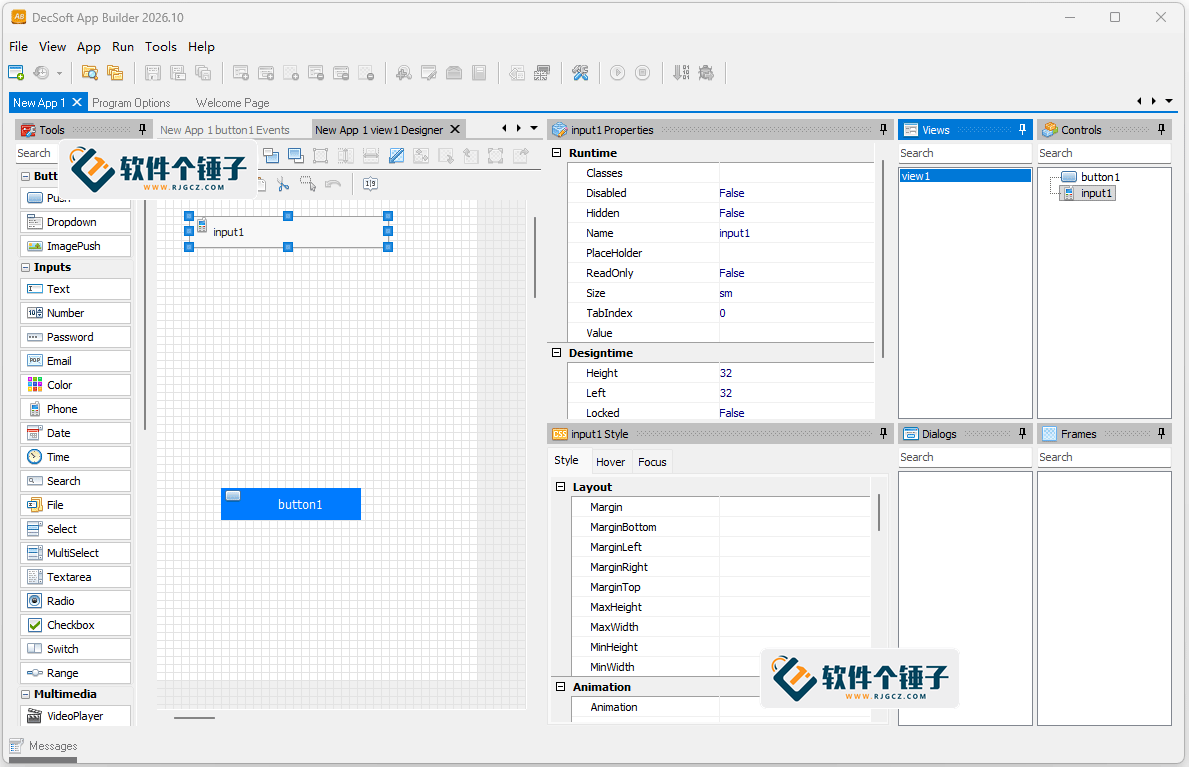
Controls library on the left, canvas on the right. Buttons, inputs, tables, images - drag them straight onto the canvas. UI design is as simple as making a slide deck.
Example: Drag a button onto the canvas → double-click to edit text → drag to resize
📦 2. One-Click Multi-Platform Build
One project exports to HTML5 web page, standalone Windows EXE, Android APK, iOS package, and browser extension - no separate development per platform.
Example: Click Build → pick target platform → one-click generate package
🧩 3. Preset Interaction Library
Thousands of ready-made interaction logic options are built in - button navigation, form submission, pop-up alerts, data storage - all configured with point-and-click.
Example: Select a button → click Actions → choose Open Web Page → enter URL
📱 4. Real-Time Multi-Platform Preview
While editing, preview both desktop and mobile effects side-by-side. Tweak and watch live - no need to build and install to confirm the final look.
Example: Click Preview → switch to Mobile mode → check layout fit
🔌 5. Component Ecosystem + Cordova Native Integration
Comes with preset forms, tables, media players, navigation menus and a full set of components; also supports native phone features like camera, geolocation, and file system via Cordova.
Example: Add a button → configure Open Camera → run on a real device
DecSoft App Builder Interface

| Case | Setup | Result & Review | Rating |
|---|---|---|---|
| Web Calculator | Drag in number buttons and a display box, configure add/subtract actions, preview and export to HTML5 | From zero to finished in just 30 minutes; calculator is fully functional with a clean UI. Review: very beginner-friendly, the interaction library saves time spent on JS. | ★★★★★ |
| Windows Desktop Sticky-Note Tool | Use a text box and a save button, configure Save-to-File action, build as EXE | The EXE runs by double-click; small footprint and no dependencies. Review: very efficient for desktop tools; icons can be customized later. | ★★★★☆ |
| Android To-Do App | Use a list component and input box, configure add/delete actions, call local storage via Cordova, package as APK | Successfully installed and ran on an Android phone; data persists. Review: no Android Studio needed to build a useful app - the entry barrier is greatly lowered. | ★★★★★ |
Tutorial: Build Your First App in 5 Steps
Step 1: Download & Install
Get v2026.22 from the Hammer Software site or DecSoft's official site. Run the installer and follow the prompts. On first launch you'll see the project wizard; click "New Blank Project" to start.
Step 2: Drag Controls to Design the UI
Drag buttons, input boxes, and text areas from the left toolbar onto the canvas. Double-click a control to edit text; drag edges to resize; the right-side properties panel lets you change color, font, and display style.
Step 3: Configure Interactions
Select a control, click the Actions panel on the right, pick the event you need from the library (e.g. click, double-click, on-load), then set the execution logic (e.g. show pop-up, open web page, save data).
Step 4: Real-Time Preview
Click Preview on the toolbar to see the running effect in a pop-up. Switch between Mobile mode and Desktop mode to check layout fit; if you spot issues, jump back to the canvas to fix them.
Step 5: Build & Publish
Click Build, pick your target platform (web / EXE / APK / browser extension), set name and icon, and the software generates the package automatically. Output files land in the output folder, ready to use.
💡 Pro tip: If you know JavaScript, you can insert custom code snippets in the Actions panel for more flexible logic. Also, every project supports local caching, which is great for offline apps.
Head-to-Head: DecSoft App Builder vs Traditional No-Code vs Traditional IDE
| Dimension | DecSoft App Builder | No-Code Platforms (e.g. Bubble) | Traditional IDE (e.g. Visual Studio) |
|---|---|---|---|
| Coding required | Mostly no | No | Yes |
| Ownership of generated code | Fully yours | Platform-locked | Fully yours |
| App types covered | Web/Desktop/Android/Extension | Mostly web | All platforms (needs setup) |
| Learning cost | Low | Low | High |
FAQ
Q1: Is DecSoft App Builder suitable for people with zero programming experience?
Very. UI design and basic interactions are done via drag-and-drop and config - no code needed. If you later want more advanced features, you can gradually learn a bit of JavaScript; the tool offers code hints for progressive learning.
Q2: Can it generate mobile apps? Which systems are supported?
Yes. Built-in Cordova integration lets you package Android APKs and iOS installers directly, with native features like camera and geolocation. Windows builds require a matching build environment.
Q3: Is the generated code good? Will it be bloated?
The generated code is clean and tidy with no redundant tags, and is not vendor-locked. After export, you can open and edit it in any editor or migrate it to other projects.
Q4: How big is the software? Will it run smoothly on an older PC?
Tiny footprint - under 200MB installer - with very low CPU usage at runtime. It runs smoothly on an office PC with 4GB RAM for drag design and preview; no fan spin-up worries.
Q5: What if I don't know how to use it? Are there tutorials?
The built-in Help menu explains every step. You can also follow the 5-step quick-start in section 4 of this article, or watch video demos on the official site. For special issues, search the developer community.
Bottom Line: Is DecSoft App Builder Worth Using?
The core problem DecSoft App Builder solves is "traditional development has a high barrier and low efficiency". It streamlines UI design, interaction logic, and cross-platform packaging into visual operations - letting beginners ship usable tools and apps in days, and freeing experienced developers from repetitive environment setup and boilerplate code. If you need to quickly validate a prototype, build internal tools, make small personal utilities, or are just starting to learn app development, it's a great starting point. We recommend kicking off with a web project to get familiar with the designer and action config, then trying EXE or APK builds to experience one-click multi-platform publishing.
👍 Download DecSoft App Builder now and get your first app live today!
Related Courses

Super local toolbox! Built-in screen recording, audio/video cutting & merging, video compression & extraction, forever free - Kedou Video Converter

100% perfect free tool! One-stop multi-function PDF software: PDF convert, compress, edit etc., minimal, no ads, so nice - JOPDF

Open-Source Desktop Remote Tool, Beats Paid Versions! Free for Personal and Commercial Use Unlimited, Cross-Platform, HopToDesk Remote Control

Latest K-12 Textbook Downloader: Whole-Grade Resource Download, Courseware, Video, Audio in One Click

HuyanBao: free blue-light eye-care app with pet break reminders

Windows Can Have a Desktop Dynamic Island Too! A Modern System Control Center — Give Your PC a Black Notch, PyIsland

3D Simulated Comic Drama Production: Seedance2.0 Full-Process Practical Course - From Zero to One High-Quality Comic Drama Creation

Win/Mac Dual Support! Latest Permanent Lifetime Version, Supports Old Photo Restoration, Image Sharpening and Lossless Upscaling Tool, Aiarty Image Enhancer

Online Video Course: Github Open-Source Bilibili Video Download Tool! Supports 8K and Dolby Vision Bilibili Video Batch Download Tool, Easy to Use Bilidown


