


-
Solo Business Courses
-
 Others
-
Overseas Tutorials
-
Photography & Editing
-
Community & Private Domain
-
Self-Media Writing & Copywriting
-
Side Income Projects
-
E-commerce
-
Short Video & Live Streaming
-
Artificial Intelligence (AI)
-
Software & Tools
-
Operating Systems
-
Plugins & Scripts
-
MacOS Software
-
Android Software
-
Windows Software
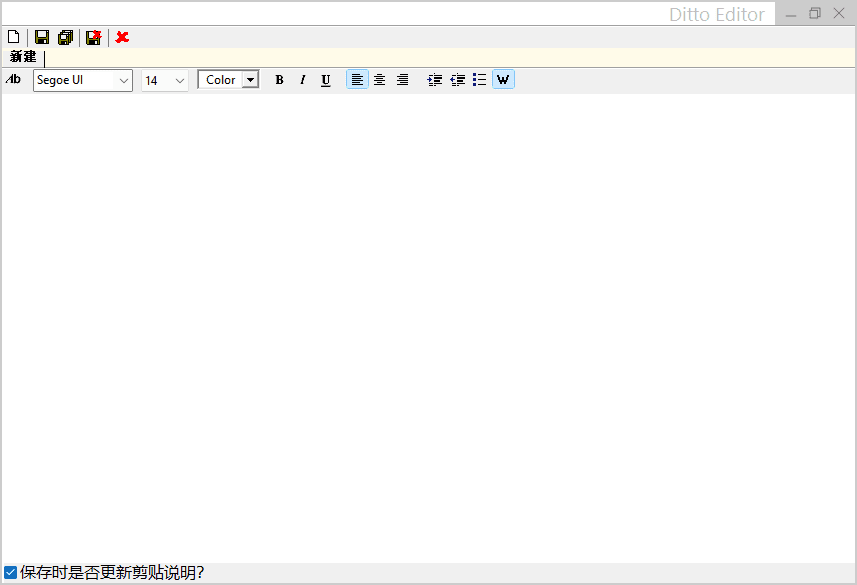
Windows Clipboard Enhancement Tool Ditto v3.25.113 Free and Open Source [R4586]
-
Game Gold-Farming Money-Making Plan: Earn 1k+ Daily, a Stable 3-Year Project Anyone Can Do in Spare Time [Revealed]
Study material — included with membership Get Membership -
Hot-game fully-automated earning: 500+ a day, no experience, simple operation - the steadiest long-term game-earning side hustle (revealed)
Study material — included with membership Get Membership -
FlyingMouse earns merit this time! Don't panic at Windows format problems — the open-source FlyingMouse format conversion tool helps, a popular GitHub gem
Study material — included with membership Get Membership -
Douyin Product-Selling Coaching Bootcamp: No On-Camera Appearance Needed, Newbies Can Produce Selling Short Videos by Following the Steps
Study material — included with membership Get Membership -
First-release game gold-farming money plan: 1K+ a day, ordinary people in spare time
Study material — included with membership Get Membership






-
FlyingMouse earns merit this time! Don't panic at Windows format problems — the open-source FlyingMouse format conversion tool helps, a popular GitHub gem
Study material — included with membership Get Membership -
LuDaShi v6.1024.4105.1121 Slim Single File
Study material — included with membership Get Membership -
2D Cartoon Animation Software Moho Pro v14.3
Study material — included with membership Get Membership -
Video Editor Aiseesoft Filmai v1.0.18
Study material — included with membership Get Membership -
To-Do Microsoft To Do v2.147 Free
Study material — included with membership Get Membership -
PR/AE/DaVinci/FCPX video Plugin Nobe OmniScope Win1.11.15 / Mac1.10.138
Study material — included with membership Get Membership





With its light footprint, powerful features, and efficient design, Ditto completely changes Windows users' clipboard experience. It not only solves the default clipboard's limitations but - through smart management and convenient operation - becomes a key productivity tool. Whether programmers handling code, content creators working with text, or ordinary users pursuing efficient office work, everyone finds suitable features in Ditto, turning copy-paste from a basic operation into a productivity breakthrough.

Breaking Clipboard Limits
For Windows users who frequently copy-paste, the default clipboard's single-item limit has long been an efficiency bottleneck. Ditto, as a free open-source clipboard manager with a mere 4MB footprint, carries powerful features to break this limit. It records extensive clipboard history, supports multi-format content management, smart search, and cross-device sync - becoming an essential efficiency tool for programmers, writers, designers, etc.
Full-Format History Management
Ditto's core breakthrough is deep extension of clipboard history. Unlike the default clipboard, it permanently saves text, images, HTML, file paths, and other formats, with customizable retention - defaulting to 200+ days of history. Whether consecutively copied text, design screenshots, or rich web content, Ditto records everything - no worry about new copies overwriting previous important content.
Smart Search & Operation Optimization
Ditto elevates clipboard-management efficiency through smart search and convenient design. Press Ctrl + ` to summon the main interface; fuzzy-match search by keyword; sort results by time, type, or frequency to quickly locate needed content. For programmer snippets or writers' fixed templates, pin them to stay in the clipboard list; with Ctrl + (1-9) hotkeys, paste any of the last 9 items with one key - greatly reducing repetitive work.
Security & Extension Features
As open-source software, Ditto excels at security and extensibility. It stores clipboard data in a local database (default .sqlite format), easy to back up and migrate - data won't be lost due to software anomalies. For cross-device needs, Ditto supports clipboard sync over LAN or internet, with AES-256-encrypted transfers ensuring info safety.
Portability & Customization
Ditto also offers a portable version - unzip and use, no install needed - not occupying the registry, easy to carry across devices. Its open-source nature lets advanced users develop custom features via API, such as custom format handling or integration with other software, suiting more complex scenarios.
Official open-source site: https://github.com/sabrogden/Ditto
Related Courses

Super local toolbox! Built-in screen recording, audio/video cutting & merging, video compression & extraction, forever free - Kedou Video Converter

100% perfect free tool! One-stop multi-function PDF software: PDF convert, compress, edit etc., minimal, no ads, so nice - JOPDF

Open-Source Desktop Remote Tool, Beats Paid Versions! Free for Personal and Commercial Use Unlimited, Cross-Platform, HopToDesk Remote Control

Latest K-12 Textbook Downloader: Whole-Grade Resource Download, Courseware, Video, Audio in One Click

HuyanBao: free blue-light eye-care app with pet break reminders

Windows Can Have a Desktop Dynamic Island Too! A Modern System Control Center — Give Your PC a Black Notch, PyIsland

3D Simulated Comic Drama Production: Seedance2.0 Full-Process Practical Course - From Zero to One High-Quality Comic Drama Creation

Win/Mac Dual Support! Latest Permanent Lifetime Version, Supports Old Photo Restoration, Image Sharpening and Lossless Upscaling Tool, Aiarty Image Enhancer

Online Video Course: Github Open-Source Bilibili Video Download Tool! Supports 8K and Dolby Vision Bilibili Video Batch Download Tool, Easy to Use Bilidown


