


-
Solo Business Courses
-
 Others
-
Overseas Tutorials
-
Photography & Editing
-
Community & Private Domain
-
Self-Media Writing & Copywriting
-
Side Income Projects
-
E-commerce
-
Short Video & Live Streaming
-
Artificial Intelligence (AI)
-
Software & Tools
-
Operating Systems
-
Plugins & Scripts
-
MacOS Software
-
Android Software
-
Windows Software
Directory Printing Software DirPrintOK v7.45 Edition Supports MD5 Verification & Folder Comparison
-
Game Gold-Farming Money-Making Plan: Earn 1k+ Daily, a Stable 3-Year Project Anyone Can Do in Spare Time [Revealed]
Study material — included with membership Get Membership -
Hot-game fully-automated earning: 500+ a day, no experience, simple operation - the steadiest long-term game-earning side hustle (revealed)
Study material — included with membership Get Membership -
FlyingMouse earns merit this time! Don't panic at Windows format problems — the open-source FlyingMouse format conversion tool helps, a popular GitHub gem
Study material — included with membership Get Membership -
Douyin Product-Selling Coaching Bootcamp: No On-Camera Appearance Needed, Newbies Can Produce Selling Short Videos by Following the Steps
Study material — included with membership Get Membership -
First-release game gold-farming money plan: 1K+ a day, ordinary people in spare time
Study material — included with membership Get Membership






-
FlyingMouse earns merit this time! Don't panic at Windows format problems — the open-source FlyingMouse format conversion tool helps, a popular GitHub gem
Study material — included with membership Get Membership -
LuDaShi v6.1024.4105.1121 Slim Single File
Study material — included with membership Get Membership -
2D Cartoon Animation Software Moho Pro v14.3
Study material — included with membership Get Membership -
Video Editor Aiseesoft Filmai v1.0.18
Study material — included with membership Get Membership -
To-Do Microsoft To Do v2.147 Free
Study material — included with membership Get Membership -
PR/AE/DaVinci/FCPX video Plugin Nobe OmniScope Win1.11.15 / Mac1.10.138
Study material — included with membership Get Membership





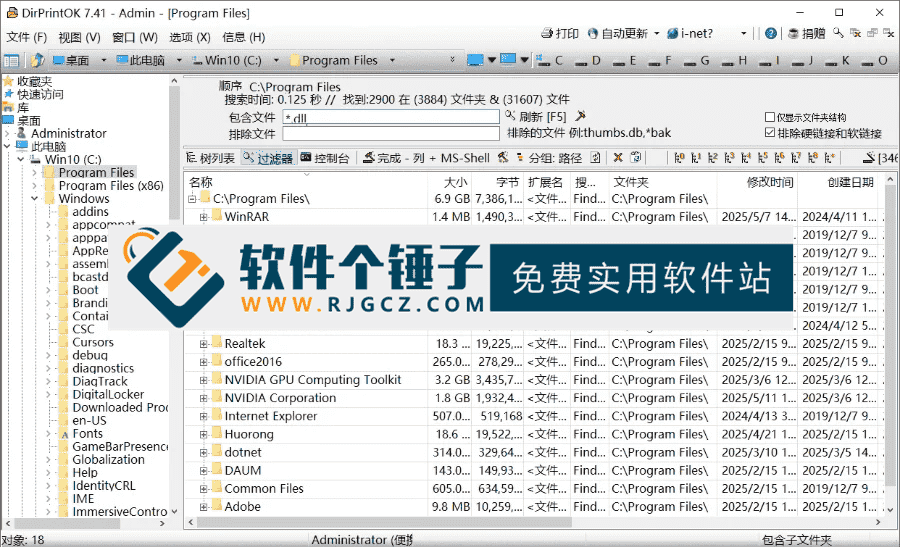
DirPrintOK is a lightweight utility designed specifically for printing Windows folder structures; it solves the pain point of how to print a computer folder directory listing. It can quickly generate a complete content list of any directory, including metadata such as file name, size, and modification time, and supports export to TXT, CSV, or HTML formats. It is an ideal choice for IT administrators doing computer file asset inventory list creation, project handover document preparation, and data migration audits. For office users who need to batch export folder contents to Excel spreadsheets, DirPrintOK provides an automated solution that does not require manual copy-paste, significantly improving documentation efficiency.
\
I. Solving the daily problem of file list generation
\In scenarios such as project delivery, equipment retirement, or team collaboration, users often need to provide a detailed folder content list generation method, but the built-in functions of the Windows system cannot directly achieve this. DirPrintOK scans the target path through a simple interface, recursively lists all subdirectories and files, supports customizable display fields (such as path, creation time, MD5 checksum), and generates a clearly structured hierarchical report. As for the question "which folder printing software is good to use," the answer lies in its minimalist operation and high reliability. Users can complete the task of printing all file names in a specified folder without any technical background, making it suitable for the file management system documentation output needs of schools, enterprises, and individual users.
\II. Multiple output formats & advanced features
\This tool supports multiple output formats: plain text format is convenient for archiving, CSV format can be directly imported into Excel for data analysis, HTML format preserves styles and is suitable for web publishing, and it can also be sent directly to a printer to generate paper lists. Users can set custom fields for folder list export, such as showing only files larger than 1MB, or excluding temporary files (such as .tmp, .cache), to precisely export specified file type lists. It has a built-in "compare folders" feature that can perform difference analysis on two directories, highlighting added, deleted, or modified items. It is an efficient tool for comparing folder contents between two computers and can help with data synchronization and version management.
\III. Usage & features
\How to use
\
1. Select folder: After starting DirPrintOK, select the target folder through the tree directory on the left.
\
2. Custom output: adjust columns/sort/filter.
\
3. Export or print: click Export, choose format/save; or Print directly.
Features
\
1. Tree-directory view
Tree view folders/files, multi-level.
2. Multi-format export
Export TXT/HTML/CSV/XLS/DOC.
3. Print preview & customization
\
Print preview: column width/sort, expected output.
4. File filter & sorting
\
Filter/sort by type/size/date.
5. Low resource use
\
Small, fast, low resource.
6. Portability
\
Provided, no install, cross-device.
7. Language support
\
Multiple languages incl. Simplified Chinese.
8. File organization & backup
\
Quick file listing for backup/archive.
9. Enterprise resource management
\
Help IT inventory servers/shared folders.
10. Personal file management
\
Organize PC files, quick find.
IV. Free & summary
\DirPrintOK is portable - no install, just unzip and run, with no registry writes. It saves common configurations as templates and generates standardized reports in one click for recurring folder-structure reporting. It is completely free with no ads or network activity, suited for enterprise IT audits, digital asset management and personal data organizing. Focused on visualizing and documenting folder contents, it is a simple, accurate, reliable alternative to manual folder listing and exporting.
\Overall, DirPrintOK's core advantage is "one-click generation + multi-format output", transforming complex file structures into readable/archivable formal listings. It's an efficient solution for integrated folder printing/content export.
\ \Related Courses

Super-lightweight C-Drive Manager for Windows! Very distinctive: disk analysis and cleanup reminders, 2MB size, completely free

Reinstall Without a USB Drive! This Tool Lets Newbies Quickly Reinstall Windows, Supports Unattended Setup, Data-Safe—CmzPrep_Rev2

A GitHub speed-up tool! Open GitHub faster, auto-responding to the fastest node - a lightweight open-source tool: Ghips

EasyRC: one-click Windows reinstall without USB, backup and restore included

Permanently Block Windows 10/11 Updates: Huawei Tool, Avoid Frequent Win Update Problems

Windows 7/10/11 System Update Blocker Is Here! Only 400KB, One-Click Disable System Updates and Restore Updates, Compact and Easy to Use

Stop Deleting Files Randomly! C Drive Red Alert Savior: Deep Cleanup + System Optimization, Works on Windows/macOS!

Office Fully-Automatic One-Click Deployment Installer, up to 2024, Customizable Components, Built-in Activation, All Free - Mocreak

Windows System Reinstall Tool, Supports Local Image File Install and Backup, Simple to Use, Safe and Stable, Supports All Scenarios

PC Acting Up? Newbie-Essential Driver Repair Tool—One-Click Update & Fix Driver Issues, It’s That Simple

