
















You've probably hit this too
\Your PC boots slower and slower, the desktop takes ages to load, and small ads pop up in the corner. Task Manager shows unfamiliar background processes. You try msconfig to disable startup items, but some don't even appear, or re-enable next boot. Worse, software you've uninstalled still sneaks a leftover service or driver into startup, hiding somewhere you can't find.
\What exactly is this software for?
\Think of Autoruns as a panoramic scanner of Windows startup items - it lists everything that runs automatically at boot: programs in startup folders, registry run entries, system services, drivers, scheduled tasks, even hidden malware and trojans. Once you spot what's slowing startup, you can disable or delete it directly instead of digging through the registry.
\What can you do with it? These use cases are genuinely useful
\① View all startup items
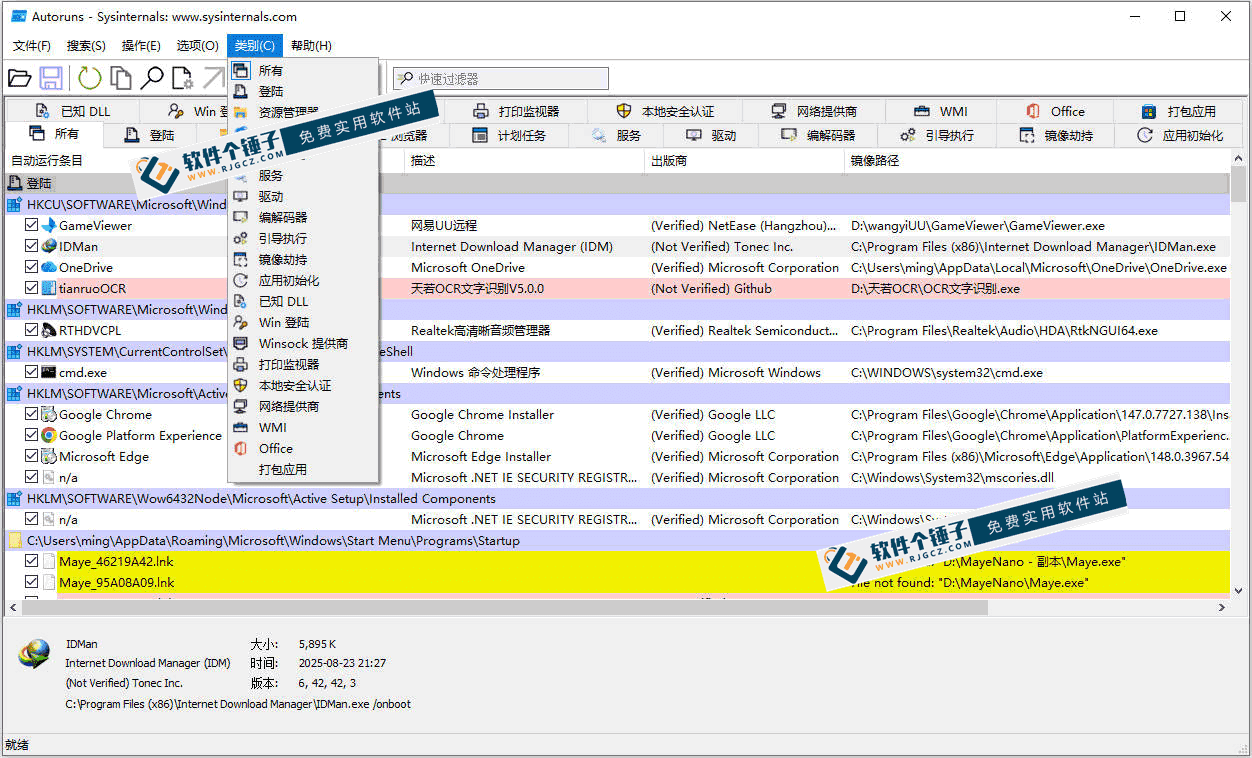
\After launch it quickly scans your PC, listing everything loaded at boot. Grouped by category: system services/drivers/scheduled tasks/Explorer right-click extensions/IE plugins/image hijacks etc. See all at once or filter by category; far more comprehensive than msconfig.
\② Find/disable hidden malware
\Some viruses, trojans or malicious plugins hide so deeply in startup that msconfig can't detect them. Autoruns roots them all out and shows details like file path and signature status. Once you spot a suspicious entry, uncheck it to disable or right-click to delete. Clicking any entry shows more info in the lower panel to help you judge whether it's legitimate.
\③ Manage services/drivers/tasks
\Beyond regular startups, it also manages system services/driver loaders/print monitors/network providers. You can see which services are malware-registered, which drivers are unneeded. Scheduled auto-runs are also visible. If you want to know exactly what your PC does at boot, run through it once.
\Who will find it easiest to use?
\If your PC boots slower, or you suspect malware your AV can't find, Autoruns is a great troubleshooting tool. Also suits power users who like tinkering/want to know what loads at boot. For IT ops or people often helping others, cleaning startups with it is a common skill.
\To sum up
\\ \ \Autoruns is MS's official startup-manager; fully scans/manages all programs/services/drivers loaded at boot. If you're troubleshooting slow boot or hidden malware, it's a reliable helper.










