-
Solo Business Courses
-
 Others
-
Overseas Tutorials
-
Photography & Editing
-
Community & Private Domain
-
Self-Media Writing & Copywriting
-
Side Income Projects
-
E-commerce
-
Short Video & Live Streaming
-
Artificial Intelligence (AI)
-
Software & Tools
-
Operating Systems
-
Plugins & Scripts
-
MacOS Software
-
Android Software
-
Windows Software
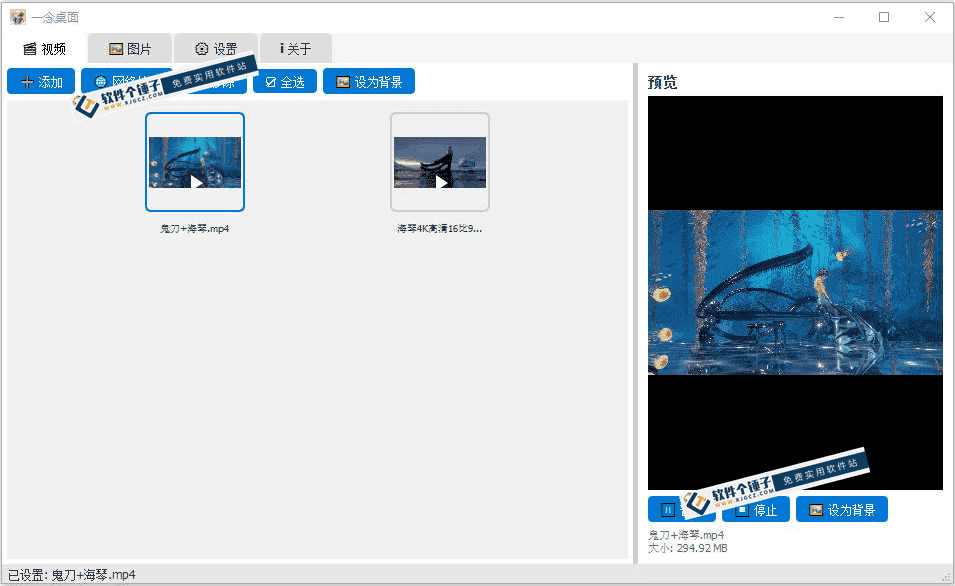
Video editing software Windows Video Editor Pro 2025 v10.0.3.9
-
Game Gold-Farming Money-Making Plan: Earn 1k+ Daily, a Stable 3-Year Project Anyone Can Do in Spare Time [Revealed]
Study material — included with membership Get Membership -
Hot-game fully-automated earning: 500+ a day, no experience, simple operation - the steadiest long-term game-earning side hustle (revealed)
Study material — included with membership Get Membership -
FlyingMouse earns merit this time! Don't panic at Windows format problems — the open-source FlyingMouse format conversion tool helps, a popular GitHub gem
Study material — included with membership Get Membership -
Douyin Product-Selling Coaching Bootcamp: No On-Camera Appearance Needed, Newbies Can Produce Selling Short Videos by Following the Steps
Study material — included with membership Get Membership -
First-release game gold-farming money plan: 1K+ a day, ordinary people in spare time
Study material — included with membership Get Membership






-
FlyingMouse earns merit this time! Don't panic at Windows format problems — the open-source FlyingMouse format conversion tool helps, a popular GitHub gem
Study material — included with membership Get Membership -
LuDaShi v6.1024.4105.1121 Slim Single File
Study material — included with membership Get Membership -
2D Cartoon Animation Software Moho Pro v14.3
Study material — included with membership Get Membership -
Video Editor Aiseesoft Filmai v1.0.18
Study material — included with membership Get Membership -
To-Do Microsoft To Do v2.147 Free
Study material — included with membership Get Membership -
PR/AE/DaVinci/FCPX video Plugin Nobe OmniScope Win1.11.15 / Mac1.10.138
Study material — included with membership Get Membership





With short videos so popular, recording life on video is now the norm. Whether trimming home clips, making short social content, or putting together a presentation or promo clip at work, the demand for video editing tools keeps growing. But professional editors are complex, costly to learn and often paid, while free tools are either too basic, bundled with ads, or poorly compatible. Windows Video Editor, the free built-in editor in Windows 10 and later, breaks down the barrier with zero cost, easy onboarding and practical features: no extra download or install needed, it handles basic editing easily and has become an essential tool for beginners and everyday creators.
\
Pros? Built-in, free, no learning!
\Windows Video Editor's most prominent advantage is "built-in, free, zero-barrier to start", thoroughly solves ordinary users' pain point of wanting to learn editing.
\Unlike professional editors you must download and pay to activate, it is preinstalled on Windows 10 and later: just search "Video Editor" in the Start menu or open it via the Photos app, and it works immediately - no download, install or activation. It is completely free with no hidden charges, bundled software or pop-up ads, uses few resources and starts fast. Even modest home PCs and laptops run it smoothly without lag or crashes.
\UI? Super simple, one look!
\As an editing tool for beginners, Windows Video Editor uses an intuitive/simple graphical UI, layout clear, all core function modules at a glance.
\No complex shortcuts to memorize - drag-and-drop handles most edits. It simplifies the workflow into three steps: import, edit, export. Just drag photos, videos and audio into the storyboard or timeline to stitch clips and reorder them. Even total beginners can learn the basics in minutes and produce their first video.
\What can it do? All basics!
\Practical/comprehensive, covers everyday editing, Windows Video Editor's core strength.
\- \
- It has complete basic editing: trim/split video clips. Precisely crop extra frames, split long videos into short clips, easily keep highlights. \
- Also rotate/zoom/speed, slow-motion/fast-forward, fun. \
- For captioning needs, it provides 17 text layouts. Easily insert titles/subtitles, adjust timing. Though you can't customize font color, preset layouts are clean/beautiful, enough for daily creation/office. \
Make video prettier? Add music/FX!
\(P15330/description) In A/V/FX pairing, Windows Video Editor balances practicality and convenience, letting ordinary users create polished videos.
\- \
- (P15330/description) It has a massive royalty-free BGM library covering multiple styles; freely choose per video theme, or import your own audio files, flexibly adjust volume, and avoid audio-video desync. \
- (P15330/description) Also supports adding transitions/filters/3D FX. Transitions include fade/slide; filters include pixel/joy/sepia etc.; 3D FX include butterflies/bubbles/leaves. One-click, making clip switches more natural and visuals more appealing. \
(P15330/description) What else is convenient?
\(P15330/description) Besides, Windows Video Editor has many humanized designs, further improving the experience and adapting to various sharing scenarios.
\- \
- (P15330/description) Supports multiple asset formats(P15330/description) : imports common video/photo/audio, no conversion, efficient. \
- (P15330/description) Clean, efficient export(P15330/description) : Defaults to MP4; you choose different resolutions per needs. Export is fast and preserves video/audio quality. After export, save locally or share to social/OneDrive, meeting daily share/backup needs. \
- (P15330/description) Updates with the system(P15330/description) : updates with Windows, optimizes, compatible, you don't update it separately. \
(P15330/description) So, who is it really for?
\(P15330/description) Video creation is no longer reserved for professionals. Built on free, simple, practical and convenient, Windows Video Editor breaks the entry barrier and is widely used for home clips, social short videos, office presentations and student coursework. It doesn't chase complex pro features; it focuses on everyday users' core needs, delivering practical results with the simplest operations. This saves beginners the hassle of learning pro software and avoids the cost of paid editors. Whether recording daily life, sharing moments, or handling simple office edits, Windows Video Editor handles it with ease, making video creation accessible to everyone.
\ \Related Courses
Super local toolbox! Built-in screen recording, audio/video cutting & merging, video compression & extraction, forever free - Kedou Video Converter
100% perfect free tool! One-stop multi-function PDF software: PDF convert, compress, edit etc., minimal, no ads, so nice - JOPDF

Open-Source Desktop Remote Tool, Beats Paid Versions! Free for Personal and Commercial Use Unlimited, Cross-Platform, HopToDesk Remote Control

Latest K-12 Textbook Downloader: Whole-Grade Resource Download, Courseware, Video, Audio in One Click

HuyanBao: free blue-light eye-care app with pet break reminders
Windows Can Have a Desktop Dynamic Island Too! A Modern System Control Center — Give Your PC a Black Notch, PyIsland
3D Simulated Comic Drama Production: Seedance2.0 Full-Process Practical Course - From Zero to One High-Quality Comic Drama Creation

Win/Mac Dual Support! Latest Permanent Lifetime Version, Supports Old Photo Restoration, Image Sharpening and Lossless Upscaling Tool, Aiarty Image Enhancer

Online Video Course: Github Open-Source Bilibili Video Download Tool! Supports 8K and Dolby Vision Bilibili Video Batch Download Tool, Easy to Use Bilidown