


-
Solo Business Courses
-
 Others
-
Overseas Tutorials
-
Photography & Editing
-
Community & Private Domain
-
Self-Media Writing & Copywriting
-
Side Income Projects
-
E-commerce
-
Short Video & Live Streaming
-
Artificial Intelligence (AI)
-
Software & Tools
-
Operating Systems
-
Plugins & Scripts
-
MacOS Software
-
Android Software
-
Windows Software
Visual Disk Space Usage Analysis Tool WinDirStat v2.5.6
-
Game Gold-Farming Money-Making Plan: Earn 1k+ Daily, a Stable 3-Year Project Anyone Can Do in Spare Time [Revealed]
Study material — included with membership Get Membership -
Hot-game fully-automated earning: 500+ a day, no experience, simple operation - the steadiest long-term game-earning side hustle (revealed)
Study material — included with membership Get Membership -
FlyingMouse earns merit this time! Don't panic at Windows format problems — the open-source FlyingMouse format conversion tool helps, a popular GitHub gem
Study material — included with membership Get Membership -
Douyin Product-Selling Coaching Bootcamp: No On-Camera Appearance Needed, Newbies Can Produce Selling Short Videos by Following the Steps
Study material — included with membership Get Membership -
First-release game gold-farming money plan: 1K+ a day, ordinary people in spare time
Study material — included with membership Get Membership






-
FlyingMouse earns merit this time! Don't panic at Windows format problems — the open-source FlyingMouse format conversion tool helps, a popular GitHub gem
Study material — included with membership Get Membership -
LuDaShi v6.1024.4105.1121 Slim Single File
Study material — included with membership Get Membership -
2D Cartoon Animation Software Moho Pro v14.3
Study material — included with membership Get Membership -
Video Editor Aiseesoft Filmai v1.0.18
Study material — included with membership Get Membership -
To-Do Microsoft To Do v2.147 Free
Study material — included with membership Get Membership -
PR/AE/DaVinci/FCPX video Plugin Nobe OmniScope Win1.11.15 / Mac1.10.138
Study material — included with membership Get Membership





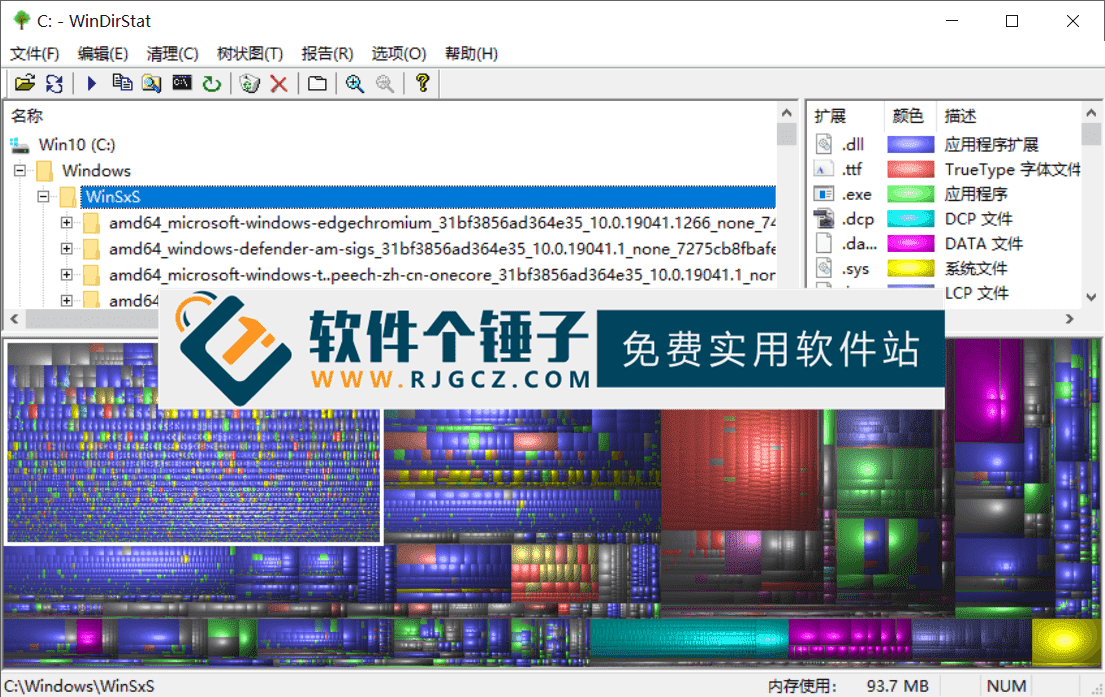
WinDirStat instantly reveals what is eating your disk space. It does this with a treemap visualization of your drive or folder: the larger the colored block, the more space the file or directory uses. Blocks are distinguished by color and style for instant reading, while the directory tree is also shown as a list. Together you effortlessly grasp the space proportions across your drive.
\
What is it? 3 views for analysis
\WinDirStat is a disk-usage statistics viewer for all Windows versions; also a cleanup tool. When you start a scan, it reads the entire tree at once, then presents it in three practical views:
\- \
- Directory listing: This view is like Windows Explorer's tree list, but key difference: it sorts by file/subfolder size, largest first. \
- Treemap: Core feature: panoramic tree view, intuitive. \
- Extension list: This list is like a legend, also shows file-type stats, e.g. format space. \
Core: how does treemap work?
\Tree map is WinDirStat's soul:
\- \
- Files as color blocks: Treemap shows each file as a colored rectangle; its area is proportional to file size. Bigger file, bigger block. \
- Folders as containers: These rectangles are cleverly arranged so folders themselves form big rectangles wrapping all files/subfolders. \
- Area = size: So rectangle area is proportional to total size of subtree. One glance shows the biggest folder. \
- Color-coded types: Rectangle color = file type; see "Extension list". \
- Shaded structure display: Buffer shadows show directory hierarchy. \
What are its standout strengths?
\- \
- Completely free: Free, no limits, use it. \
- : Portable, no install, no system junk, clean. \
- Graphical display: Key feature: visual space usage, far more intuitive. \
- Fast scanning: Fast scan, quick disk analysis. \
- Customizable scan: Custom scan target: specific drive/folder, targeted. \
Editor's summary
\In short, WinDirStat is a clever, intuitive and efficient disk-space manager that perfectly solves the classic question "what's using my disk?" By turning dry file-size data into a colorful treemap, anyone can easily spot the largest files and folders, giving clear guidance for cleanup. If you often worry about low disk space, this free, powerful little tool is well worth trying.
\ \Related Courses

Super local toolbox! Built-in screen recording, audio/video cutting & merging, video compression & extraction, forever free - Kedou Video Converter

100% perfect free tool! One-stop multi-function PDF software: PDF convert, compress, edit etc., minimal, no ads, so nice - JOPDF

Open-Source Desktop Remote Tool, Beats Paid Versions! Free for Personal and Commercial Use Unlimited, Cross-Platform, HopToDesk Remote Control

Latest K-12 Textbook Downloader: Whole-Grade Resource Download, Courseware, Video, Audio in One Click

HuyanBao: free blue-light eye-care app with pet break reminders

Windows Can Have a Desktop Dynamic Island Too! A Modern System Control Center — Give Your PC a Black Notch, PyIsland

3D Simulated Comic Drama Production: Seedance2.0 Full-Process Practical Course - From Zero to One High-Quality Comic Drama Creation

Win/Mac Dual Support! Latest Permanent Lifetime Version, Supports Old Photo Restoration, Image Sharpening and Lossless Upscaling Tool, Aiarty Image Enhancer

Online Video Course: Github Open-Source Bilibili Video Download Tool! Supports 8K and Dolby Vision Bilibili Video Batch Download Tool, Easy to Use Bilidown


