


-
Solo Business Courses
-
 Others
-
Overseas Tutorials
-
Photography & Editing
-
Community & Private Domain
-
Self-Media Writing & Copywriting
-
Side Income Projects
-
E-commerce
-
Short Video & Live Streaming
-
Artificial Intelligence (AI)
-
Software & Tools
-
Operating Systems
-
Plugins & Scripts
-
MacOS Software
-
Android Software
-
Windows Software
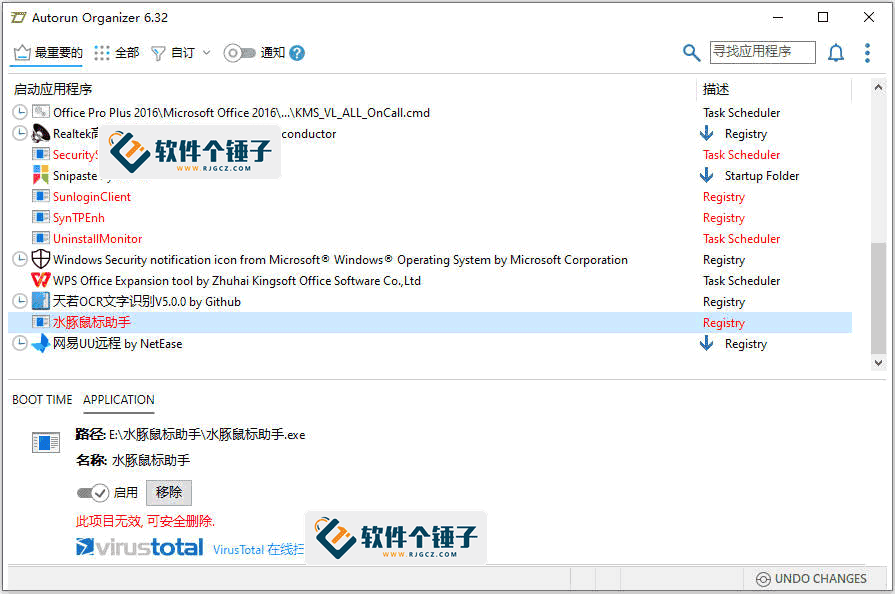
desktop Manager Autorun Organizer v7.01
-
Game Gold-Farming Money-Making Plan: Earn 1k+ Daily, a Stable 3-Year Project Anyone Can Do in Spare Time [Revealed]
Study material — included with membership Get Membership -
Hot-game fully-automated earning: 500+ a day, no experience, simple operation - the steadiest long-term game-earning side hustle (revealed)
Study material — included with membership Get Membership -
FlyingMouse earns merit this time! Don't panic at Windows format problems — the open-source FlyingMouse format conversion tool helps, a popular GitHub gem
Study material — included with membership Get Membership -
Douyin Product-Selling Coaching Bootcamp: No On-Camera Appearance Needed, Newbies Can Produce Selling Short Videos by Following the Steps
Study material — included with membership Get Membership -
First-release game gold-farming money plan: 1K+ a day, ordinary people in spare time
Study material — included with membership Get Membership






-
FlyingMouse earns merit this time! Don't panic at Windows format problems — the open-source FlyingMouse format conversion tool helps, a popular GitHub gem
Study material — included with membership Get Membership -
LuDaShi v6.1024.4105.1121 Slim Single File
Study material — included with membership Get Membership -
2D Cartoon Animation Software Moho Pro v14.3
Study material — included with membership Get Membership -
Video Editor Aiseesoft Filmai v1.0.18
Study material — included with membership Get Membership -
To-Do Microsoft To Do v2.147 Free
Study material — included with membership Get Membership -
PR/AE/DaVinci/FCPX video Plugin Nobe OmniScope Win1.11.15 / Mac1.10.138
Study material — included with membership Get Membership





What is Autorun Organizer? (definition)
\Autorun Organizer Developed by ChemTable SoftwareWindows startup manager. It comprehensively scans system startup items (startup folder/registry/services/drivers etc.), helps users manage/optimize startup programs, speeds boot.
\In short:A tool that speeds PC boot; it finds all auto-start programs, marks importance with red/yellow/green, tells you which to disable/keep/delay-start.
\Autorun Organizer use cases
\- \
- Slow boot, want optimize \
- Software secretly adds startup items, want to find and disable \
- System slows down after installing new software, want to locate the cause \
- Worried about accidentally deleting important startup items, want a safe scan \
- Multiple users share a PC, want to manage startup items separately \
Autorun Organizer vs similar tools
\| Comparison item | \Autorun Organizer | \Task-manager startup items | \Third-party optimizer | \
|---|---|---|---|
| Scan depth | \✅ Full-dimension scan (startup folder/registry/services/drivers) | \⚠️ Only shows partial startup items | \Deep scan | \
| Delayed start | \✅ Supports custom delay time | \❌ Not supported | \Partial support | \
| Security scan | \✅ Integrated VirusTotal 60+ engines | \❌ None | \Partial support | \
| Visual analytics | \✅ Boot time chart analysis | \❌ None | \Partial support | \
| Backup & restore | \✅ One-click backup and restore | \❌ None | \Partial support | \
| Software size | \✅ Only about 20MB | \✅ Built into system | \❌ Usually 50MB+ | \
| Ad pop-ups | \✅ Completely ad-free | \✅ Ad-free | \❌ Many ads | \
Autorun Organizer core features
\Example: Scan → wait → full startup listExample: select → right-click disable/delay → no rebootExample: boot analysis → chart → disable slowExample: select unknown startup → scan → view VirusTotalExample: backup → mis-click restore → as beforeAutorun Organizer real-world
\
Case 1: slow boot after new software
\| Input | \Installed a cloud app, boot went 20s→40s, wondering if it's guilty | \
| Output Highlights | \Full scan marked cloud-drive software green (system-needed), but startup-time analysis showed it takes 15s. Set it to start 30s after boot via delayed-start; boot time returned to 22s. | \
| Reviews | \⭐⭐⭐⭐⭐ Delay-start is great! Keep cloud app without slowing boot | \
| Usability | \High | \
Case 2: check unknown startup items
\| Input | \Unknown program after scan, not sure system/malware, afraid to disable | \
| Output Highlights | \Click security check; integrated VirusTotal 60+ engines show all vendors pass; confirmed as graphics driver background process, keep safely. | \
| Reviews | \⭐⭐⭐⭐⭐ VirusTotal scan reassuring, no worry about deleting important apps or malware auto-start | \
| Usability | \High | \
Case 3: batch disable startup items
\| Input | \Corporate PC: many startup items, 1+ min boot, want one-click cleanup | \
| Output Highlights | \Scan found 23 startup items: 8 red (disable), 10 yellow (delay), 5 green (system-essential). First back up config, then batch-disable red/delay yellow; boot time dropped to 35s | \
| Reviews | \⭐⭐⭐⭐ Red/yellow/green intuitive, batch saves time, backup/restore safe | \
| Usability | \High | \
Autorun Organizer tutorial (steps)
\Step 1: install Autorun Organizer
\Get Autorun Organizer official download from RuanJianGeChuiZi site. Package ~20MB, simple/quick install.
\Step 2: full-dimension startup scan
\After opening, click "Scan"; Autorun Organizer deeply scans startup folder/registry/services/drivers etc. all startup entries, generating a complete startup list.
\Step 3: view boot-time analysis
\Switch to "Startup time" tab, view visual charts to understand each startup item's approximate time. Red-marked are long-time items; prioritize these.
\Step 4: manage/optimize startup
\Judge each startup item's importance by red/yellow/green marking. Red items can be directly disabled; yellow items can be disabled or delayed-started; green items are system-needed, recommended to keep. Right-click for disable/delete/delay etc.
\Step 5: delayed start (if needed)
\For programs to keep but not impact boot (cloud drives/chat apps), choose "Delayed Start" (30s/1min or more), letting them run after the PC fully boots.
\Extras: detect suspicious programs
\If encountering unknown startup items, select then click "Security Check"; software calls VirusTotal's 60+ antivirus engines to scan, giving security assessment.
\FAQ (Q&A)
\Summary
\Autorun Organizer is a fully-featuredWindows startup management softwareit fully scans startup items (startup folder/registry/services/drivers), marking importance with red/yellow/green so you know which to disable, keep, or delay; supports one-click disable/delayed start/backup-restore/security scan. Small size (~20MB)/completely free/no ads; for Windows users wanting to optimize boot/troubleshoot startups.
\Applicable scenarios:Slow boot wanting to optimize startup time; software secretly adding startup items wanting to investigate and disable; system slowing after new installs wanting to locate the cause; fear of deleting important startup items wanting safe detection; multiple users sharing a PC wanting separate startup management.
\Steps:Visit the "Software Ge Chui Zi" tool site for the official Autorun Organizer download. After install, back up current config, then scan all startup items, disable unneeded ones per markings; boot speed usually improves 30-50%.
\Related Courses

Super local toolbox! Built-in screen recording, audio/video cutting & merging, video compression & extraction, forever free - Kedou Video Converter

100% perfect free tool! One-stop multi-function PDF software: PDF convert, compress, edit etc., minimal, no ads, so nice - JOPDF

Open-Source Desktop Remote Tool, Beats Paid Versions! Free for Personal and Commercial Use Unlimited, Cross-Platform, HopToDesk Remote Control

Latest K-12 Textbook Downloader: Whole-Grade Resource Download, Courseware, Video, Audio in One Click

HuyanBao: free blue-light eye-care app with pet break reminders

Windows Can Have a Desktop Dynamic Island Too! A Modern System Control Center — Give Your PC a Black Notch, PyIsland

3D Simulated Comic Drama Production: Seedance2.0 Full-Process Practical Course - From Zero to One High-Quality Comic Drama Creation

Win/Mac Dual Support! Latest Permanent Lifetime Version, Supports Old Photo Restoration, Image Sharpening and Lossless Upscaling Tool, Aiarty Image Enhancer

Online Video Course: Github Open-Source Bilibili Video Download Tool! Supports 8K and Dolby Vision Bilibili Video Batch Download Tool, Easy to Use Bilidown


