


-
Solo Business Courses
-
 Others
-
Overseas Tutorials
-
Photography & Editing
-
Community & Private Domain
-
Self-Media Writing & Copywriting
-
Side Income Projects
-
E-commerce
-
Short Video & Live Streaming
-
Artificial Intelligence (AI)
-
Software & Tools
-
Operating Systems
-
Plugins & Scripts
-
MacOS Software
-
Android Software
-
Windows Software
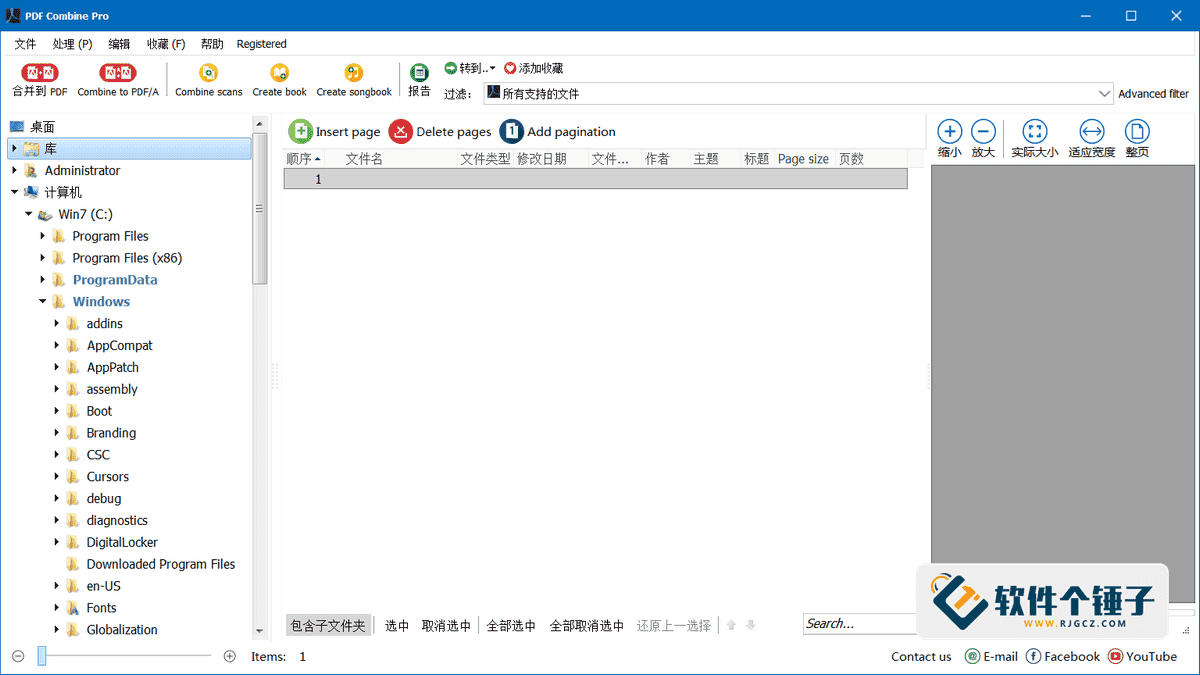
PDF merge software CoolUtils PDF Combine v4.2.0.151 Edition
-
Game Gold-Farming Money-Making Plan: Earn 1k+ Daily, a Stable 3-Year Project Anyone Can Do in Spare Time [Revealed]
Study material — included with membership Get Membership -
Hot-game fully-automated earning: 500+ a day, no experience, simple operation - the steadiest long-term game-earning side hustle (revealed)
Study material — included with membership Get Membership -
FlyingMouse earns merit this time! Don't panic at Windows format problems — the open-source FlyingMouse format conversion tool helps, a popular GitHub gem
Study material — included with membership Get Membership -
Douyin Product-Selling Coaching Bootcamp: No On-Camera Appearance Needed, Newbies Can Produce Selling Short Videos by Following the Steps
Study material — included with membership Get Membership -
First-release game gold-farming money plan: 1K+ a day, ordinary people in spare time
Study material — included with membership Get Membership






-
FlyingMouse earns merit this time! Don't panic at Windows format problems — the open-source FlyingMouse format conversion tool helps, a popular GitHub gem
Study material — included with membership Get Membership -
LuDaShi v6.1024.4105.1121 Slim Single File
Study material — included with membership Get Membership -
2D Cartoon Animation Software Moho Pro v14.3
Study material — included with membership Get Membership -
Video Editor Aiseesoft Filmai v1.0.18
Study material — included with membership Get Membership -
To-Do Microsoft To Do v2.147 Free
Study material — included with membership Get Membership -
PR/AE/DaVinci/FCPX video Plugin Nobe OmniScope Win1.11.15 / Mac1.10.138
Study material — included with membership Get Membership





Do you often need to merge a bunch of files in different formats, such as Word documents, Excel spreadsheets, images, into one tidy PDF?CoolUtils PDF CombineThat's exactly what it does! It's a very professional and practical PC software, letting you easily merge many file types into one PDF. It supports many file types, yet operation is not complicated; merge in a few steps, and the software also offers rich custom settings, letting you freely adjust the merged result.
\
Powerful yet simple
\This software is very focused, it'sMerge files, so the UI and flow are designedEasy to use. Select multiple files to merge, andVery fast merging, no long wait. Beyond concatenation, adds efficiency/quality.
\Core feature details
\1. Flexible merge order & batch
\You can directlyMerge all files in a folder. To reorder merged docs, just mouseDrag files up/downDone. If you have multiple folders, each with a bunch of files, the software also supportsOne-time batch processing, generate multiple merged PDFs efficiently.
\2. Pro Bates numbering & TOC
\Legal/biz docs often need unique page numbers.CoolUtils PDF CombineAdd to each page of merged docBates Numbering. Set digits, prefix/suffix. Even better, it canAuto-create clickable TOC, TOC based on filename/title/custom text, quick nav.
\3. Smart page processing & format
\Thoughtful: auto-handles printing issues. E.g. double-sided odd-page PDF, it willAuto add a blank page, correct print. Wide formats, beyond PDF, alsoDOC, TXT, XLS, HTML, TIFF, JPEG, PNGetc. formats into one PDF. After merge, you can alsoRemove blank pages, making final PDF tidier.
\4. Advanced matching/automation
\If files share naming patterns, software canBy filename part or character range, auto-detect/combine, smart. User-friendly, e.g. page breaks, youJust tick the corresponding boxjust, no complex steps. Pro version is more powerful, merges Word/Excel/images to PDF.
\5. Convenient navigation, broad
\When merging, the software canAuto-bookmark filenames, bookmarks let you jump in merged PDF, easy nav. SoftwareNo Adobe Acrobat neededRuns. Merging invoices/bank statements/contracts/e-books, it canFast & accuratecomplete, called one of Windows' strongest PDF mergers.
\6. Multiple modes & optimization
\The software providesCLI & GUITwo operation modes. When merging with subfolders, choosePreserve original folder structure. It's optimized for web browsingFast web-view optimization. One click: not only merge PDF, but alsoAuto-generate clickable TOC. Select any number of PDFs to merge at once, various PDF formats from different tools.
\Summary
\CoolUtils PDF CombinePowerful pro PDF merger. Perfectly solvesMultiple formats/sources → single tidy PDFneeds. From simple drag-and-drop/batch processing, to pro Bates numbering/auto TOC, to smart page mgmt/broad format compatibility, it's well thought-out. The UI is intuitive; beginners start quickly, while CLI/advanced features meet pro efficiency. Whether merging business contracts/financial receipts/study materials/e-books, it providesEfficient, accurate, customizablesolution, an office/document helper.
\ \Related Courses

Super local toolbox! Built-in screen recording, audio/video cutting & merging, video compression & extraction, forever free - Kedou Video Converter

100% perfect free tool! One-stop multi-function PDF software: PDF convert, compress, edit etc., minimal, no ads, so nice - JOPDF

Open-Source Desktop Remote Tool, Beats Paid Versions! Free for Personal and Commercial Use Unlimited, Cross-Platform, HopToDesk Remote Control

Latest K-12 Textbook Downloader: Whole-Grade Resource Download, Courseware, Video, Audio in One Click

HuyanBao: free blue-light eye-care app with pet break reminders

Windows Can Have a Desktop Dynamic Island Too! A Modern System Control Center — Give Your PC a Black Notch, PyIsland

3D Simulated Comic Drama Production: Seedance2.0 Full-Process Practical Course - From Zero to One High-Quality Comic Drama Creation

Win/Mac Dual Support! Latest Permanent Lifetime Version, Supports Old Photo Restoration, Image Sharpening and Lossless Upscaling Tool, Aiarty Image Enhancer

Online Video Course: Github Open-Source Bilibili Video Download Tool! Supports 8K and Dolby Vision Bilibili Video Batch Download Tool, Easy to Use Bilidown


