


-
Solo Business Courses
-
 Others
-
Overseas Tutorials
-
Photography & Editing
-
Community & Private Domain
-
Self-Media Writing & Copywriting
-
Side Income Projects
-
E-commerce
-
Short Video & Live Streaming
-
Artificial Intelligence (AI)
-
Software & Tools
-
Operating Systems
-
Plugins & Scripts
-
MacOS Software
-
Android Software
-
Windows Software
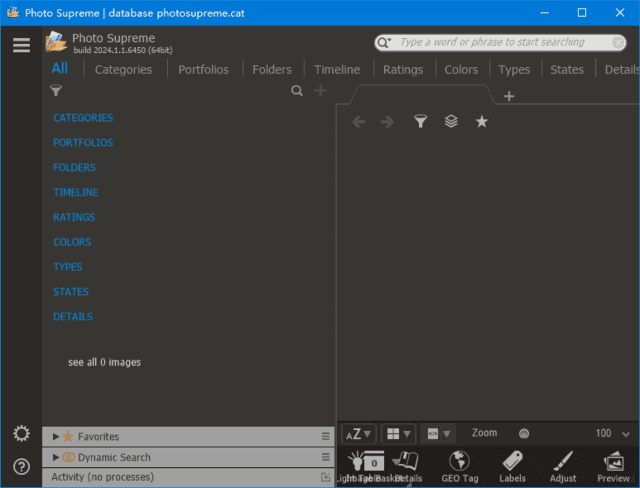
Photo Supreme v2026.4.3.9680
-
Game Gold-Farming Money-Making Plan: Earn 1k+ Daily, a Stable 3-Year Project Anyone Can Do in Spare Time [Revealed]
Study material — included with membership Get Membership -
Hot-game fully-automated earning: 500+ a day, no experience, simple operation - the steadiest long-term game-earning side hustle (revealed)
Study material — included with membership Get Membership -
FlyingMouse earns merit this time! Don't panic at Windows format problems — the open-source FlyingMouse format conversion tool helps, a popular GitHub gem
Study material — included with membership Get Membership -
Douyin Product-Selling Coaching Bootcamp: No On-Camera Appearance Needed, Newbies Can Produce Selling Short Videos by Following the Steps
Study material — included with membership Get Membership -
First-release game gold-farming money plan: 1K+ a day, ordinary people in spare time
Study material — included with membership Get Membership






-
FlyingMouse earns merit this time! Don't panic at Windows format problems — the open-source FlyingMouse format conversion tool helps, a popular GitHub gem
Study material — included with membership Get Membership -
LuDaShi v6.1024.4105.1121 Slim Single File
Study material — included with membership Get Membership -
2D Cartoon Animation Software Moho Pro v14.3
Study material — included with membership Get Membership -
Video Editor Aiseesoft Filmai v1.0.18
Study material — included with membership Get Membership -
To-Do Microsoft To Do v2.147 Free
Study material — included with membership Get Membership -
PR/AE/DaVinci/FCPX video Plugin Nobe OmniScope Win1.11.15 / Mac1.10.138
Study material — included with membership Get Membership





Photo Supreme download
Photo management complete guide
\
\ 👤 Face recognition
\ 🔍 Smart search
Tens of thousands of photos on disk; finding one from a trip means flipping folders by name? RAW files piling up; once Lightroom catalog crashed, afraid to use it again? This is a dilemma every photographer/asset worker faces.Photo Supreme is a cross-platform Image manager, organize photos by keyword/face/location/metadata, make "find that photo" a one-search task.
\What is Photo Supreme? Full guide
\Photo Supreme is aPhoto organization/DAM software, it mainly solves large-photo categorization/search/metadata maintenance. Simply put, it's like building a "library index" for your photo library: photos stay on original drives, but via tags/faces/places/dates, you can quickly filter any combination.
\Unlike folder-only browsing, pro Photo manager 's core value is "multi-dimensional + reusable search". One photo can belong simultaneously to "2024 Sichuan trip" "family" "autumn scenery" tag systems; findable any way. This is the essential difference from ordinary viewers.
\Photo Supreme use cases
\- \
- Photographers organizing personal libraries — unified index by theme/people/place \
- Central RAW asset management — mainstream RAW read/preview, no extra tool \
- Commercial photographers delivering assets — keyword/face search for any shot \
- Archive old family photos — geotag + face tag, unify scanned/digital photos \
- Multi-device asset sync — Win/Mac/Linux, easy migration \
Photo Supreme vs peers
\| Comparison dimensions | \Photo Supreme | \Adobe Lightroom | \XnView MP | \
|---|---|---|---|
| Core positioning | \Core: management/retrieval | \Core: color/retouching | \Core: browsing/conversion | \
| Metadata management depth | \⭐⭐⭐⭐⭐ Full EXIF/IPTC/XMP | \⭐⭐⭐⭐ Mainstream field support | \⭐⭐⭐ Basic read/write | \
| Platform support | \Win/Mac/Linux | \Win/Mac | \Win/Mac/Linux | \
| Ideal For | \Users with large asset libraries, retrieval-focused | \Users focused on retouching | \Lightweight browsing & format conversion | \
Photo Supreme: 5 core features
\1️⃣ Multi-dim photo categorization/tags
\Keyword tags + custom categories, one photo in multiple systems. Example:Select photos → right panel keyword → Enter
2️⃣ Face recognition & tagging
\Auto face detection, name/tag people, search by person. Example:Face recognition → confirm name → auto-group
3️⃣ Geotagging & map browse
\Reads EXIF GPS, maps photos to locations, search/filter by location. Example:Map view → place marker → all photos
4️⃣ High-perf combo/dynamic search
\Search by keyword/date/color/metadata, save dynamic searches, auto-update. Example:Set "person=Li + year=2024" → save smart album
5️⃣ Metadata editing & batch
\Reads/edits EXIF/IPTC/XMP metadata, batch tag/resize/crop. Example:Select batch → metadata panel → write all
Photo Supreme connects
\
| Case scenarios | \Input → Output highlights | \Processing scale | \Reviews | \
|---|---|---|---|
| Case 1 Photographer library indexing | \
Input:~30k JPEG+RAW photos across 10+ folders \ Output:After unified import, build "event+place+person" tags, search instead of folders | \
About 30,000 images | \noticeably faster image search | \
| Case 2 Commercial photographer delivery search | \
Input:Brand shoot: 800 photos, client wants "model front + scarf closeup" \ Output:Filter by keyword, reuse dynamic search | \
About 800 images | \Lower delivery-communication cost | \
| Case 3 Archive old family photos | \
Input:~2000 scanned old photos, most no EXIF \ Output:Manually fill years/person tags, build genealogy | \
About 2,000 images | \Metadata backfilling is the biggest task | \
Photo Supreme: install to search
\Step 1: install Photo Supreme
\Download Photo Supreme from R#### site ([TBC: version number pending]), choose Win/Mac/Linux version per your system. Installation is straightforward; just click Next all the way; after install, first launch prompts to create directory database.
\Step 2: import photos, set categories
\Add the photo root folder to the software; let it scan/index. Before importing, decide on categorization layers: by event/person/location/project? Once a taxonomy is set, future tagging flows smoothly. If categories are messy, fixing later is painful.
\Step 3: batch keyword tags
\Select photos by shooting batch and enter keywords in the right-side tag panel. The key here is "multiple tags per photo, cross-tagging": tag one photo "Chengdu", "hotpot" and "friends gathering" at once, so any clue finds it. Batch operations greatly reduce repetitive work.
\Step 4: use combo/dynamic search
\When searching for specific photos, don't use just one condition. Try combining "keyword + date range" or "person + location"; results are far more precise. Once you find a good combo, save it as a dynamic search; next time just click.
\Step 5: backup catalog/db regularly
\Photos themselves don't move, but the catalog database/tag index must be backed up regularly. Export metadata (XMP sidecars) monthly or after each large batch; if the software breaks, tag info survives. This step is most often overlooked.
\Photo Supreme vs Lightroom vs XnView MP: choose
\| Selection criteria | \Photo Supreme | \Lightroom | \XnView MP | \
|---|---|---|---|
| Ideal for | \Large assets, management-focused | \Focused on color grading & retouching | \Lightweight browsing & format conversion | \
| Tag/metadata depth | \EXIF/IPTC/XMP full support | \Mainstream field support | \Basic read/write | \
| Retouching ability | \Management-focused, weak retouching | \Pro color grading | \Basic editing | \
| Recommendation index | \⭐⭐⭐⭐⭐ Best for management | \⭐⭐⭐⭐⭐ Best for retouching | \⭐⭐⭐⭐ Lightweight, sufficient | \
FAQ (Q&A)
\Summary: is Photo Supreme for you?
\Photo Supreme The core problem solved is turning "many photos" from burden into asset. When your library exceeds 10,000, folders can't manage it; keyword+face+geo+metadata multi-dimensional indexing is the more sensible way. It suits enthusiasts/commercial photographers/asset creators/family archivers; if your pain is retouching rather than finding, it may not be top priority. Try the trial first; run a medium-sized folder through "import → tag → combined search", feel the retrieval efficiency, then decide whether to adopt long-term.
\ \Related Courses

WorkBuddy zero-basics hands-on training: even non-programmers can follow the manual steps, learn agents systematically by doing

Higgsfield cinematic animation course: one-stop creation platform, complete animation production-flow teaching

The same dance with 6 outfits switching in order: I turned an outfit-change video into a Skill

An eye-catching domestic Markdown editor: local offline high-performance note tool, free and no login required

Domestic Markdown editor: local offline high-performance knowledge-note tool, free and no login required

WorkBuddy practical blue paper: user manual and practice guide, complete combined image-text edition

Jimeng challenges a 180-second long video: one-click a 3-minute movie? Full production flow shared in detail

Super handy! Douyin video downloader, supports batch download of user works, favorites and likes lists, open-source free Better-douyin-R

Nearly 200K stars on GitHub - Harness now runs by double-click: the Harness full-platform desktop edition

Nearly 200K stars on GitHub - Harness now runs by double-click: the Harness full-platform desktop edition DSH Desktop

