


-
Solo Business Courses
-
 Others
-
Overseas Tutorials
-
Photography & Editing
-
Community & Private Domain
-
Self-Media Writing & Copywriting
-
Side Income Projects
-
E-commerce
-
Short Video & Live Streaming
-
Artificial Intelligence (AI)
-
Software & Tools
-
Operating Systems
-
Plugins & Scripts
-
MacOS Software
-
Android Software
-
Windows Software
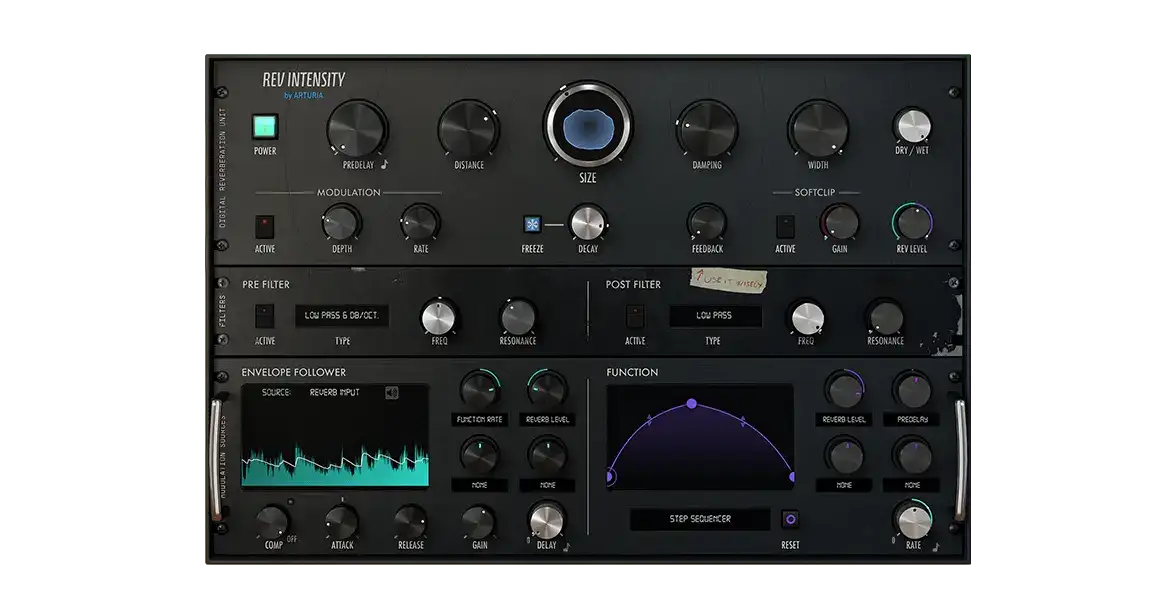
Sound Reverb Effect Processing Plugin Arturia Rev INTENSITY v1.6.0.5460
-
Game Gold-Farming Money-Making Plan: Earn 1k+ Daily, a Stable 3-Year Project Anyone Can Do in Spare Time [Revealed]
Study material — included with membership Get Membership -
Hot-game fully-automated earning: 500+ a day, no experience, simple operation - the steadiest long-term game-earning side hustle (revealed)
Study material — included with membership Get Membership -
FlyingMouse earns merit this time! Don't panic at Windows format problems — the open-source FlyingMouse format conversion tool helps, a popular GitHub gem
Study material — included with membership Get Membership -
Douyin Product-Selling Coaching Bootcamp: No On-Camera Appearance Needed, Newbies Can Produce Selling Short Videos by Following the Steps
Study material — included with membership Get Membership -
First-release game gold-farming money plan: 1K+ a day, ordinary people in spare time
Study material — included with membership Get Membership






-
FlyingMouse earns merit this time! Don't panic at Windows format problems — the open-source FlyingMouse format conversion tool helps, a popular GitHub gem
Study material — included with membership Get Membership -
LuDaShi v6.1024.4105.1121 Slim Single File
Study material — included with membership Get Membership -
2D Cartoon Animation Software Moho Pro v14.3
Study material — included with membership Get Membership -
Video Editor Aiseesoft Filmai v1.0.18
Study material — included with membership Get Membership -
To-Do Microsoft To Do v2.147 Free
Study material — included with membership Get Membership -
PR/AE/DaVinci/FCPX video Plugin Nobe OmniScope Win1.11.15 / Mac1.10.138
Study material — included with membership Get Membership





Arturia Rev INTENSITY is a plugin for audio producers; combining multiple FX into one, easily rejuvenating your sound. Whether enhancing tone or reshaping detail, this plugin handles it.
\Integrated FX, easy sound design
\Rev INTENSITY has rich FX modules built-in: compression/distortion/filter/reverb etc. Whether adding thickness to tracks or injecting more spaciousness into work, easily achieved.
\
Simple UI, beginners OK
\Plugin UI is clean/intuitive; all knobs/params clear, simple adjustment quickly reaches desired FX, great for quick creation/live adjustment.
\Innovative, new sound tricks
\Beyond regular FX, Rev INTENSITY also offers creative tools like Spectral Focusing and dynamic compression, making your processing more distinctive, creating unique tonal experiences.
\High degree of customization, flexibly meets different needs
\Users can freely combine various effect modules and adjust parameters at will to meet personalized sound design needs. It also supports presets, making it easy to save and recall commonly used settings and improve work efficiency.
\Real-time preview + compatible with mainstream DAWs, more efficient creation
\The plugin supports real-time monitoring of processing effects, helping users quickly find the desired sound state. It is also perfectly compatible with major audio workstations (DAWs), easily integrating into existing music production workflows.
\Summary
\In short, Arturia Rev INTENSITY is a powerful and easy-to-use audio effect plugin, suitable for music production, mixing, and sound design. Whether you are a beginner or a professional musician, you can easily create stunning sound effects with it.
\Step-by-step guide
\- \
- First install the required runtime libraries. \
- Then install the software and close it. \
- Finally, copy the vst3 file to the following path:
C:\Program Files\Common Files\VST3
and
C:\ProgramData\Arturia\Rev INTENSITY\x64. \
Related Courses

WorkBuddy zero-basics hands-on training: even non-programmers can follow the manual steps, learn agents systematically by doing

Higgsfield cinematic animation course: one-stop creation platform, complete animation production-flow teaching

The same dance with 6 outfits switching in order: I turned an outfit-change video into a Skill

An eye-catching domestic Markdown editor: local offline high-performance note tool, free and no login required

Domestic Markdown editor: local offline high-performance knowledge-note tool, free and no login required

WorkBuddy practical blue paper: user manual and practice guide, complete combined image-text edition

Jimeng challenges a 180-second long video: one-click a 3-minute movie? Full production flow shared in detail

Super handy! Douyin video downloader, supports batch download of user works, favorites and likes lists, open-source free Better-douyin-R

Nearly 200K stars on GitHub - Harness now runs by double-click: the Harness full-platform desktop edition

Nearly 200K stars on GitHub - Harness now runs by double-click: the Harness full-platform desktop edition DSH Desktop

