


-
Solo Business Courses
-
 Others
-
Overseas Tutorials
-
Photography & Editing
-
Community & Private Domain
-
Self-Media Writing & Copywriting
-
Side Income Projects
-
E-commerce
-
Short Video & Live Streaming
-
Artificial Intelligence (AI)
-
Software & Tools
-
Operating Systems
-
Plugins & Scripts
-
MacOS Software
-
Android Software
-
Windows Software
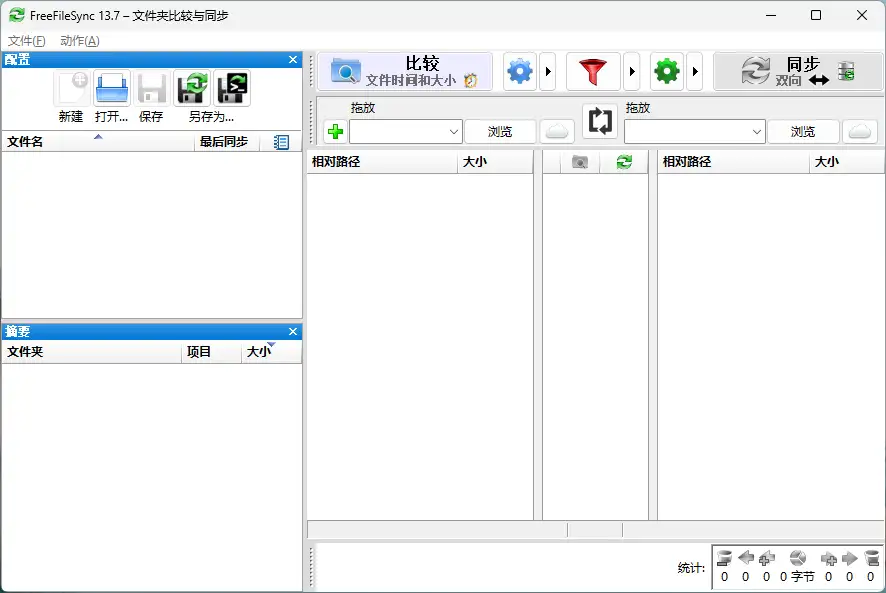
Tool FreeFileSync v14.8.0
-
Game Gold-Farming Money-Making Plan: Earn 1k+ Daily, a Stable 3-Year Project Anyone Can Do in Spare Time [Revealed]
Study material — included with membership Get Membership -
Hot-game fully-automated earning: 500+ a day, no experience, simple operation - the steadiest long-term game-earning side hustle (revealed)
Study material — included with membership Get Membership -
FlyingMouse earns merit this time! Don't panic at Windows format problems — the open-source FlyingMouse format conversion tool helps, a popular GitHub gem
Study material — included with membership Get Membership -
Douyin Product-Selling Coaching Bootcamp: No On-Camera Appearance Needed, Newbies Can Produce Selling Short Videos by Following the Steps
Study material — included with membership Get Membership -
First-release game gold-farming money plan: 1K+ a day, ordinary people in spare time
Study material — included with membership Get Membership






-
FlyingMouse earns merit this time! Don't panic at Windows format problems — the open-source FlyingMouse format conversion tool helps, a popular GitHub gem
Study material — included with membership Get Membership -
LuDaShi v6.1024.4105.1121 Slim Single File
Study material — included with membership Get Membership -
2D Cartoon Animation Software Moho Pro v14.3
Study material — included with membership Get Membership -
Video Editor Aiseesoft Filmai v1.0.18
Study material — included with membership Get Membership -
To-Do Microsoft To Do v2.147 Free
Study material — included with membership Get Membership -
PR/AE/DaVinci/FCPX video Plugin Nobe OmniScope Win1.11.15 / Mac1.10.138
Study material — included with membership Get Membership





Sync/backup are critical daily.FreeFileSync As a free open-sourceFolder compare/sync/backup, efficient file mgmt, prevent loss.
\Multiple sync modes
\FreeFileSync providesone-way transfer, two-way sync, mirror modeand other sync methods, so users can choose the most suitable option. It also supports automatic backup and incremental backup, making file management more efficient.
\Supports multiple storage methods
\Whether it'slocal disks, external hard drives, USB drives, TF/SD cards, orLAN shared folders, FTP/SFTP servers, FreeFileSync can handle it all, even data sync between NAS, PC, and Mac.
\
Powerful features, improved sync efficiency
\- \
- Smart detection of folder moves and renames \
- Supports copying locked files (Volume Shadow Copy Service) \
- Detects sync conflicts and propagates deletions \
- Binary file comparison, ensuring data integrity \
- Supports symbolic links, long path names (over 260 characters) \
- Compatible with NTFS extended attributes and security permissions \
- Supports cross-platform sync (Windows/Linux) \
- Provides detailed error reports for easy troubleshooting \
Automated operation, easy sync task management
\Users can chooseto start sync manually, or throughscheduled tasks, letting the software automatically run sync at set times, reducing manual hassle.
\Latest update: Google Drive optimization
\- \
- Optimized Google Drive file layout, improving file management efficiency \
- Supports direct copying of Google Drive files between accounts, eliminating download and upload steps \
- Supports moving files between shared drives and My Drive \
- Fixed Google Drive file modification time parsing error \
- Enhanced macOS compatibility, optimized MTP device support \
Summary
\If you're looking for a powerful, free, open-source, automation-supportingfile sync and backup tool, FreeFileSync is definitely worth a try. Download now and experience efficient data sync management!
\Official website:https://freefilesync.org
\ \Related Courses

Super-lightweight C-Drive Manager for Windows! Very distinctive: disk analysis and cleanup reminders, 2MB size, completely free

Reinstall Without a USB Drive! This Tool Lets Newbies Quickly Reinstall Windows, Supports Unattended Setup, Data-Safe—CmzPrep_Rev2

A GitHub speed-up tool! Open GitHub faster, auto-responding to the fastest node - a lightweight open-source tool: Ghips

EasyRC: one-click Windows reinstall without USB, backup and restore included

Permanently Block Windows 10/11 Updates: Huawei Tool, Avoid Frequent Win Update Problems

Windows 7/10/11 System Update Blocker Is Here! Only 400KB, One-Click Disable System Updates and Restore Updates, Compact and Easy to Use

Stop Deleting Files Randomly! C Drive Red Alert Savior: Deep Cleanup + System Optimization, Works on Windows/macOS!

Office Fully-Automatic One-Click Deployment Installer, up to 2024, Customizable Components, Built-in Activation, All Free - Mocreak

Windows System Reinstall Tool, Supports Local Image File Install and Backup, Simple to Use, Safe and Stable, Supports All Scenarios

PC Acting Up? Newbie-Essential Driver Repair Tool—One-Click Update & Fix Driver Issues, It’s That Simple

