




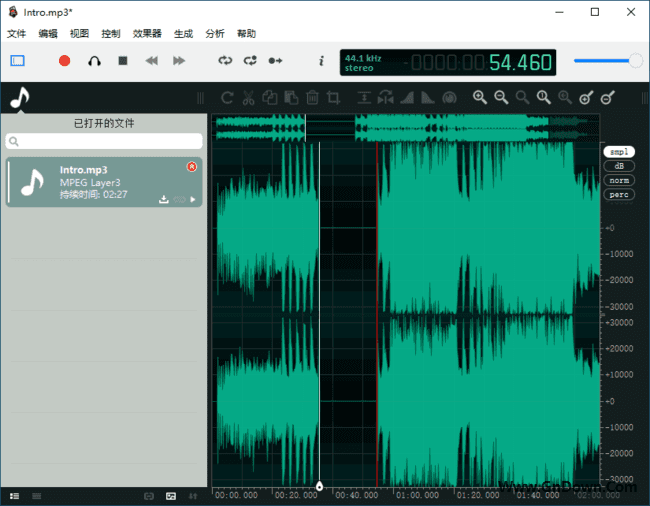












Sound familiar?
\- \
- Want a podcast intro? Noise after recording, want silence trim, no tool? \
- Want to extract song accompaniment? Or join clips, tried tools, none good. \
- Batch audio files to MP3? Open/save one by one, dozens of times, waste. \
If any of this sounds familiar, this software is made for you.
\Simply put
\In short, it is aFree audio editor/recorder, like photo editor but for sound.
\Record/edit/add FX, batch, fully free.
\What is it for?
\① Audio recording & editing
\Supports recording mic + internal PC audio; after recording, directly trim/delete/merge clips on timeline. E.g., record an interview, cut pauses/coughs, done in minutes.
\② Real-time effect preview
\When adjusting volume/adding fades/using EQ/denoiser, effects feedback instantly. No more repeated "listen-adjust-listen"; hear results immediately after adjusting, much more efficient.
\③ Batch audio-format conversion
\Select multiple audio files at once, batch convert to MP3/WAV/FLAC etc. E.g., batch convert dozens of WAV recordings to MP3 to send clients, saving per-file hassle.
\Who needs it most?
\\ Need vocal recording/trim/join? Multi-track/denoise.
\ Trim clips, adjust fades, add reverb/EQ.
\ BGM/voice/FX: trim/volume/convert one-click.
\ Denoise/normalize dictation; convert meeting audio.
Runtime & System Requirements
\- \
- Supported OS:Windows / Mac \
- Language support:Official Chinese edition \
- How to use:, no install, extract & run \
- Supported formats:MP3/WAV/OGG/FLAC/AAC \
In a Nutshell
\\ \ \Audio editor/recorder recommendations?If seeking a free/cross-platform/multi-track/batch-conversion audio editor, Ocenaudio is worth trying.










