


-
Solo Business Courses
-
 Others
-
Overseas Tutorials
-
Photography & Editing
-
Community & Private Domain
-
Self-Media Writing & Copywriting
-
Side Income Projects
-
E-commerce
-
Short Video & Live Streaming
-
Artificial Intelligence (AI)
-
Software & Tools
-
Operating Systems
-
Plugins & Scripts
-
MacOS Software
-
Android Software
-
Windows Software
MobiMusic v1.1.0 Beta — Music Downloader & Player for Android, supports lossless music downloads
-
Game Gold-Farming Money-Making Plan: Earn 1k+ Daily, a Stable 3-Year Project Anyone Can Do in Spare Time [Revealed]
Study material — included with membership Get Membership -
Hot-game fully-automated earning: 500+ a day, no experience, simple operation - the steadiest long-term game-earning side hustle (revealed)
Study material — included with membership Get Membership -
FlyingMouse earns merit this time! Don't panic at Windows format problems — the open-source FlyingMouse format conversion tool helps, a popular GitHub gem
Study material — included with membership Get Membership -
Douyin Product-Selling Coaching Bootcamp: No On-Camera Appearance Needed, Newbies Can Produce Selling Short Videos by Following the Steps
Study material — included with membership Get Membership -
First-release game gold-farming money plan: 1K+ a day, ordinary people in spare time
Study material — included with membership Get Membership






-
FlyingMouse earns merit this time! Don't panic at Windows format problems — the open-source FlyingMouse format conversion tool helps, a popular GitHub gem
Study material — included with membership Get Membership -
LuDaShi v6.1024.4105.1121 Slim Single File
Study material — included with membership Get Membership -
2D Cartoon Animation Software Moho Pro v14.3
Study material — included with membership Get Membership -
Video Editor Aiseesoft Filmai v1.0.18
Study material — included with membership Get Membership -
To-Do Microsoft To Do v2.147 Free
Study material — included with membership Get Membership -
PR/AE/DaVinci/FCPX video Plugin Nobe OmniScope Win1.11.15 / Mac1.10.138
Study material — included with membership Get Membership





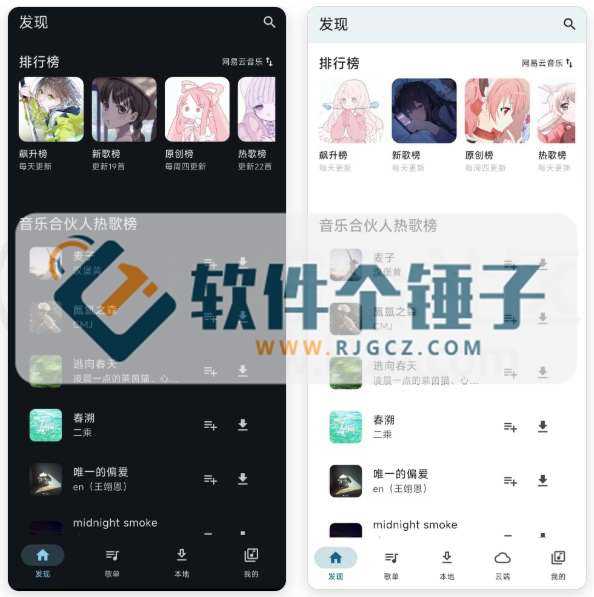
MobiMusic is a music app designed for Android users. It features a clean, beautiful interface and rich, practical functions, giving you a one-stop music playback and management experience.

1. A Clean, Efficient Home Screen
The home screen is kept simple, yet nothing essential is missing. Search for songs directly, switch between music platforms, or browse various charts to discover new music. Its smart caching makes the home screen load fast.
You can easily switch between your favorite music platforms on the home screen, and enable a feature called "Opening Thunder Strike," so music begins playing as soon as you open the app—no picking required.
2. Powerful Playlist Management
Playlist features are where this app shines. Import playlists from other music platforms directly, then refresh them with one click or set them to auto-refresh. Of course, you can also create your own playlists.
Back up your playlists to the cloud with one click, or restore them from the cloud just as easily. The app even uses AI to summarize your playlists and offer recommendations.
Inside a playlist, you can freely search for songs and manually reorder the track list.
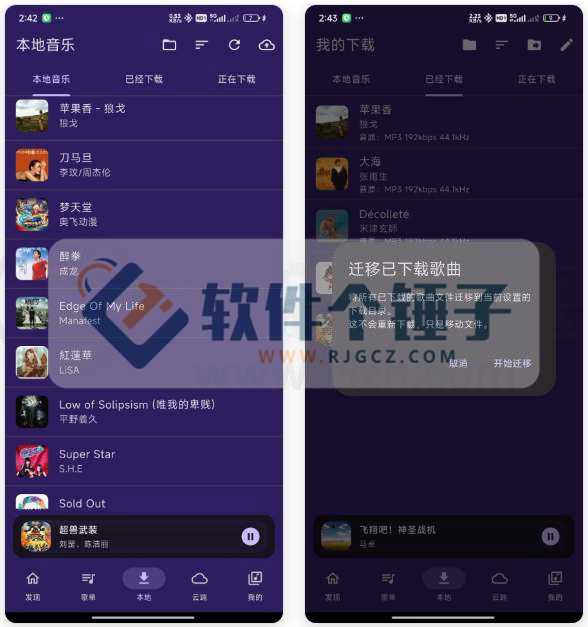
3. Flexible Local Playback
Here, almost anything that can be played can be downloaded. Besides downloading songs within the app, it can scan local music files in a folder you specify and display them.
Customize where downloads are saved and migrate all your music files in one click. You can also upload local songs to a WebDAV-compatible cloud drive with one tap.

4. Unlimited Cloud Playback
This app supports the WebDAV protocol, meaning you can upload songs to your personal cloud storage (such as a NAS) and stream them online directly—expanding your music library.
5. Safe, Reliable Data Sync
To prevent data loss and make it easy to move your playlists between devices, you can register an account and sign in. Once signed in, you can upload and sync playlists. Sign-in is optional, though—without logging in, you can still use every feature except playlist sync.
6. An Intuitive Listening Log
We record your listening history as a heatmap. See at a glance how much you listen each day. Click a day's block to view detailed listening records and the track list; long-press to delete a day's record.
7. "Instant Start" for the Lazy Listener
Want music playing the moment you open the app but can't be bothered to choose? We built the "Instant Start" feature. Set your playback strategy, and every time you open the app it automatically starts playing exactly the way you configured.
8. Highly Customizable Floating Lyrics
The app offers a highly customizable floating-lyrics feature. Freely adjust lyric color, font size, and on-screen position to suit your habits and taste.
9. Themes Your Way
Don't like the default colors? Or the background image? Pick any color you like in Settings. It supports a color wheel as well as smart color picking (like sampling from an image). You can also choose your own background image and adjust blur and transparency to create a one-of-a-kind player interface.
Related Courses

Super local toolbox! Built-in screen recording, audio/video cutting & merging, video compression & extraction, forever free - Kedou Video Converter

100% perfect free tool! One-stop multi-function PDF software: PDF convert, compress, edit etc., minimal, no ads, so nice - JOPDF

Open-Source Desktop Remote Tool, Beats Paid Versions! Free for Personal and Commercial Use Unlimited, Cross-Platform, HopToDesk Remote Control

Latest K-12 Textbook Downloader: Whole-Grade Resource Download, Courseware, Video, Audio in One Click

HuyanBao: free blue-light eye-care app with pet break reminders

Windows Can Have a Desktop Dynamic Island Too! A Modern System Control Center — Give Your PC a Black Notch, PyIsland

3D Simulated Comic Drama Production: Seedance2.0 Full-Process Practical Course - From Zero to One High-Quality Comic Drama Creation

Win/Mac Dual Support! Latest Permanent Lifetime Version, Supports Old Photo Restoration, Image Sharpening and Lossless Upscaling Tool, Aiarty Image Enhancer

Online Video Course: Github Open-Source Bilibili Video Download Tool! Supports 8K and Dolby Vision Bilibili Video Batch Download Tool, Easy to Use Bilidown


