




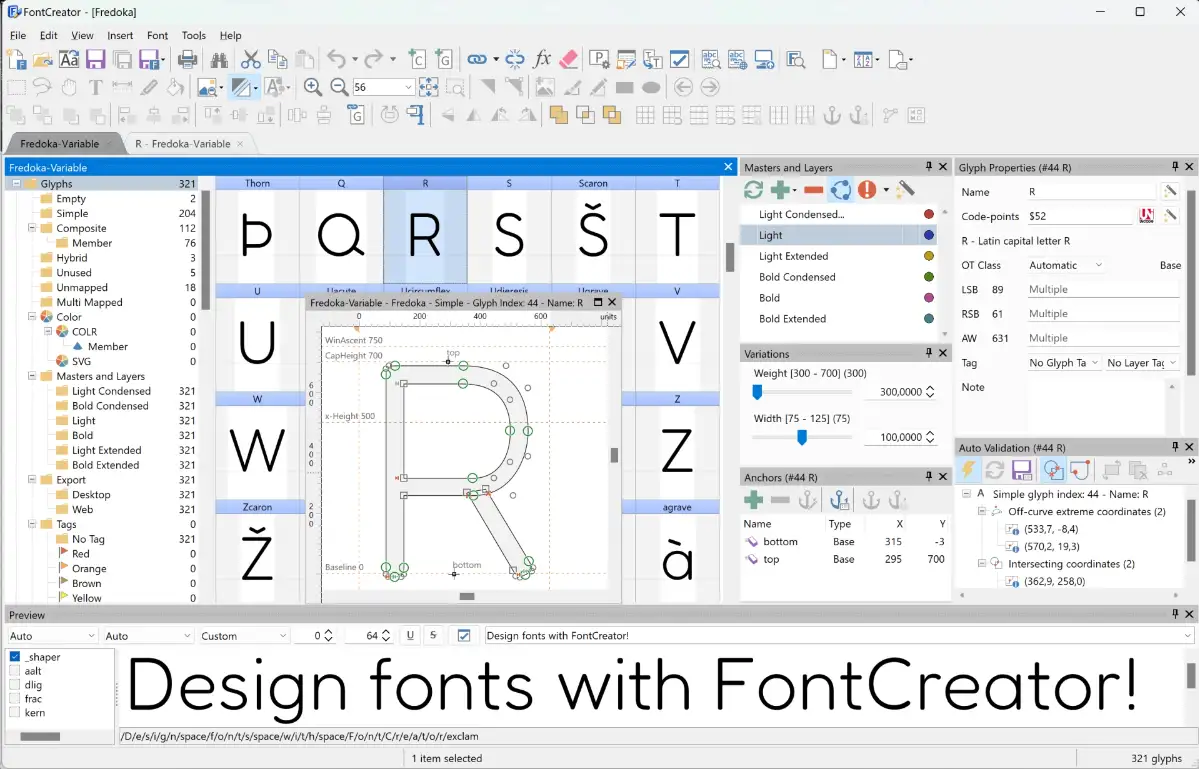












Want a truly one-of-a-kind font—without paying for one?
Do you also have this feeling: your computer holds hundreds of fonts, yet when you actually design, make a poster or add subtitles to a video, something always feels off—the style doesn't match, some characters are missing, it just "isn't quite right." Sometimes you want to thicken a stroke or tweak letter spacing to your liking, but off-the-shelf font software won't let you change a thing. In fact, designing your own font isn't as hard as you think.
It's like a workbench for fonts
Put simply, FontCreator gives you a set of tools to design or modify the fonts on your computer, almost like shaping clay. You can draw each letter, number and symbol, adjust their weight, size and spacing, and build a font entirely your own from scratch. Finished fonts install directly onto your computer and work anywhere—in Word, Photoshop, CapCut and more.
What can you do with it?
① Design your own font from scratch
It includes drawing tools so you can sketch the outlines of every letter and symbol like an artist. Elegant scripts, bold display type, cute cartoon fonts—draw them stroke by stroke. Then export as a font file, install, and use.
② Tweak existing fonts and instantly change the look
You don't have to draw from scratch every time. Import an existing font into FontCreator and edit it directly—thicken strokes, widen spacing, reshape a letter. Save as a new font, keeping the style you love while adding your own adjustments.
③ Supports many font formats and auto-optimizes
Finished fonts export to common formats like TrueType (.ttf) and OpenType (.otf), working on both Windows and Mac. Built-in optimization tools auto-fix small outline and path errors, ensuring your font renders cleanly and completely across apps.
Who might need it?
If you're a graphic designer, video creator, or frequently build decks and posters and want more personalized font choices, FontCreator is very useful. It's also great for font enthusiasts who want to try making their own. And if your work needs a special symbol or rare character that existing fonts lack, adding it yourself is a practical use.
To sum up
Want a font that stands out? No need to ask anyone or pay for one—just build your own with FontCreator.










