


-
Solo Business Courses
-
 Others
-
Overseas Tutorials
-
Photography & Editing
-
Community & Private Domain
-
Self-Media Writing & Copywriting
-
Side Income Projects
-
E-commerce
-
Short Video & Live Streaming
-
Artificial Intelligence (AI)
-
Software & Tools
-
Operating Systems
-
Plugins & Scripts
-
MacOS Software
-
Android Software
-
Windows Software




GiliSoft File Lock Pro v14.0 — Encrypt & Hide Files
-
Game Gold-Farming Money-Making Plan: Earn 1k+ Daily, a Stable 3-Year Project Anyone Can Do in Spare Time [Revealed]
Study material — included with membership Get Membership -
Hot-game fully-automated earning: 500+ a day, no experience, simple operation - the steadiest long-term game-earning side hustle (revealed)
Study material — included with membership Get Membership -
FlyingMouse earns merit this time! Don't panic at Windows format problems — the open-source FlyingMouse format conversion tool helps, a popular GitHub gem
Study material — included with membership Get Membership -
Douyin Product-Selling Coaching Bootcamp: No On-Camera Appearance Needed, Newbies Can Produce Selling Short Videos by Following the Steps
Study material — included with membership Get Membership -
First-release game gold-farming money plan: 1K+ a day, ordinary people in spare time
Study material — included with membership Get Membership






-
FlyingMouse earns merit this time! Don't panic at Windows format problems — the open-source FlyingMouse format conversion tool helps, a popular GitHub gem
Study material — included with membership Get Membership -
LuDaShi v6.1024.4105.1121 Slim Single File
Study material — included with membership Get Membership -
2D Cartoon Animation Software Moho Pro v14.3
Study material — included with membership Get Membership -
Video Editor Aiseesoft Filmai v1.0.18
Study material — included with membership Get Membership -
To-Do Microsoft To Do v2.147 Free
Study material — included with membership Get Membership -
PR/AE/DaVinci/FCPX video Plugin Nobe OmniScope Win1.11.15 / Mac1.10.138
Study material — included with membership Get Membership





Everyone has private secrets on their computer they'd rather colleagues or friends not see when borrowing it. That's where a file-hiding or encryption tool comes in. Today I recommend this data-protection tool—GiliSoft File Lock Pro.
What Is GiliSoft File Lock Pro?
GiliSoft File Lock Pro is the most advanced, simplest data-protection tool. With it, no one can access or tamper with your private data without a password. Never again worry about data theft from malicious behavior or privacy leaks on a shared computer.
Core Features
This security software restricts access to files, folders and drives, including:
- Encrypt files and folders: strong encryption algorithms keep data safe.
- Hide files, folders and drives: make them completely invisible, even in Windows Safe Mode.
- Make files, folders and drives read-only: prevent unauthorized modification, deletion or renaming.
- Password-protect folders and drives: require a password to access protected files.
Exclusive Features
GiliSoft File Lock Pro has exclusive features that set it apart:
- Hide files/folders/drives: make private items completely invisible to anyone or any program, even in Safe Mode.
- Deny reading: locked files/folders/drives can't be opened, read, modified, renamed, moved, deleted or copied without a password.
- Deny writing: people can read write-protected items but can't modify, delete or rename them without a password.
- Monitor folder changes and write logs: watch disks, folders and subfolders for any operation, keeping you informed.
- Strong self-protection: no one can uninstall it without a password; hide the program in stealth mode. After 5 wrong passwords, it emails an alert to your predefined address and temporarily blocks unknown logins.
Easy to Use
GiliSoft File Lock Pro is very simple:
- One password for everything: protect all folders and drives with a single password for easy management.
- Drag and drop: drag files or folders onto the main window to lock them, or use the Explorer right-click menu.
- Recover lost passwords: if you forget, recover via your predefined email.
Encrypted Data
GiliSoft File Lock Pro uses AES to encrypt files and folders into .exe files. You can then open the encrypted files on other computers, ensuring security and portability.
Secure Delete (File Shredder)
It also offers secure deletion—overwriting sensitive data multiple times so it's unrecoverable, ensuring private files are gone for good.
Note
GiliSoft File Lock Pro is somewhat risky—back up your system and data first!
Install & Use
1. Turn off antivirus (including the built-in security center and third-party security/antivirus tools).
2. Double-click or run "file-lock-pro.exe" as administrator and follow the prompts.

3. After restarting, disconnect the internet and check that the firewall is off to avoid blocking. Open the install directory; the archive contains two options—copy either into the install directory (one shown here).



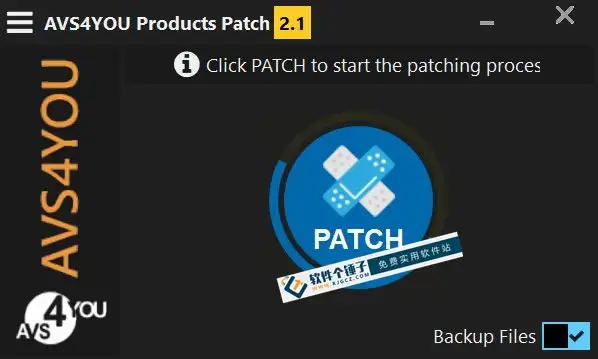
4. Unzip the copied archive and run the patch as administrator; choose the software type in the interface and find File Lock Pro (as shown).

5. Click "Patch Hosts" below, then "Generate" to create the key. Copy it to the clipboard.

6. The app opens as a trial; in the main window, enter any properly formatted email and paste the copied key to activate.



7. After entering, the top-right may still show "trial"; quit and reopen and it becomes activated. The app then prompts for setup—set your protection password and email as shown, then click "OK" to reach the main window.


Related Courses

Super local toolbox! Built-in screen recording, audio/video cutting & merging, video compression & extraction, forever free - Kedou Video Converter

100% perfect free tool! One-stop multi-function PDF software: PDF convert, compress, edit etc., minimal, no ads, so nice - JOPDF

Open-Source Desktop Remote Tool, Beats Paid Versions! Free for Personal and Commercial Use Unlimited, Cross-Platform, HopToDesk Remote Control

Latest K-12 Textbook Downloader: Whole-Grade Resource Download, Courseware, Video, Audio in One Click

HuyanBao: free blue-light eye-care app with pet break reminders

Windows Can Have a Desktop Dynamic Island Too! A Modern System Control Center — Give Your PC a Black Notch, PyIsland

3D Simulated Comic Drama Production: Seedance2.0 Full-Process Practical Course - From Zero to One High-Quality Comic Drama Creation

Win/Mac Dual Support! Latest Permanent Lifetime Version, Supports Old Photo Restoration, Image Sharpening and Lossless Upscaling Tool, Aiarty Image Enhancer

Online Video Course: Github Open-Source Bilibili Video Download Tool! Supports 8K and Dolby Vision Bilibili Video Batch Download Tool, Easy to Use Bilidown


