
















Sound Familiar?
- Want to record a tutorial or a gaming highlight? Open the built-in recorder and find the quality is blurry, files are huge, and you can't export a shareable GIF.
- Need to annotate a screenshot fast? Arrows, boxes, text notes—but you have to reopen Photoshop or another editor each time. So tedious.
- You want to copy some web text, only to find it's an image, so you type it out by hand?
If you've been through this, this tool is for you.
In Short
In short, it's a free, open-source screenshot and screen-recording tool—your all-in-one capture and recording assistant that also edits what you capture.
Screenshot, record, make GIFs, OCR text from images, and upload to the cloud for a shareable link—all in one place.
What Does It Do?
① Fast Capture & HD Recording
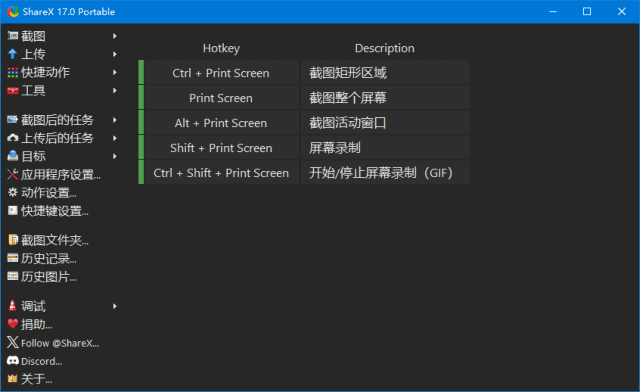
Multiple capture modes; hotkeys grab full screen, a window or a custom region. Also record HD video or GIFs—clear quality, controlled file size, easy to share.
② Image Editing & Annotation
Jump straight into the editor after a capture—add arrows, text, shapes and mosaic to highlight key points, skipping a second trip to another image tool.
③ OCR & Color Picker
One tap recognizes text in screenshots or video and turns it into editable text—no more typing. Designers also pick any on-screen color code.
Who Needs It Most?
Regularly record tutorials, gaming videos or GIFs; need a professional, free tool.
Quick screenshots for reports or slides, or extracting text from images.
Pick colors, capture designs with annotated feedback, or share code snippets.
Love sharing chats, funny clips or steps—image host + share link in one.
Requirements
- OS: Windows / macOS
- Languages: English and more
In One Line
Looking for a free screen recorder? ShareX screenshots and records easily, and bundles annotation, OCR, color picking and cloud upload—one tool replacing many, effortless and efficient.










