
















Reinstalling a System — Can't It Just Be Simpler?
You've been there: your PC suddenly blue-screens and won't boot, or you want a clean install on a new drive—only to find that just making a bootable drive takes forever. Finding a tool, following tutorials, setting parameters, fearing every step. You finally finish it, plug it in, and it won't boot—start all over again.
Worse, different PCs need different boot modes. Older machines use BIOS, newer ones UEFI. If the tool doesn't auto-adapt, you research and set it all manually—by the end, making the bootable drive took longer than installing the system. Wouldn't it be great if one tool handled it all without you sweating the technical details?
A "No-Brainer" Bootable-Drive Maker
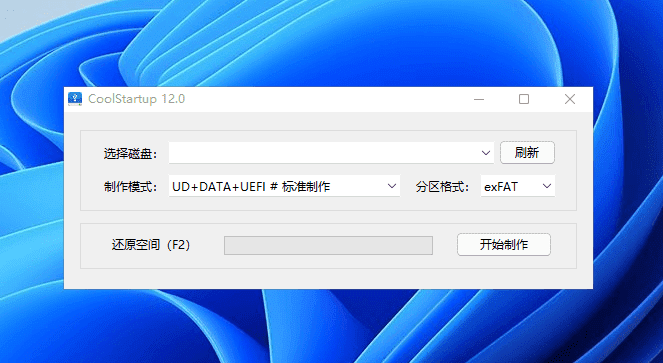
CoolStartup's idea is direct—make a working bootable drive with the simplest steps. Plug in the USB, pick the system image, click "Create," wait a few minutes. It handles partitions and boot mode under the hood. You don't need to know BIOS from UEFI—it auto-matches for you.
What Can You Do With It?
① Bootable Drive in Three Steps
Plug in the USB, pick the system image, click "One-Click Create," and in about 5 minutes you have a ready-to-use bootable drive. No need to grasp partition formats or boot modes—the flow is like installing an ordinary app.
② Old and New PCs Alike
Whether your machine is years old or brand new, CoolStartup adapts. It supports both BIOS and UEFI, auto-detecting which your PC needs—no checking motherboard models or manual settings.
③ Install Systems and Back Up Data
The drive includes CoolInstall, supporting WIM and ESD images and auto-repairing boot conflicts. There's also CoolBackup to back up your current system—restore directly if problems arise, no full reinstall.
④ One USB, Multiple Systems
A DIY boot menu lets you put multiple PE systems or images on one USB and choose which to use at startup. A huge time-saver if you often set up PCs for others or maintain many devices.
Who Is It For?
If you just want to reinstall your own system without studying complex bootable-drive tutorials, this tool fits. If you often set up PCs for colleagues and friends, or handle IT ops and batch system deployment, CoolStartup also saves a lot of time. It lowers professional tools to a minimum learning curve—beginners make a bootable drive themselves in minutes.
In Short
CoolStartup is a one-click bootable-drive creator that reduces installing a system to "plug in USB → pick image → click create," with built-in system install and data backup—suitable for everyone from beginners to professional ops.










