


-
Solo Business Courses
-
 Others
-
Overseas Tutorials
-
Photography & Editing
-
Community & Private Domain
-
Self-Media Writing & Copywriting
-
Side Income Projects
-
E-commerce
-
Short Video & Live Streaming
-
Artificial Intelligence (AI)
-
Software & Tools
-
Operating Systems
-
Plugins & Scripts
-
MacOS Software
-
Android Software
-
Windows Software
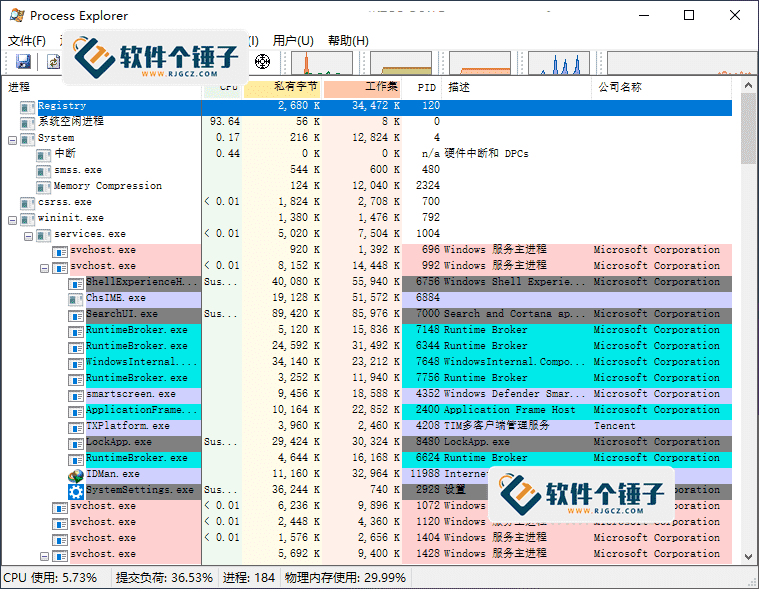
Process Explorer v17.11 Chinese Version
-
Game Gold-Farming Money-Making Plan: Earn 1k+ Daily, a Stable 3-Year Project Anyone Can Do in Spare Time [Revealed]
Study material — included with membership Get Membership -
Hot-game fully-automated earning: 500+ a day, no experience, simple operation - the steadiest long-term game-earning side hustle (revealed)
Study material — included with membership Get Membership -
FlyingMouse earns merit this time! Don't panic at Windows format problems — the open-source FlyingMouse format conversion tool helps, a popular GitHub gem
Study material — included with membership Get Membership -
Douyin Product-Selling Coaching Bootcamp: No On-Camera Appearance Needed, Newbies Can Produce Selling Short Videos by Following the Steps
Study material — included with membership Get Membership -
First-release game gold-farming money plan: 1K+ a day, ordinary people in spare time
Study material — included with membership Get Membership






-
FlyingMouse earns merit this time! Don't panic at Windows format problems — the open-source FlyingMouse format conversion tool helps, a popular GitHub gem
Study material — included with membership Get Membership -
LuDaShi v6.1024.4105.1121 Slim Single File
Study material — included with membership Get Membership -
2D Cartoon Animation Software Moho Pro v14.3
Study material — included with membership Get Membership -
Video Editor Aiseesoft Filmai v1.0.18
Study material — included with membership Get Membership -
To-Do Microsoft To Do v2.147 Free
Study material — included with membership Get Membership -
PR/AE/DaVinci/FCPX video Plugin Nobe OmniScope Win1.11.15 / Mac1.10.138
Study material — included with membership Get Membership





Process Explorer is a deep monitoring tool for Windows systems and applications developed by the Sysinternals team, which is now part of Microsoft. It's not just a simple task manager—it merges the functions of the classic Filemon (file monitor) and Regmon (registry monitor) tools into one, and adds many important enhancements.

1. Core Features & Enhancements
This tool has improvements in stability and performance, offering powerful filtering options. It has a process tree dialog with an added process lifetime chart for an at-a-glance view. Its right-click menu intelligently changes based on where you click, filtering out relevant action items.
It also integrates a stack trace dialog with source code storage, making stack tracing faster. It can even load 32-bit log files on 64-bit Windows. It can monitor the loading of image files such as DLLs and kernel-mode drivers, and can also record all operations during system startup.
In short, Process Explorer is a free professional enhanced task manager—a powerful system and application monitoring tool. It helps you manage processes hidden in the background: monitor, suspend, restart, or even force-kill any program, including system-critical processes that normally cannot be terminated.
2. Key Features
- Detailed information: Can display various detailed information about executed program image files.
- Security information: Can display process security tokens and permission information.
- Highlighted changes: Highlights changes in process and thread lists, making anomalies easier to spot.
- Job management: shows processes in jobs with job details.
- .NET support: shows processes running .NET/WinFX apps with .NET details.
- Timing: shows process and thread start times.
- Memory maps: shows a full list of memory-mapped files.
- Process control: can suspend a process.
- Thread control: can force-terminate (kill) a thread.
- Security detection: shows a process's VirusTotal safety score.
3. About This Chinese Version
(Based on the localization work of rzp428 and MagicGenius.)
This Chinese version is built from Process Explorer's latest official release. Localization covers standard and non-standard resources, fully meeting the needs of users unfamiliar with English.
Both 32-bit and 64-bit embedded files are localized for a perfect Chinese UI on either system. It's a native single-file build without packing, so it runs very fast.
Related Courses

WorkBuddy zero-basics hands-on training: even non-programmers can follow the manual steps, learn agents systematically by doing

Higgsfield cinematic animation course: one-stop creation platform, complete animation production-flow teaching

The same dance with 6 outfits switching in order: I turned an outfit-change video into a Skill

An eye-catching domestic Markdown editor: local offline high-performance note tool, free and no login required

Domestic Markdown editor: local offline high-performance knowledge-note tool, free and no login required

WorkBuddy practical blue paper: user manual and practice guide, complete combined image-text edition

Jimeng challenges a 180-second long video: one-click a 3-minute movie? Full production flow shared in detail

Super handy! Douyin video downloader, supports batch download of user works, favorites and likes lists, open-source free Better-douyin-R

Nearly 200K stars on GitHub - Harness now runs by double-click: the Harness full-platform desktop edition

Nearly 200K stars on GitHub - Harness now runs by double-click: the Harness full-platform desktop edition DSH Desktop

