


-
Solo Business Courses
-
 Others
-
Overseas Tutorials
-
Photography & Editing
-
Community & Private Domain
-
Self-Media Writing & Copywriting
-
Side Income Projects
-
E-commerce
-
Short Video & Live Streaming
-
Artificial Intelligence (AI)
-
Software & Tools
-
Operating Systems
-
Plugins & Scripts
-
MacOS Software
-
Android Software
-
Windows Software
PPT Template Hub v1.4.5 — Mobile AI Slides
-
Game Gold-Farming Money-Making Plan: Earn 1k+ Daily, a Stable 3-Year Project Anyone Can Do in Spare Time [Revealed]
Study material — included with membership Get Membership -
Hot-game fully-automated earning: 500+ a day, no experience, simple operation - the steadiest long-term game-earning side hustle (revealed)
Study material — included with membership Get Membership -
FlyingMouse earns merit this time! Don't panic at Windows format problems — the open-source FlyingMouse format conversion tool helps, a popular GitHub gem
Study material — included with membership Get Membership -
Douyin Product-Selling Coaching Bootcamp: No On-Camera Appearance Needed, Newbies Can Produce Selling Short Videos by Following the Steps
Study material — included with membership Get Membership -
First-release game gold-farming money plan: 1K+ a day, ordinary people in spare time
Study material — included with membership Get Membership






-
FlyingMouse earns merit this time! Don't panic at Windows format problems — the open-source FlyingMouse format conversion tool helps, a popular GitHub gem
Study material — included with membership Get Membership -
LuDaShi v6.1024.4105.1121 Slim Single File
Study material — included with membership Get Membership -
2D Cartoon Animation Software Moho Pro v14.3
Study material — included with membership Get Membership -
Video Editor Aiseesoft Filmai v1.0.18
Study material — included with membership Get Membership -
To-Do Microsoft To Do v2.147 Free
Study material — included with membership Get Membership -
PR/AE/DaVinci/FCPX video Plugin Nobe OmniScope Win1.11.15 / Mac1.10.138
Study material — included with membership Get Membership





Still staying up late at your desk editing slides? Need a work report, defense deck or business plan on the spot, but you're stuck without a computer? If you want a mobile PPT app that generates slides with AI one-tap, offers a huge free template library, and lets you finish the whole edit on your phone—PPT Template Hub may be exactly the answer. As a mobile slide-making tool for Android, AI generation saves you building the framework from scratch, a massive template library covers every scenario, and a complete on-phone editing loop lets you handle slides on your commute. This guide to PPT Template Hub walks through its core powers, real performance and first steps.
What Is PPT Template Hub?
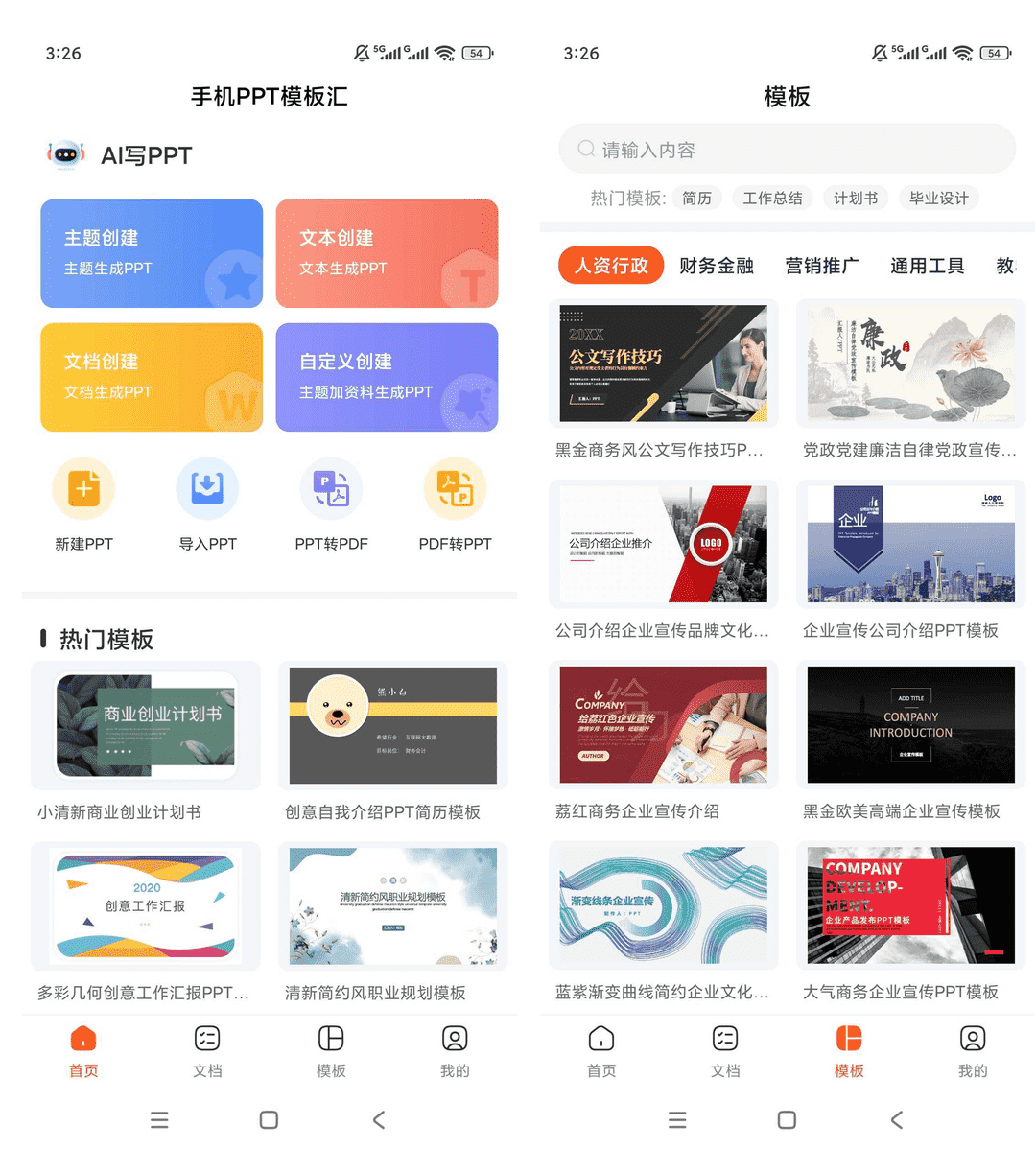
PPT Template Hub is a mobile slide-making app on Android. It supports AI one-tap generation (theme creation, text creation, document creation and custom creation), has tens of thousands of all-scene templates built in, and supports full on-phone editing and multi-format export.
In short: an on-phone AI slide generator + huge template library + mobile office editing studio—make slides anytime, anywhere.
Ideal Scenarios
- 💼 Last-Minute Work Reports: suddenly need a report while out? AI generates a draft in minutes—tweak the text and deliver.
- 🎓 Defense Slides: not sure how to build your thesis-defense deck? Enter keywords and AI auto-builds the framework with images.
- 📝 Fast Document-to-Slides: import Word, TXT or PDF directly and AI turns it into a presentation.
- 💼 Editing on Business Trips: when you can't open a laptop, edit on your phone and export a PDF to send.
- 📊 Quick Templates: huge library of resume, work-summary and business-plan templates—swap the text and go.
Quick Comparison
| Aspect | PPT Template Hub | Traditional PPT | Web AI Generators |
|---|---|---|---|
| Scenarios | phone, anytime, anywhere | requires a computer | needs network + computer/phone |
| AI Generation | native, 4 modes | not supported | partially supported |
| Templates | tens of thousands, all scenes | search & download yourself | limited templates |
| Editing | full on-phone editing | full but needs a computer | limited editing |
5 Core Features
🤖 1. AI One-Tap Generation
Four modes—theme, text, document and custom. Enter keywords or import a document, and AI builds the full outline, page framework and visuals.
Example: tap "Theme Creation" → enter "Year-End Review" → AI builds the full deck → preview & edit
✏️ 2. Full On-Phone Editing
Refine the generated deck right on your phone—fonts, sizes, line spacing, text color; insert images, icons and shapes; add, delete, copy and reorder pages.
Example: open the generated deck → tap text to edit → add images → drag to reposition
📊 3. Tens of Thousands of Templates
Ready-made templates covering work reports, year-end summaries, thesis defenses, business plans, resumes, company profiles, teaching slides and more—many styles.
Example: open templates → search "resume" → pick a style → download and swap text/images
📤 4. Multi-Format Export & Share
Beyond native PPT, export to PDF or image—for printing, forwarding and more.
Example: tap Export → choose PPT/PDF/image → confirm → share via WeChat/email
🔄 5. PPT ⇄ PDF Conversion
Convert PPT to PDF or PDF to PPT—format conversion in one tap on your phone.
Example: tap Convert → choose "PPT to PDF" → import the file → convert & export
Real-World Test: 3 Scenarios

The 3 cases below cover last-minute reports, document conversion and template reuse—all recorded from real use.
| Scenario | Steps | Result & Notes | Time Saved |
|---|---|---|---|
| Last-minute work report | got notice on a trip → opened the app → chose "Theme Creation" → entered "Quarterly Sales Report" → AI generated → swapped data → exported PDF | full framework in 5 minutes; swapping data took 2. Review: before, I had to get back to a hotel and open a laptop; now it's done on the subway. | ~80% |
| Word doc to PPT | prepared Word plan → chose "Document Creation" → imported the file → AI read the structure → generated the deck → fine-tuned layout | a 10,000-word plan auto-split into a 10-page deck with clear logic. Review: no more copy-pasting into PowerPoint by hand. | ~60% |
| Resume template | searched "resume" → filtered business style → downloaded the template → swapped personal info → exported image/PDF | polished design, ready after swapping text. Review: updating my resume repeatedly while job hunting is so convenient on the phone. | ~70% |
💡 Tip: AI-generated decks tend to be generic. Generate the draft framework first, then swap in your real data and refine details. That saves time while keeping content accurate.
Step-by-Step: Your First Deck in 5 Steps
Step 1: Download & Install
Get the PPT Template Hub v1.4.5 installer from our tool site, install on Android and open the app. First launch shows four bottom tabs: Home, Documents, Templates and Mine.
Step 2: Choose a Generation Mode
In the AI area on the home screen, pick a mode: theme (keywords), text (paste text), document (import a file) or custom (upload references + a topic).
Step 3: AI Generates & Preview
After entering or importing content, tap generate. AI analyzes the content and builds the full outline, page framework and visuals. Preview the result; regenerate or adjust manually if you're not satisfied.
Step 4: Fine-Edit
In edit mode, adjust text, fonts and colors; insert or replace images and icons; reorder pages and layouts. Phone editing isn't as precise as a computer, but it's plenty for on-the-go use.
Step 5: Export & Share
When done, tap Export. Choose PPT/PDF/image and confirm. Share the file via WeChat, email, or save it locally for later.
PPT Template Hub vs Desktop PPT vs Web AI
| Dimension | PPT Template Hub | Desktop Office/WPS | Web AI Tools |
|---|---|---|---|
| Convenience | phone anytime, no computer | needs a computer, fixed place | needs network, some features limited |
| AI Generation | 4 native modes | no AI generation | partially supported |
| Templates | tens of thousands, offline | download online | limited |
| Editing Freedom | full on-phone editing | most complete | limited |
FAQ
Q1: Can I use it right away? Does it need a network?
Yes. Basic functions work after install. AI generation needs a network (cloud processing); template browsing and local editing work offline, and exported files can be shared anytime.
Q2: How good is the generated deck? Is it formal-ready?
AI decks have complete frameworks and clean layouts—fully usable as a draft or base. Swap in your specific data and refine details to balance efficiency with accuracy and professionalism.
Q3: Which document formats can I import?
Word (.doc/.docx), TXT and PDF. After import, AI analyzes the document structure and content and builds matching slide pages.
Q4: Can exported PPT open in desktop Office or WPS?
Exported PPT files are standard and fully compatible with Microsoft Office and WPS Office. Exported PDFs and images also view and share on any device.
Q5: What if I don't know how to use it?
Section 4 above gives a complete 5-step walkthrough from install to sharing. The UI is simple and intuitive—core AI generation sits right on the home screen. Start with "Theme Creation."
Is It Worth It?
PPT Template Hub solves the core problems of "can't make slides without a computer," "no time for last-minute decks," and "document-to-PPT is such a hassle." AI generation saves building the framework from scratch, tens of thousands of templates cover every scenario, and a complete on-phone editing loop lets you handle slides on your commute—plus multi-format export for easy sharing. If you're fed up with having no laptop when you suddenly need slides, or staying up late editing at a desk, this mobile slide app is worth a try. Install it today; next time a last-minute report pops up, you'll realize your phone can make slides fast.
👍 Get PPT Template Hub now and make slides efficiently, anywhere!
Related Courses

Format Factory Comes to Mobile! 100% Completely Free, Audio/Video/Image Format Converter, Free & No-Login (Android)

A Fun Tool! One-Click Cover Faces With Emoji, Local Offline Privacy-Safe, Works on Android Phones — EmojiFace

Video Prompt Reverse Engineering Software (Android App), Quickly Generate, Optimize, and Reverse-Analyze Videos


One Prompt: AI Fully Automatically Builds a Live TV App, Works on PC, Android and TV, Completely Free, Smooth Picture with No Lag

Mobile Video Aggregator — Dashi Xiong Video v4.0.8

Android massive hot free short dramas Hongguo Short Drama v7.4.1.32

Android Mobile Fingerprint Browser v1.1.8 with Hundreds of Built-in Tools

Android Video Re-creation & Repost Master v2.14

Android Volume Control App Volume Control Pro v6.7.2 [Software Hammer · R4561]

