
















Sound familiar?
- Bought a batch of new PCs that need Autodesk deployed at scale? Manually configuring licenses one by one is painfully slow—IT's weekend is gone again.
- After deployment, a few devices can't reach the license service? Is it a config issue or a network issue—troubleshooting is a headache.
- The company runs Autodesk products across several versions—2014, 2018, 2023—each configured differently, so writing deployment scripts is a slog.
If any of this sounds like you, this tool is built for you.
What it is, in one line
It's a deployment helper built for IT admins—an "automation butler" for your Autodesk rollout.
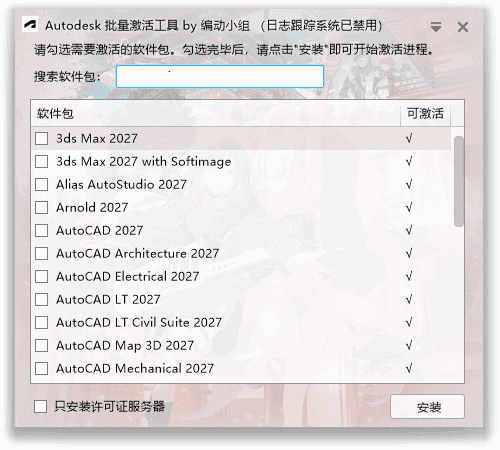
Check the products you need configured and it handles the rest of the licensing setup—saving hours of manual work, ideal for organizations deploying across many PCs.
What does it do?
① One-click batch licensing
Auto-scans installed Autodesk products; tick a box to complete local license-service config. No need to set the license-server address per machine—fast and easy.
② Wide multi-version compatibility
Supports most mainstream products from 2014 through 2027. Whether your company runs old or new versions, one tool covers it—no separate deployment plan per version.
③ Smart detection & logging
Auto-checks license config and writes detailed logs on anomalies. Even small issues can be pinpointed from the log, so IT resolves them precisely.
Who needs it most?
Need to quickly deploy Autodesk licensing across many in-house machines efficiently.
Run multiple Autodesk versions (CAD, Revit, 3ds Max) and need unified license management.
Offer Autodesk install/deploy services and need an efficient batch-config tool.
Labs reinstall often and need to quickly restore Autodesk licensing on many teaching PCs.
System requirements
- OS: Windows
- Language: Chinese
- Versions: most Autodesk 2017–2027 products
- Run: portable, no install—just run it
In short
Deploying Autodesk at scale, tired of configuring licenses machine by machine? This tool completes license deployment fast—covers most versions from 2014 to 2027, ready to use, and greatly boosts deployment efficiency.










