


-
Solo Business Courses
-
 Others
-
Overseas Tutorials
-
Photography & Editing
-
Community & Private Domain
-
Self-Media Writing & Copywriting
-
Side Income Projects
-
E-commerce
-
Short Video & Live Streaming
-
Artificial Intelligence (AI)
-
Software & Tools
-
Operating Systems
-
Plugins & Scripts
-
MacOS Software
-
Android Software
-
Windows Software

Ashampoo AntiSpy Pro v1.6.0
-
Game Gold-Farming Money-Making Plan: Earn 1k+ Daily, a Stable 3-Year Project Anyone Can Do in Spare Time [Revealed]
Study material — included with membership Get Membership -
Hot-game fully-automated earning: 500+ a day, no experience, simple operation - the steadiest long-term game-earning side hustle (revealed)
Study material — included with membership Get Membership -
FlyingMouse earns merit this time! Don't panic at Windows format problems — the open-source FlyingMouse format conversion tool helps, a popular GitHub gem
Study material — included with membership Get Membership -
Douyin Product-Selling Coaching Bootcamp: No On-Camera Appearance Needed, Newbies Can Produce Selling Short Videos by Following the Steps
Study material — included with membership Get Membership -
First-release game gold-farming money plan: 1K+ a day, ordinary people in spare time
Study material — included with membership Get Membership






-
FlyingMouse earns merit this time! Don't panic at Windows format problems — the open-source FlyingMouse format conversion tool helps, a popular GitHub gem
Study material — included with membership Get Membership -
LuDaShi v6.1024.4105.1121 Slim Single File
Study material — included with membership Get Membership -
2D Cartoon Animation Software Moho Pro v14.3
Study material — included with membership Get Membership -
Video Editor Aiseesoft Filmai v1.0.18
Study material — included with membership Get Membership -
To-Do Microsoft To Do v2.147 Free
Study material — included with membership Get Membership -
PR/AE/DaVinci/FCPX video Plugin Nobe OmniScope Win1.11.15 / Mac1.10.138
Study material — included with membership Get Membership





Why is Windows 10 jokingly called a "telemetry pig"? It learns your habits in detail to help Microsoft tune ads and features—as long as you don't block it. Search engines like Google and Bing also track your every move, collecting data to build detailed profiles. Ashampoo® AntiSpy Pro stops these telemetry uploads at 100+ points with one click—on Windows 10, 8 or 7.

Features
- One-click tracking block: simple operation, instant protection.
- Privacy protection: maximizes personal privacy by cutting unnecessary reporting.
- Broad blocking: stops tracking from Google, Office, Bing and hardware makers.
- Auto-start: runs with Windows for continuous protection.
- Reversible: undo any change easily.
- Fully resistant: opposes user profiling in any form.
- Stops data collection: blocks 100+ programs and services.
- Maximized disabling: turns off Windows 10 diagnostics and feedback as far as possible.
Details
We built Ashampoo AntiSpy Pro to make privacy protection simple. One click disables all data-collection services—but you can also tune settings manually, choosing which services to block or allow. You stay in full control: enable only what you need and block the rest.
Family Multi-Device License
With Ashampoo AntiSpy Pro, one license covers up to 10 home PCs. One purchase gives the whole family a safer OS experience. Commercial use requires a separate license per install.
Fighting Software Eavesdropping
Ashampoo AntiSpy Pro blocks not only Windows data collection—it also detects and stops other software, from Google Analytics to preinstalled bloatware, even browser and graphics-driver telemetry. It even spots those annoying Office bundles.
Changelog
We keep optimizing performance and features for the best privacy protection. The latest update adds multi-window support, improves favorites management, and drops Windows XP support for a more secure, modern baseline.
Details and open-source projects: see the official GitHub page.
Activation Steps
1. Download and extract the package—you'll see a set of files.

2. Run the Ashampoo AntiSpy Pro installer first.

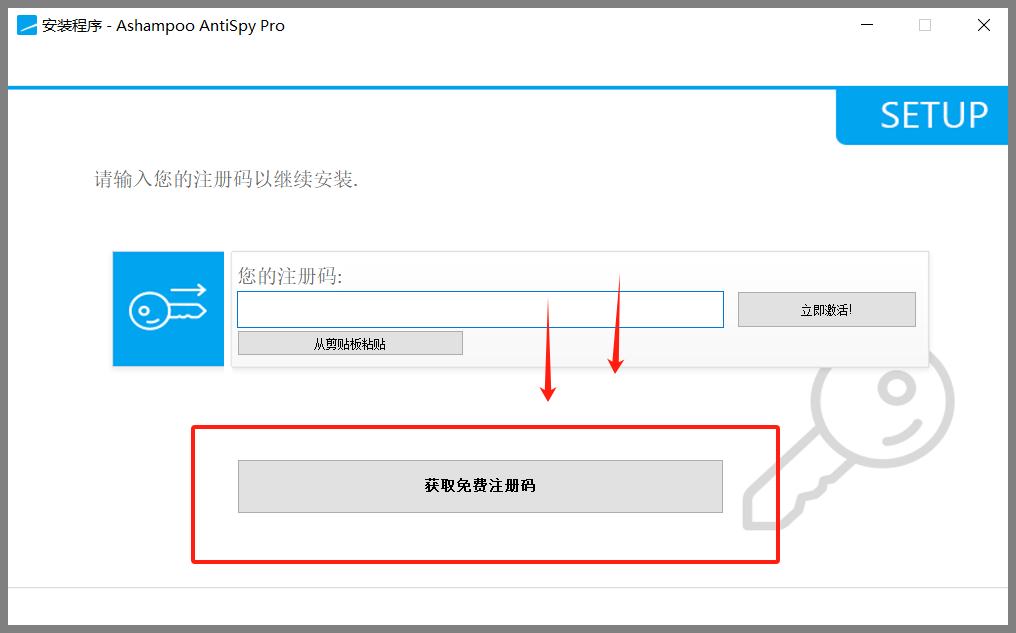
3. During install, you'll be prompted to enter a key—choose "Get Free".

4. Follow the prompts to enter your email; you'll get a mail with a registration link to obtain your key.

5. Enter the received key in the install dialog and continue.

6. Note the install path—default is C:\Program Files (x86)\Ashampoo\Ashampoo AntiSpy Pro.

7. After install, don't launch the app yet.

8. Return to the extracted folder, open the patch folder, copy the contents of the x64 folder into the install path and overwrite—activation complete.

Related Courses

Super-lightweight C-Drive Manager for Windows! Very distinctive: disk analysis and cleanup reminders, 2MB size, completely free

Reinstall Without a USB Drive! This Tool Lets Newbies Quickly Reinstall Windows, Supports Unattended Setup, Data-Safe—CmzPrep_Rev2

A GitHub speed-up tool! Open GitHub faster, auto-responding to the fastest node - a lightweight open-source tool: Ghips

EasyRC: one-click Windows reinstall without USB, backup and restore included

Permanently Block Windows 10/11 Updates: Huawei Tool, Avoid Frequent Win Update Problems

Windows 7/10/11 System Update Blocker Is Here! Only 400KB, One-Click Disable System Updates and Restore Updates, Compact and Easy to Use

Stop Deleting Files Randomly! C Drive Red Alert Savior: Deep Cleanup + System Optimization, Works on Windows/macOS!

Office Fully-Automatic One-Click Deployment Installer, up to 2024, Customizable Components, Built-in Activation, All Free - Mocreak

Windows System Reinstall Tool, Supports Local Image File Install and Backup, Simple to Use, Safe and Stable, Supports All Scenarios

PC Acting Up? Newbie-Essential Driver Repair Tool—One-Click Update & Fix Driver Issues, It’s That Simple

