
















You've probably been here
After a few years, your hard drive fills up: one file downloaded several times, photos backed up in multiple folders, the same song in several versions. Cleaning by hand means paging through folders one by one—it's a slog—and some files have different names but identical content, impossible to spot by eye. Windows search alone won't find the real duplicates. You just want to find the space-wasting extras and clear them out.
What does this software actually do?
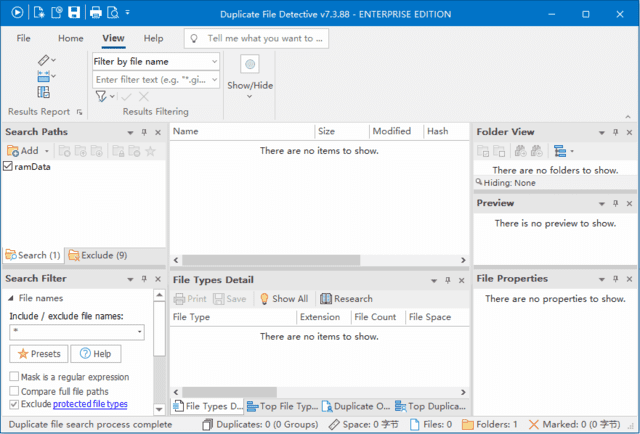
Think of Duplicate File Detective as a "duplicate detective for your hard drive"—it scans the disks or folders you pick and compares filenames, sizes and content to surface every identical or near-identical file. Then you can delete the extra copies, move them elsewhere, or replace them with symbolic links to save space. For media like music and photos, it also reads metadata such as audio tags to help spot duplicate songs and pictures.
What can you do with it? Three practical scenarios
① Find every duplicate, none missed
Filter by filename, size, modified date or attributes, and compare content with MD5, SHA256 and 15+ other hash algorithms—results are accurate. Files with different names but identical content are still caught. For music, it parses artist, album and title tags to de-duplicate songs.
② Batch delete / move / compress in one go
Once found, delete the extra copies, move them to a backup folder, or compress them into archives. The built-in SmartMark feature helps you decide which copies to keep and which to remove. You can preview files before acting, so you won't delete something important.
③ Scheduled scans, multi-platform, enterprise-grade
A built-in task scheduler scans chosen folders on a timer and generates reports. It covers local disks, network paths and even files inside ZIP archives. Windows, Mac and Linux are all supported—great for PCs, company servers and NAS devices. Results export to XML, HTML, CSV and PDF for records and audits.
Who is it best for?
It's for people whose drives are tight but who don't want to page through folders by hand—especially anyone storing large photo, music and video libraries. If you manage a NAS or a business server, you can schedule regular scans to save storage costs. And for anyone who downloads a lot and ends up with duplicate copies, batch cleanup is far less hassle.
In short
Duplicate File Detective is a professional duplicate-file cleaner with many comparison modes, batch processing and three OS platforms. If duplicates are eating your drive space, it's an efficient choice.










