


Categories
See All >
-
Solo Business Courses
-
 Others
-
Overseas Tutorials
-
Photography & Editing
-
Community & Private Domain
-
Self-Media Writing & Copywriting
-
Side Income Projects
-
E-commerce
-
Short Video & Live Streaming
-
Artificial Intelligence (AI)
-
Software & Tools
-
Operating Systems
-
Plugins & Scripts
-
MacOS Software
-
Android Software
-
Windows Software
C: Drive Cleaner csimplecleaner v0.1.2 by a 52pojie Dev [Software Hammer · R4958]
📚Video Course
🕒Last updated: 03/22/2026
🎯Premiere Pro · Featured · Software
👥Entrepreneurs / Self-media creators / Cross-border e-commerce sellers / Side-hustlers
Study material — included with membership
Unlock Course with Membership
🔓
Get this course for reference study with membership
📦
Join membership — study all 16742 courses & software tools as reference
🔄
Courses keep updating — members study new material as it arrives
Share:
Top Selling Courses
-
Game Gold-Farming Money-Making Plan: Earn 1k+ Daily, a Stable 3-Year Project Anyone Can Do in Spare Time [Revealed]
Study material — included with membership Get Membership -
Hot-game fully-automated earning: 500+ a day, no experience, simple operation - the steadiest long-term game-earning side hustle (revealed)
Study material — included with membership Get Membership -
FlyingMouse earns merit this time! Don't panic at Windows format problems — the open-source FlyingMouse format conversion tool helps, a popular GitHub gem
Study material — included with membership Get Membership -
Douyin Product-Selling Coaching Bootcamp: No On-Camera Appearance Needed, Newbies Can Produce Selling Short Videos by Following the Steps
Study material — included with membership Get Membership -
First-release game gold-farming money plan: 1K+ a day, ordinary people in spare time
Study material — included with membership Get Membership






Top Selling Software Tools
-
FlyingMouse earns merit this time! Don't panic at Windows format problems — the open-source FlyingMouse format conversion tool helps, a popular GitHub gem
Study material — included with membership Get Membership -
LuDaShi v6.1024.4105.1121 Slim Single File
Study material — included with membership Get Membership -
2D Cartoon Animation Software Moho Pro v14.3
Study material — included with membership Get Membership -
Video Editor Aiseesoft Filmai v1.0.18
Study material — included with membership Get Membership -
To-Do Microsoft To Do v2.147 Free
Study material — included with membership Get Membership -
PR/AE/DaVinci/FCPX video Plugin Nobe OmniScope Win1.11.15 / Mac1.10.138
Study material — included with membership Get Membership





[One-line recommendation]
An emergency tool for anyone with “red-C:-drive anxiety.” Built by a 52pojie expert, it's totally free, ad-free, and portable—one click frees several GB. Perfect for beginners.

[When does it help?]
- When your PC'sC: drive suddenly turns red and the system keeps popping up “low disk space” warnings that drive you crazy.
- When youdon't want to deal withcomplex settings or hunt for junk manually, and just want to free space quickly and safely.
- When youdon't trustthird-party cleaners that bundle ads, charge secretly, or might delete system files.
- When you need toquickly clear browser cache and temp files to make the PC run a bit smoother.
- When you're a hassle-averse beginner who wants an ultra-simple, brainless cleaner.
[Core features & highlights]
- Ultra-simple one-click cleaning, a beginner's blessing:
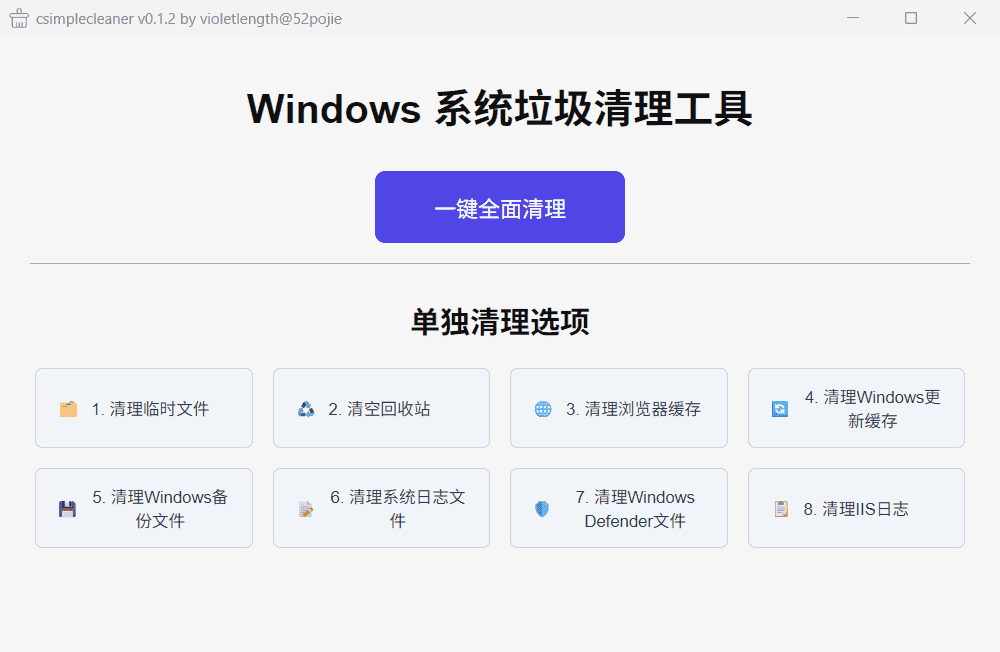
- The UI is shockingly clean and centers on one“Clean” button . Click it and itauto-scans system junk, temp files, browser cache, logs, and more, thenauto-cleans them . You barely make any choices—true one-click operation.
- Categorized cleaning, more control:
- If you know a bit more, or only want to clean certain types of junk (e.g. just browser cache, to avoid deleting other things), it also supportsselecting cleanup items individually so you can manage space more purposefully and with peace of mind.
- Totally free, from a 52pojie expert:
- Developed bya 52pojie forum expert whose motto is simply“powered by love” . The softwareis completely free, with no activation tricks and no ads , and never secretly installs anything in the background.
- , safe and reassuring:
- No installation needed—it's a single exe you unzip and run directly. Close it after use and it leaves nothing behind. Thanks to the open-source community background, everyone oversees it together, sothe risk of accidentally deleting critical system files is low , making it safer to use.
- Transparent cleaning process:
- It showsreal-time scan and cleanup progress , so you know what it's doing and won't be left staring at a frozen screen.
[Who is it suitable for?]
- Beginners with a perpetually full C: drive : need the simplest, safest solution.
- Users who hate ads and bundling : want a clean, pure software experience.
- Users who need quick space : e.g. freeing up room before installing large software or updating the system.
- Fans of 52pojie and open-source community tools : glad to try honest tools made by community experts.
[A few things to know]
- Positioning : it's alightweight tool focused on basic C: drive junk cleanup , not as feature-complete as some pro tools (no deep registry cleaning or large-file analysis). Its strengths aresimplicity, safety, and being free .
- Version & source : current version isv0.1.2 , made by a 52pojie developer and embodying the spirit of community sharing.
- Usage advice Forvery important files or data, regular backups are advised even though the app is safe. Before cleaning, in categorized mode, glance at the detected items to know what's there.
- Results: for long-accumulated temp files and cache,one cleanup often frees from a few GB to over ten GB effectively relieving C: drive pressure.
Related Courses

Study material — included with membership
Get Membership
Super-lightweight C-Drive Manager for Windows! Very distinctive: disk analysis and cleanup reminders, 2MB size, completely free

Study material — included with membership
Get Membership
Reinstall Without a USB Drive! This Tool Lets Newbies Quickly Reinstall Windows, Supports Unattended Setup, Data-Safe—CmzPrep_Rev2

Study material — included with membership
Get Membership
A GitHub speed-up tool! Open GitHub faster, auto-responding to the fastest node - a lightweight open-source tool: Ghips

Study material — included with membership
Get Membership
EasyRC: one-click Windows reinstall without USB, backup and restore included

Study material — included with membership
Get Membership
Permanently Block Windows 10/11 Updates: Huawei Tool, Avoid Frequent Win Update Problems

Study material — included with membership
Get Membership
Windows 7/10/11 System Update Blocker Is Here! Only 400KB, One-Click Disable System Updates and Restore Updates, Compact and Easy to Use

Study material — included with membership
Get Membership
Stop Deleting Files Randomly! C Drive Red Alert Savior: Deep Cleanup + System Optimization, Works on Windows/macOS!

Study material — included with membership
Get Membership
Office Fully-Automatic One-Click Deployment Installer, up to 2024, Customizable Components, Built-in Activation, All Free - Mocreak

Study material — included with membership
Get Membership
Windows System Reinstall Tool, Supports Local Image File Install and Backup, Simple to Use, Safe and Stable, Supports All Scenarios

Study material — included with membership
Get Membership
PC Acting Up? Newbie-Essential Driver Repair Tool—One-Click Update & Fix Driver Issues, It’s That Simple

China Projects — one person, one company. No team, no middlemen. Every model here is already proven in China. Join the membership, study it as reference, and launch it locally in your country.
