


-
Solo Business Courses
-
 Others
-
Overseas Tutorials
-
Photography & Editing
-
Community & Private Domain
-
Self-Media Writing & Copywriting
-
Side Income Projects
-
E-commerce
-
Short Video & Live Streaming
-
Artificial Intelligence (AI)
-
Software & Tools
-
Operating Systems
-
Plugins & Scripts
-
MacOS Software
-
Android Software
-
Windows Software
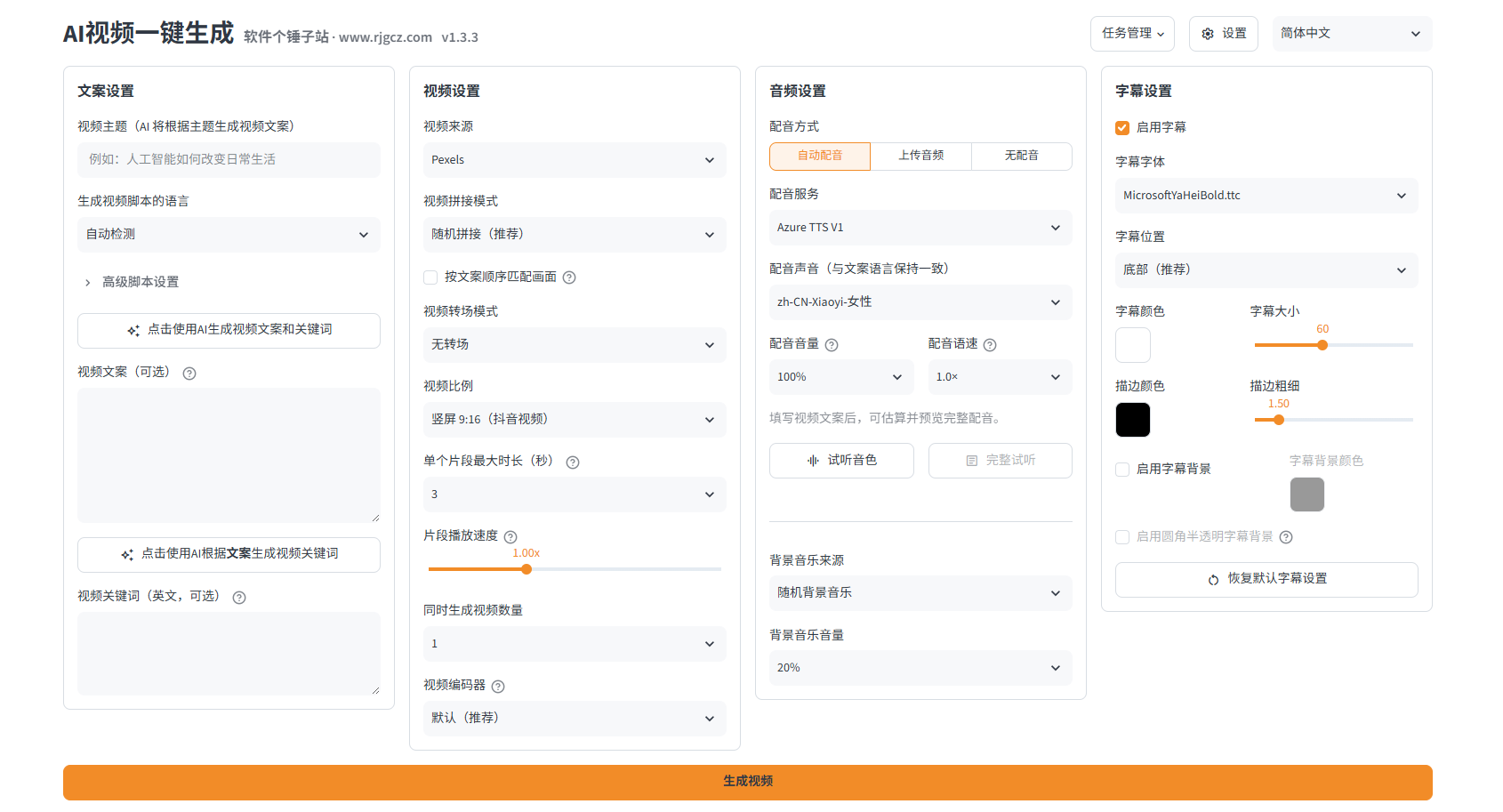
MoneyPrinterTurbo (MPT) v1.3.3 — AI Short-Video Generator
-
Game Gold-Farming Money-Making Plan: Earn 1k+ Daily, a Stable 3-Year Project Anyone Can Do in Spare Time [Revealed]
Study material — included with membership Get Membership -
Hot-game fully-automated earning: 500+ a day, no experience, simple operation - the steadiest long-term game-earning side hustle (revealed)
Study material — included with membership Get Membership -
FlyingMouse earns merit this time! Don't panic at Windows format problems — the open-source FlyingMouse format conversion tool helps, a popular GitHub gem
Study material — included with membership Get Membership -
Douyin Product-Selling Coaching Bootcamp: No On-Camera Appearance Needed, Newbies Can Produce Selling Short Videos by Following the Steps
Study material — included with membership Get Membership -
First-release game gold-farming money plan: 1K+ a day, ordinary people in spare time
Study material — included with membership Get Membership






-
FlyingMouse earns merit this time! Don't panic at Windows format problems — the open-source FlyingMouse format conversion tool helps, a popular GitHub gem
Study material — included with membership Get Membership -
LuDaShi v6.1024.4105.1121 Slim Single File
Study material — included with membership Get Membership -
2D Cartoon Animation Software Moho Pro v14.3
Study material — included with membership Get Membership -
Video Editor Aiseesoft Filmai v1.0.18
Study material — included with membership Get Membership -
To-Do Microsoft To Do v2.147 Free
Study material — included with membership Get Membership -
PR/AE/DaVinci/FCPX video Plugin Nobe OmniScope Win1.11.15 / Mac1.10.138
Study material — included with membership Get Membership





Sound familiar: you want short-video traffic, but you can't write scripts, can't find footage, and don't want to show your face. When you finally open an editor, there are too many features to learn and one video eats an afternoon. Now there's an open-source tool called MoneyPrinterTurbo that compresses the whole pipeline into one sentence: enter a topic, finish setup in 30 seconds, and get a video out in 2–3 minutes. Script, B-roll, AI voiceover, subtitles and background music are all automatic—you just click "export" at the end.
What Is MoneyPrinterTurbo?
MoneyPrinterTurbo is a free, open-source AI short-video batch generator. Enter a topic and it automatically writes the script, matches HD footage, adds AI voiceover, bakes in subtitles and exports the video.
In short: type the topic, get the video out—no editing software, no on-camera appearances.

It fits these scenarios
- 🎬 Knowledge-talk channels: turn trivia and explainers into videos fast, in bulk.
- 💼 Workplace skill tutorials: Excel tips, PowerPoint tricks, productivity tools.
- 📚 Book / growth accounts: turn article ideas into short-video traffic magnets in one tap.
- 🏢 Matrix-account studios: batch-produce differentiated content for many accounts at near-zero cost.
- 🎓 Students / self-learners: course demos, contest videos, side-hustle trial runs.
5 Core Features
📝 1. AI script generation
A large model writes the voiceover script—hooked, paced, built for the golden opening 3 seconds of short video.
Example: type "10 surprising facts about cats" in the topic box and click generate
🎬 2. Smart HD footage matching
Pulls HD B-roll from free libraries like Pexels and Pixabay, matched sentence by sentence to the script.
Example: no manual footage picking—the app matches visuals to each line
🎙️ 3. Human-grade AI voiceover
A built-in free Edge TTS engine with many Chinese voices—a natural narration without opening your mouth.
Example: pick the voice "Xiaoxiao" in settings for a soft female narration
✅ 4. Auto-aligned subtitles
Recognizes speech to generate subtitles, aligned line by line; font and position adjust in one tap.
Example: tick "auto-generate subtitles" and pick a subtitle style
🎞️ 5. One-click render & export
Auto-composites video + audio + subtitles + background music and exports a 1080P vertical video.
Example: click "generate video", wait 2–3 minutes, and the file lands in the output folder
Real-World Test: 3 Scenarios
To verify real results, I tested three topics from completely different fields:
| Scenario | Topic entered | Result & verdict | Time / rating |
|---|---|---|---|
| Knowledge-talk channel | 10 surprising facts about cats | AI wrote a full script with a suspenseful opening, matched cat B-roll line by line with text overlays, tight pacing. Voiceover was a warm, informed female tone—not like AI at all. Verdict: publish-ready. | 2:47 ★★★★★ |
| Workplace skills channel | 3 Excel tricks every professional must know | The script broke down 3 Excel tips clearly; each segment paired with composited UI footage, feeling close to a real tutorial. Verdict: good for knowledge-product lead-gen, though UI details need a manual check. | 3:12 ★★★★☆ |
| Personal growth channel | People earning $700 and $7,000 a month differ in these 5 habits | A clear logical arc from time management to mindset, building layer by layer; upbeat background music auto-paired. Verdict: perfect for book/growth content—publish directly. | 2:58 ★★★★★ |
Tutorial: Generate Your First Video, 0 to 1
Step 1: Download and unzip
Grab the latest build from the MoneyPrinterTurbo GitHub Releases page and unzip to an all-English path, e.g. D:\mpt\. Don't put it on the desktop or in a Chinese-named folder—this avoids startup errors.
Step 2: Start the service
Double-click start.bat in the unzipped folder. A black console window opens and the browser UI launches automatically. Note: this black window means the app is running—do not close it.
Step 3: Configure API keys
On the settings page, fill in two keys: the LLM API key (DeepSeek / Kimi / Qwen supported) and the footage-library API key (free registration at Pexels / Pixabay). The app has a built-in visual guide; registration takes under 5 minutes.
Step 4: Enter a topic and start
Type your video topic in the home box (under 30 seconds), pick the voice, subtitle style and aspect ratio (vertical 9:16 recommended), and click "generate video". The app automatically writes the script, matches footage, adds voiceover and subtitles, and composites everything.
Step 5: Export and publish
When done, find the finished video in the output folder, preview it, then upload to Douyin, Xiaohongshu, WeChat Channels and more. Batch topics are supported for a production line.
💡 Tip: on the first run, try one simple topic to confirm the script style and voice feel right, then batch-produce via the API. With scripts, you can turn out 50+ videos per hour.
Compared: MoneyPrinterTurbo vs CapCut vs HeyGen
| Dimension | MoneyPrinterTurbo | CapCut | HeyGen |
|---|---|---|---|
| Install | Local deployment | Local install | Cloud service |
| Cost | Open-source, free | Free + paid assets | Pay per use |
| Automation | Fully auto | Manual editing | Digital-avatar videos |
| Learning curve | Very low—ready in 30 seconds | Medium—learn to edit | Low |
FAQ
Q1: Can I use MoneyPrinterTurbo right away?
Yes. The project is free and open-source—download, configure the API keys per the tutorial, and use it. No feature gating, no cracking.
Q2: What PC specs do I need?
Because it calls APIs locally, requirements are modest. Windows 10/11 with 4 GB RAM runs it smoothly; 10 GB free disk is plenty.
Q3: Are the videos copyright-safe?
Scripts come from the LLM, footage from free libraries, voiceover from Microsoft TTS—the resulting videos are yours to publish commercially, with no platform watermark and no forced end card.
Q4: I don't code—can I set it up?
Yes. No coding required—double-click start.bat and fill in the API keys in the browser. If you hit issues, check the project Wiki or tutorial videos on Bilibili.
Q5: Does it support batch generation?
Yes. Two ways: (1) enter several topics at once in the UI; (2) call the project's API with scripts for batch production—perfect for matrix-account studios.
Verdict: Is MoneyPrinterTurbo Worth It?
MoneyPrinterTurbo solves one core problem: "the short-video pipeline is too heavy". It merges scripting, sourcing, voiceover, subtitles and export into a single click, so creators focus on just one thing—picking topics. It suits knowledge-talk hosts, workplace-skill creators, book-account operators and matrix studios, plus ordinary people testing a low-cost short-video side hustle. Start with simple topics, run the flow, then batch-produce via the API: type a topic in 30 seconds, get a video in 2–3 minutes, and the per-video cost is nearly negligible.
🚀 Open MoneyPrinterTurbo now, enter your first topic, and start your video production line in 30 seconds!
Related Courses

Super local toolbox! Built-in screen recording, audio/video cutting & merging, video compression & extraction, forever free - Kedou Video Converter

100% perfect free tool! One-stop multi-function PDF software: PDF convert, compress, edit etc., minimal, no ads, so nice - JOPDF

Open-Source Desktop Remote Tool, Beats Paid Versions! Free for Personal and Commercial Use Unlimited, Cross-Platform, HopToDesk Remote Control

Latest K-12 Textbook Downloader: Whole-Grade Resource Download, Courseware, Video, Audio in One Click

HuyanBao: free blue-light eye-care app with pet break reminders

Windows Can Have a Desktop Dynamic Island Too! A Modern System Control Center — Give Your PC a Black Notch, PyIsland

3D Simulated Comic Drama Production: Seedance2.0 Full-Process Practical Course - From Zero to One High-Quality Comic Drama Creation

Win/Mac Dual Support! Latest Permanent Lifetime Version, Supports Old Photo Restoration, Image Sharpening and Lossless Upscaling Tool, Aiarty Image Enhancer

Online Video Course: Github Open-Source Bilibili Video Download Tool! Supports 8K and Dolby Vision Bilibili Video Batch Download Tool, Easy to Use Bilidown


