


-
Solo Business Courses
-
 Others
-
Overseas Tutorials
-
Photography & Editing
-
Community & Private Domain
-
Self-Media Writing & Copywriting
-
Side Income Projects
-
E-commerce
-
Short Video & Live Streaming
-
Artificial Intelligence (AI)
-
Software & Tools
-
Operating Systems
-
Plugins & Scripts
-
MacOS Software
-
Android Software
-
Windows Software
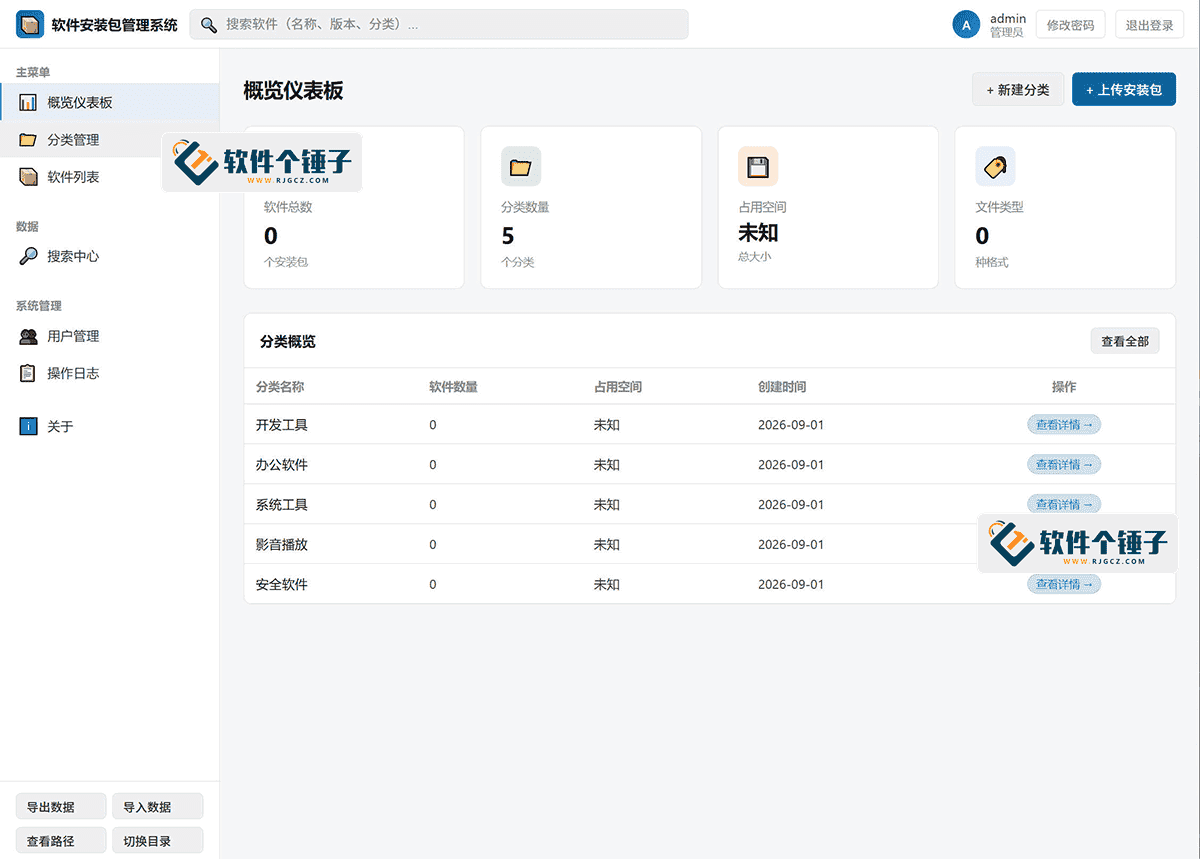
Software Installer Package Management System v3.0 — Supports LAN Upload and Download
-
Game Gold-Farming Money-Making Plan: Earn 1k+ Daily, a Stable 3-Year Project Anyone Can Do in Spare Time [Revealed]
Study material — included with membership Get Membership -
Hot-game fully-automated earning: 500+ a day, no experience, simple operation - the steadiest long-term game-earning side hustle (revealed)
Study material — included with membership Get Membership -
FlyingMouse earns merit this time! Don't panic at Windows format problems — the open-source FlyingMouse format conversion tool helps, a popular GitHub gem
Study material — included with membership Get Membership -
Douyin Product-Selling Coaching Bootcamp: No On-Camera Appearance Needed, Newbies Can Produce Selling Short Videos by Following the Steps
Study material — included with membership Get Membership -
First-release game gold-farming money plan: 1K+ a day, ordinary people in spare time
Study material — included with membership Get Membership






-
FlyingMouse earns merit this time! Don't panic at Windows format problems — the open-source FlyingMouse format conversion tool helps, a popular GitHub gem
Study material — included with membership Get Membership -
LuDaShi v6.1024.4105.1121 Slim Single File
Study material — included with membership Get Membership -
2D Cartoon Animation Software Moho Pro v14.3
Study material — included with membership Get Membership -
Video Editor Aiseesoft Filmai v1.0.18
Study material — included with membership Get Membership -
To-Do Microsoft To Do v2.147 Free
Study material — included with membership Get Membership -
PR/AE/DaVinci/FCPX video Plugin Nobe OmniScope Win1.11.15 / Mac1.10.138
Study material — included with membership Get Membership





Software Installer Package Management System Download
Complete tutorial for building a LAN software repository
🌐 LAN sharing
🔒 Permissions
—
What Is the Software Installer Package Management System? A Complete Breakdown of the LAN Software Repository Tool
The Software Installer Package Management System is a web management tool for sharing software installer packages within a LAN. In short, it's the "software repository butler" for IT operations staff—it organizes installer packages scattered across hard drives into a standardized, shareable resource library. Every computer on the LAN can browse and download them by opening a browser, completely eliminating the hassle of copying back and forth with USB drives.
Overview of Use Cases for the Software Installer Package Management System
- Cross-desk sharing in the office — colleagues can temporarily retrieve installer packages without USB copying, downloading directly through the browser.
- Batch deployment in computer labs — administrators centrally manage software resources, and student machines can install software in bulk to improve efficiency.
- Temporary LAN setup — when a laptop shares a phone hotspot, quickly set up a temporary software repository for devices to use.
- IT operations installation management — operations staff manage commonly used software installer packages, and new machines can quickly obtain the needed software during setup.
- Enterprise software asset management — paired with NAS storage, build a long-term software resource pool and standardize software asset management.
Software Installer Package Management System vs. Similar Tools
| Comparison Dimension | Software Installer Package Management System | Windows Shared Folder | Private Cloud Drive |
|---|---|---|---|
| Core focus | Installer management | General file sharing | General file management |
| Installer recognition | ⭐⭐⭐⭐⭐ auto info | ⭐ file management only | ⭐ file management only |
| Access control | ⭐⭐⭐⭐⭐ roles + audit logs | ⭐ basic permissions | ⭐⭐⭐ config-dependent |
| Deploy difficulty | ⭐⭐⭐⭐⭐ single EXE, ready | ⭐⭐⭐⭐ simple, weak rights | ⭐ needs DB/web setup |
| Client requirement | ⭐⭐⭐⭐⭐ browser only | ⭐⭐⭐⭐ sharing must be on | ⭐⭐⭐ browser or app |
—
5 Core Features Explained
1️⃣ Categories & batch scan-import
Create software categories (dev tools, office apps, system tools) and batch-scan folders to import EXE, MSI, ZIP, APK and 10+ formats; already-imported files are skipped. Flow: Categories → New category → Batch scan → Import
2️⃣ LAN web sharing
Launching the EXE starts an HTTP service on port 5823, auto-detecting your LAN IP. Other devices visit in a browser—even old IE. No client install. Flow: Start → browse http://IP:5823 → download
3️⃣ Multi-role permissions
Three built-in roles: admin (full rights), client admin (web management), regular user (browse and download only). MD5-encrypted storage and 7-day login-free sessions. Flow: Users → New user → Pick role → Set password
4️⃣ Operation audit logs
Auto-records logins, downloads, uploads and deletions—time, username and IP, up to 2000 entries. Who accessed and downloaded is on record. Flow: Logs → View → filter by user/time → export audit report
5️⃣ Software info & data management
Auto-reads package names and sizes; edit name, version and notes manually. JSON import/export and storage-folder switching make migration painless. Flow: Software list → Edit info → change name/version → save notes
—
Real-World Test: 3 Ops Scenarios

| Scenario | Input → Result | Time | Verdict |
|---|---|---|---|
| Case 1 Computer-lab bulk install |
Input: 50 common installers, 60 student PCs Output: a categorized repository, browser downloads |
Setup 10 min Deploy 5 min/PC |
No more USB shuffling |
| Case 2 Office resource sharing |
Input: 100+ installers, 30-person office Output: categorized library, role access, logs |
Setup 5 min Batch import 3 min |
Great permission control |
| Case 3 Temporary LAN test |
Input: laptop + phone hotspot, 20 GB installers Output: temporary repo, accessible on LAN devices |
Setup 2 min Start and go |
Single EXE, ready |
—
Tutorial: From Setup to LAN Sharing
Step 1: Get the Package Manager
Download the latest build, unzip to a local folder—no database or web environment needed—run the main program.
Step 2: Start the LAN web service
Double-click the main program. It auto-detects your LAN IP and starts HTTP on port 5823. The UI shows the address as http://IP:5823.
Step 3: Create categories and batch-import
Open the admin in a browser, click Categories to create software groups, then Batch scan-import to pick a local folder—the system auto-detects EXE, MSI, ZIP and more.
Step 4: Set permissions (optional)
To control access, click Users to create users and assign roles. Admins can set client admins or regular users—regular users can only browse and download, not edit or delete.
Step 5: Access from LAN devices
Other PCs or devices on the same LAN open a browser to http://server-IP:5823, browse categories and download installers—no client software.
—
Package Manager vs Windows Share vs Private Cloud: Choosing
| Dimension | Package Manager | Windows Share | Private Cloud |
|---|---|---|---|
| Team size | Small-mid teams, IT ops | Small teams, temporary | Mid-large enterprises |
| Access control | Roles + audit logs | Basic read/write | Fine-grained rights |
| Deploy complexity | Single EXE, zero config | Built-in, simple | Needs DB/web |
| Recommendation | ⭐⭐⭐⭐⭐ top pick for IT ops | ⭐⭐⭐ temporary use | ⭐⭐⭐ enterprise use |
—
FAQ
—
Summary: Is It For You?
The Software Package Manager is a practical IT-ops tool—especially for frequent installs, managing installers, or building a shared LAN repository. The single-EXE design makes deployment simpler than ever, while permissions and logs meet enterprise audit needs. If you're tired of hunting for installers in a drive full of files—or the USB shuffle—give it a try.
Related Courses

Super local toolbox! Built-in screen recording, audio/video cutting & merging, video compression & extraction, forever free - Kedou Video Converter

100% perfect free tool! One-stop multi-function PDF software: PDF convert, compress, edit etc., minimal, no ads, so nice - JOPDF

Open-Source Desktop Remote Tool, Beats Paid Versions! Free for Personal and Commercial Use Unlimited, Cross-Platform, HopToDesk Remote Control

Latest K-12 Textbook Downloader: Whole-Grade Resource Download, Courseware, Video, Audio in One Click

HuyanBao: free blue-light eye-care app with pet break reminders

Windows Can Have a Desktop Dynamic Island Too! A Modern System Control Center — Give Your PC a Black Notch, PyIsland

3D Simulated Comic Drama Production: Seedance2.0 Full-Process Practical Course - From Zero to One High-Quality Comic Drama Creation

Win/Mac Dual Support! Latest Permanent Lifetime Version, Supports Old Photo Restoration, Image Sharpening and Lossless Upscaling Tool, Aiarty Image Enhancer

Online Video Course: Github Open-Source Bilibili Video Download Tool! Supports 8K and Dolby Vision Bilibili Video Batch Download Tool, Easy to Use Bilidown


