
















Screen Mirroring — Sound Familiar?
You want a phone video on the TV, but the TV demands an app and the phone hides the feature—after a struggle you finally connect, only to get a blurry, choppy slide-show. Want to cast a web page or use a PC? Forget it.
There's a mirroring tool that needs nothing on the TV—open the phone and it finds your TV. Four cast modes, up to 2K at 60fps; smart TVs and plain displays alike.
What Is It?
PigeonCast is a "universal casting remote." Mirror your phone screen to the TV, beam local photos and videos to the big screen, cast web pages, even cast to a non-smart TV through its browser. Up to 2K at 60fps—sharp and smooth. Nothing to install on the TV; the phone finds and connects automatically.
What Problems Does It Solve?
① Nothing on the TV—just open and connect
Install the app on your phone only; the TV needs no setup. Auto-detects Google Cast and other protocols and finds your TV. Easy for grandparents and kids—no more hunting through TV menus.
② Four cast modes for every scene
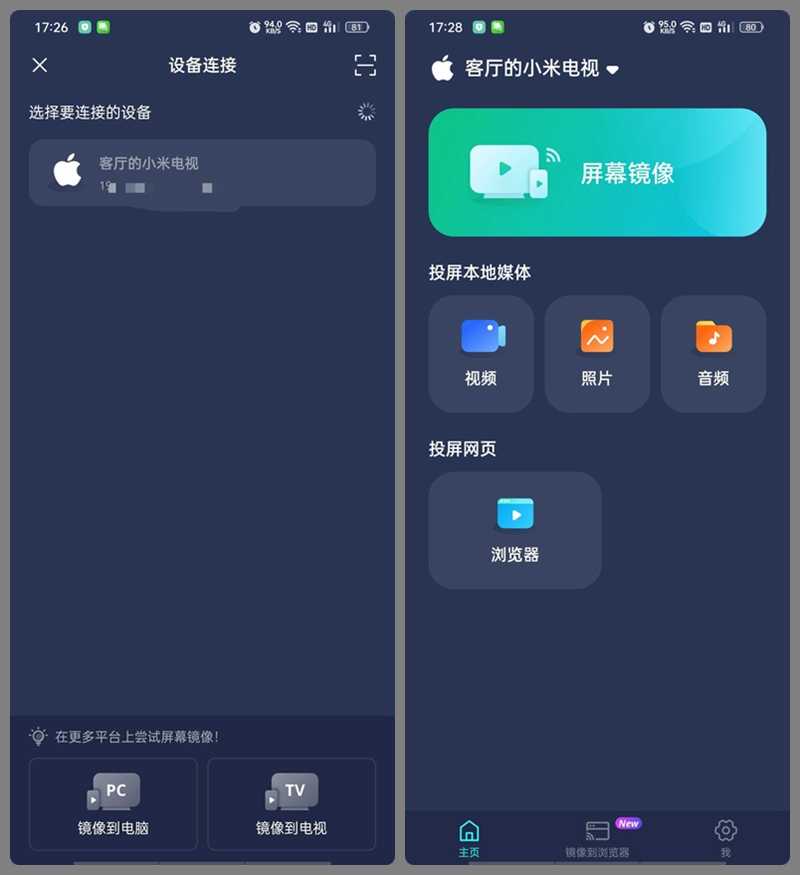
Screen mirroring for shows and games; local-media cast for family photo browsing; built-in browser casting for web video and slides without switching apps; and cast to PCs and projectors through a browser.
③ 2K at 60fps, sharp and smooth
Up to 2K resolution and 60fps—manual or auto. Older TVs stay sharp, fast motion has no smear or stutter. Toggle sound independently so late-night casting doesn't wake the family.
④ Multiple connections, any network
Beyond Wi-Fi auto-discovery, cast-code and QR pairing work across networks. The device list separates "mirror to PC" and "mirror to TV" entries for quick switching. Non-smart TVs cast via a browser URL.
Who Is It For?
Anyone casting phone shows and games to the TV. Elderly family who find TV remotes confusing and just want phone casting. Professionals casting demos and slides. Even owners of non-smart TVs or projectors, via browser casting. Simple, zero learning curve.
Requirements
Android 7.0+. No TV-side install—auto-adapts to Google Cast and other protocols. Up to 2K at 60fps. Wi-Fi auto, cast-code and QR connections. Package about 35.7 MB, light on storage.
In Short
PigeonCast is a practical mirroring tool—zero TV install, four modes, sharp and smooth—covering everyday casting. If you're done with clunky, choppy casting, give it a try.










