


-
Solo Business Courses
-
 Others
-
Overseas Tutorials
-
Photography & Editing
-
Community & Private Domain
-
Self-Media Writing & Copywriting
-
Side Income Projects
-
E-commerce
-
Short Video & Live Streaming
-
Artificial Intelligence (AI)
-
Software & Tools
-
Operating Systems
-
Plugins & Scripts
-
MacOS Software
-
Android Software
-
Windows Software
HelpU Toolbox v1.0.15 — The All-in-One Toolkit for Creators (Video Download, Script Extraction, Emotional AI Voiceover)
-
Game Gold-Farming Money-Making Plan: Earn 1k+ Daily, a Stable 3-Year Project Anyone Can Do in Spare Time [Revealed]
Study material — included with membership Get Membership -
Hot-game fully-automated earning: 500+ a day, no experience, simple operation - the steadiest long-term game-earning side hustle (revealed)
Study material — included with membership Get Membership -
FlyingMouse earns merit this time! Don't panic at Windows format problems — the open-source FlyingMouse format conversion tool helps, a popular GitHub gem
Study material — included with membership Get Membership -
Douyin Product-Selling Coaching Bootcamp: No On-Camera Appearance Needed, Newbies Can Produce Selling Short Videos by Following the Steps
Study material — included with membership Get Membership -
First-release game gold-farming money plan: 1K+ a day, ordinary people in spare time
Study material — included with membership Get Membership






-
FlyingMouse earns merit this time! Don't panic at Windows format problems — the open-source FlyingMouse format conversion tool helps, a popular GitHub gem
Study material — included with membership Get Membership -
LuDaShi v6.1024.4105.1121 Slim Single File
Study material — included with membership Get Membership -
2D Cartoon Animation Software Moho Pro v14.3
Study material — included with membership Get Membership -
Video Editor Aiseesoft Filmai v1.0.18
Study material — included with membership Get Membership -
To-Do Microsoft To Do v2.147 Free
Study material — included with membership Get Membership -
PR/AE/DaVinci/FCPX video Plugin Nobe OmniScope Win1.11.15 / Mac1.10.138
Study material — included with membership Get Membership





Short-video creators keep hitting the same walls: a reference clip you want carries a watermark and won’t save; the voiceover in a video has to be transcribed word by word by hand; once your script is written, you still can’t find a good-sounding AI voiceover tool, and end up paying for one. If you want an all-in-one creator toolkit — no-watermark video/image downloads, AI script extraction, one-tap emotional voiceover — HelpU Toolbox may be exactly what you need. Built for Android, it bundles three daily workflows — saving material, extracting subtitles, AI voiceover — into one free app. This HelpU Toolbox guide walks through its core features, real performance and setup steps.
\What is HelpU Toolbox?
\HelpU Toolbox is an Android all-in-one creator app: no-watermark downloading of videos and images from Douyin, Kuaishou and Xiaohongshu; AI script extraction; and powerful emotional AI voiceover powered by Microsoft neural voices.
\In short: a short-video workstation that combines material gathering, script extraction and AI voiceover — no more jumping between apps.
\Who it’s for
\- \
- 📥 Gathering material: save the original file of a great video or image post — copy the link, download without watermark in one tap. \
- 📝 Quoting scripts: when you find an explainery or educational short, transcribe its speech to text automatically and lift the best lines. \
- 🎙️ AI voiceover: after writing your script, pick an emotional voice, paste the text, and generate voiceover in one tap — MP3/WAV export. \
- ✍️ Rewriting: after recognition, it auto-generates 3 rewritten versions for quick script reference. \
- 🎬 Full pipeline: from downloading material to extracting scripts to rendering voiceover — the whole creation chain. \
Quick comparison
\| Criterion | \HelpU Toolbox | \Single-purpose apps | \Web tools | \
|---|---|---|---|
| Integration | \Download + script extraction + voiceover, unified | \One feature each — install many apps | \Scattered, ad-heavy UI | \
| Platforms | \Douyin + Kuaishou + Xiaohongshu | \Partial | \Limited | \
| Voiceover quality | \Microsoft neural voices, adjustable emotion | \Hit or miss | \Mostly robotic | \
| Rewriting | \Built-in, 10 uses/day | \None | \Paid | \
5 core features
\📥 1. No-watermark video download
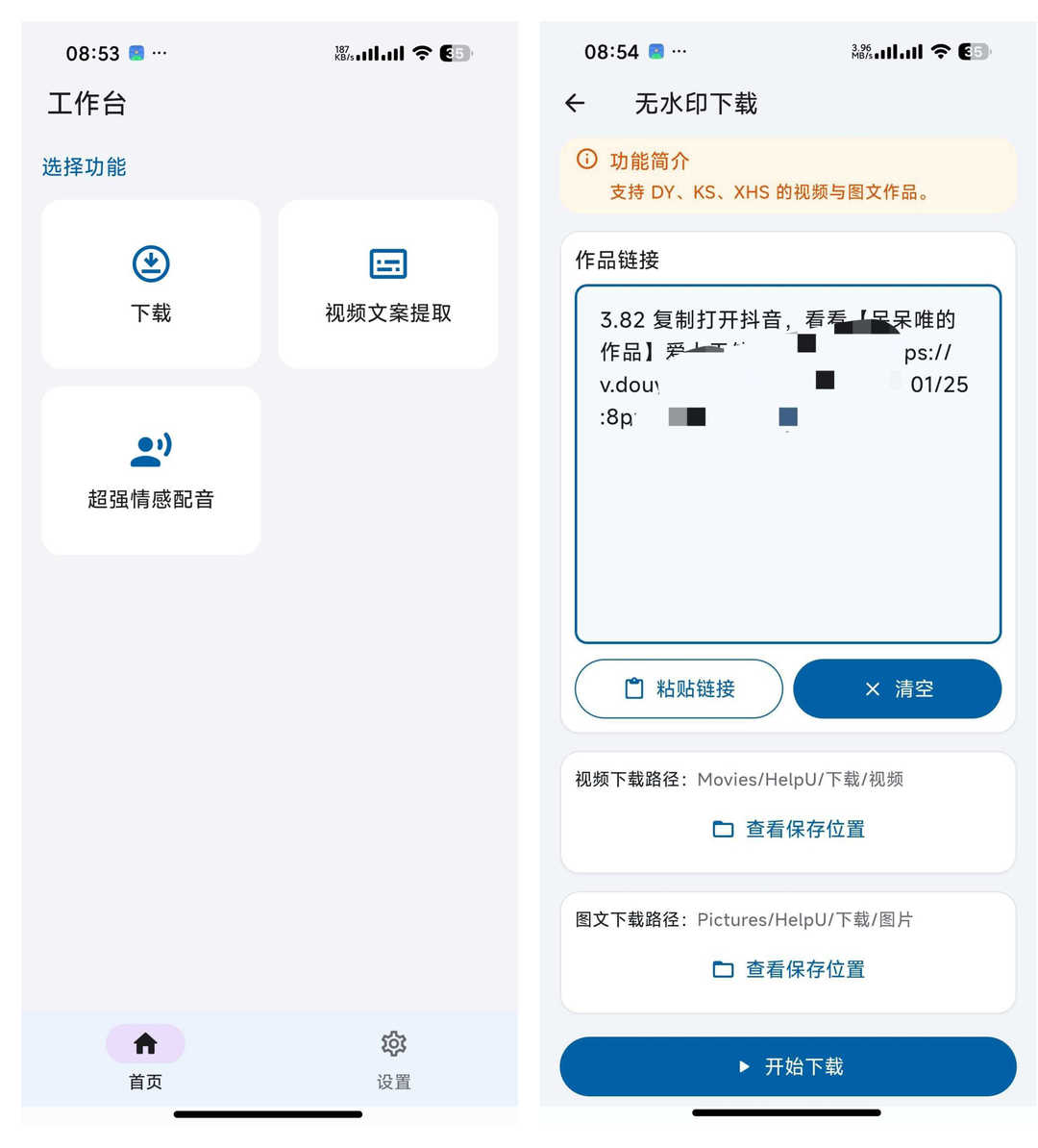
\Download videos and image posts from Douyin, Kuaishou and Xiaohongshu. Copy the post link, paste it into the box, tap download, and you get the original file — no watermark.
\Example: copy a Douyin link → open HelpU → paste → tap download → watermark-free video saved locally
📝 2. Video script extraction
\Paste a video link, pick the AI engine, and transcribe the speech to text in one tap. Edit the recognized text directly, copy it, or use it as script reference — no more manual typing.
\Example: copy link → open script extraction → paste → AI transcribes → copy the text
🎙️ 3. Powerful emotional AI voiceover
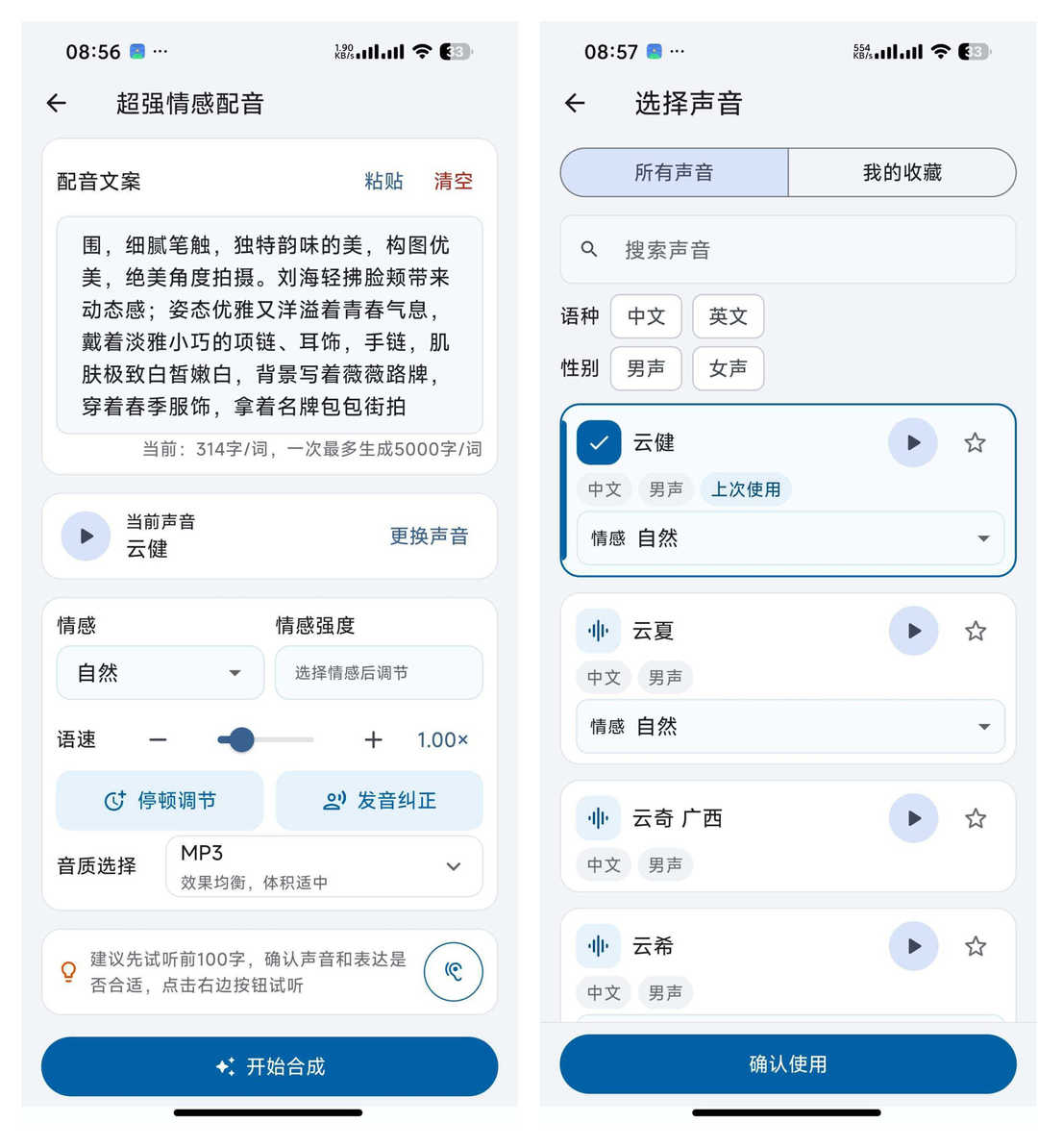
\Powered by Microsoft neural voices, with a voice library that stays in sync with the official one. Chinese and English, male and female voices, plus regional accents. Adjust emotion strength, speech rate, pauses and pronunciation.
\Example: paste text (up to 5,000 chars) → pick voice & emotion → tune rate & strength → generate & export
✍️ 4. Script rewriting
\After extraction, a rewrite feature gives you 10 uses a day and auto-generates 3 different versions to help polish your script.
\Example: extract script → tap rewrite → get 3 versions → pick the best
🎬 5. Multi-format export
\Export audio as MP3 or WAV, SRT subtitles, or even render a finished video with the voiceover baked in — covering the full short-video pipeline.
\Example: voiceover ready → pick format (MP3/WAV/SRT) → export → save locally
Real-world test: 3 scenarios
\

Three cases below cover material gathering, script creation and voiceover — all recorded from real use.
\| Scenario | \Steps | \Result & review | \Time saved | \
|---|---|---|---|
| Gathering a Douyin clip | \found a great short → copy link → open HelpU → paste → download → watermark-free clip saved | \Stable download, complete clip, no watermark. Previously web tools always left one; now clean material in one step. | \~90% faster | \
| Extracting a knowledge-video script | \found an explainer → copy link → script extraction → AI transcribes → rewrite to 3 versions → copy | \High accuracy, good rewrite quality. No more typing subtitles by hand — quoting great lines is twice as fast. | \~80% faster | \
| Making an emotional voiceover | \script ready → paste 3,000 chars → pick emotional voice → tune rate & strength → export MP3 | \Microsoft voices sound natural, rich emotion modes, clear export. Better than the paid tool I used before — and completely free. | \~70% cost saved | \
💡 Pro tip: before voiceover, run the script through rewrite to get 3 versions, then feed the smoothest one to the voice engine — the result sounds better. Use the pause control too: well-placed pauses make the narration feel natural.
\HelpU Toolbox tutorial: your first work in 5 steps
\Step 1: download & install
\Get HelpU Toolbox v1.0.15 from our tool hub, install on Android, and open it. First launch shows a clean workspace with Home and Settings — the three core features are right there.
\Step 2: download material without watermark
\On the video you want, tap Share and copy the link. Open HelpU, choose the platform in the download module (Douyin/Kuaishou/Xiaohongshu), paste, and tap download. Find the result in your gallery or file manager.
\Step 3: extract the script
\Open “Video Script Extraction”, paste the link, pick the AI engine, and tap Start. Edit the text afterwards, or tap rewrite for 3 optimized versions.
\Step 4: make the AI voiceover
\Open “Emotional Voiceover”, paste the script (up to 5,000 chars per run). Pick a voice (Chinese/English, male/female, accents), tune emotion and speed, and tap Generate.
\Step 5: export & use
\Once generated, pick the export format (MP3/WAV/SRT) and confirm. Use the audio locally, or render it into a finished video with voiceover baked in.
\HelpU vs. single-purpose apps vs. web tools
\| Dimension | \HelpU Toolbox | \Single-purpose apps | \Web tools | \
|---|---|---|---|
| Integration | \Download + script + voiceover in one | \Single feature | \Scattered | \
| UI experience | \Clean, no ads | \Simple but clean | \Ads and pop-ups | \
| AI voiceover | \Microsoft neural voices, adjustable emotion | \Hit or miss, often paid | \Robotic tones | \
| Cost | \All features free | \Partly free, partly paid | \Many paywalls | \
FAQ
\Q1: Is HelpU ready to use? Does it need internet?
\Yes. Install and the basics work. Video download, script extraction and AI voiceover require a network connection; generated media files save locally automatically.
\Q2: Which platforms can I download from?
\Douyin, Kuaishou and Xiaohongshu — videos and image posts. Copy the link, paste it into the matching box, and download the original file without watermark.
\Q3: How much text can the AI voiceover take?
\Up to 5,000 characters per run — enough for long scripts. Chinese and English, male and female voices, plus regional accents.
\Q4: Is there a daily limit on rewriting?
\10 rewrites per day; each produces 3 different versions. That’s plenty for regular creation — just pick the best version.
\Q5: What if I’m not sure how to use it?
\The 5-step tutorial above covers everything from install to export. The UI is simple, with the three core features on the home screen — start with video download.
\Bottom line: is HelpU worth it?
\HelpU solves three daily pains: watermarked downloads, manually transcribed scripts, and paid voiceover tools. No-watermark downloads give you clean material; AI script extraction kills the manual typing; Microsoft emotional voiceover gives you high-quality audio for free — plus rewriting and multi-format export. If you’re tired of switching between apps and paying for voiceover, this all-in-one creator toolkit is worth a try. Install it today — next time you make a short, you’ll find one app is all you need.
\👍 Get HelpU Toolbox now and double your creation speed!
\Related Courses

Super local toolbox! Built-in screen recording, audio/video cutting & merging, video compression & extraction, forever free - Kedou Video Converter

100% perfect free tool! One-stop multi-function PDF software: PDF convert, compress, edit etc., minimal, no ads, so nice - JOPDF

Open-Source Desktop Remote Tool, Beats Paid Versions! Free for Personal and Commercial Use Unlimited, Cross-Platform, HopToDesk Remote Control

Latest K-12 Textbook Downloader: Whole-Grade Resource Download, Courseware, Video, Audio in One Click

HuyanBao: free blue-light eye-care app with pet break reminders

Windows Can Have a Desktop Dynamic Island Too! A Modern System Control Center — Give Your PC a Black Notch, PyIsland

3D Simulated Comic Drama Production: Seedance2.0 Full-Process Practical Course - From Zero to One High-Quality Comic Drama Creation

Win/Mac Dual Support! Latest Permanent Lifetime Version, Supports Old Photo Restoration, Image Sharpening and Lossless Upscaling Tool, Aiarty Image Enhancer

Online Video Course: Github Open-Source Bilibili Video Download Tool! Supports 8K and Dolby Vision Bilibili Video Batch Download Tool, Easy to Use Bilidown


