
















Want to make mouse use more fun? Have you hit these issues?
Your desktop feels flat, but adding effects seems too complex or performance-heavy. Online or presenting, the cursor is too small for viewers to follow. You want click feedback to confirm a hit, but the system hint isn't noticeable.
There's a mouse-effects tool that adds trails and click animations. Moving the mouse draws silky light trails; clicking triggers ripples or fireworks. Sliders tune every parameter, it imports third-party packs, and it's light on resources.
What exactly is this tool?
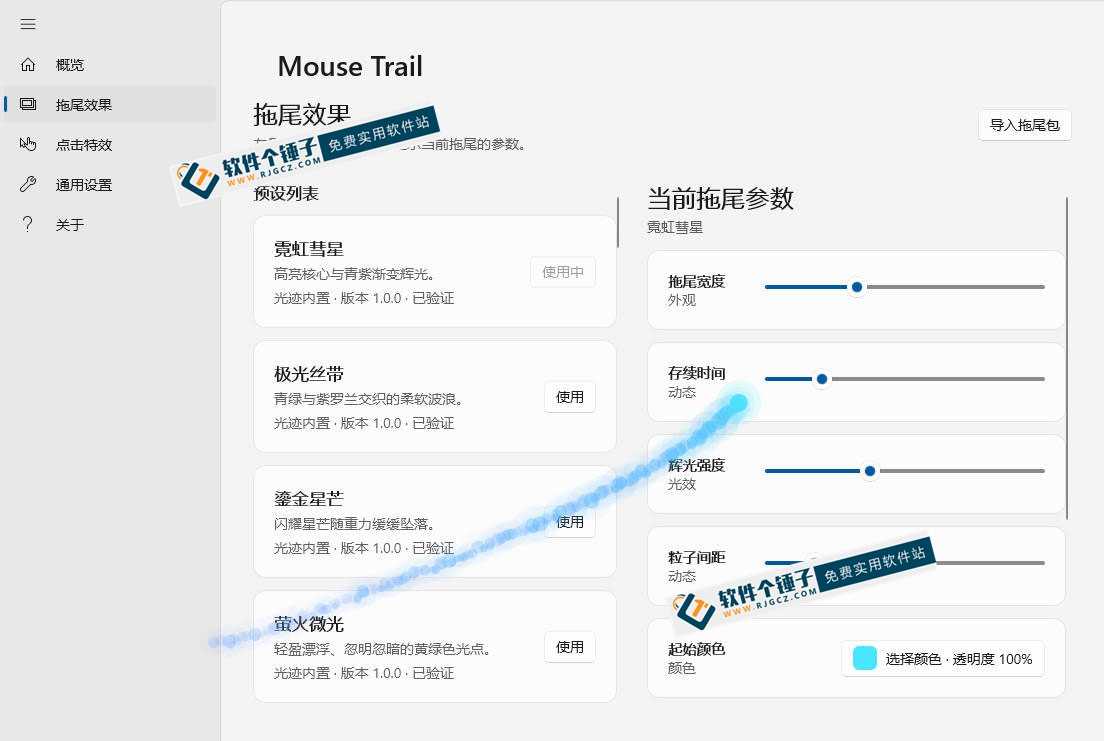
Mouse TrailThink of it as a “magic FX artist for your mouse.” It adds neon-comet, aurora-ribbon, and gilded-star trails that draw colored light paths as you move. Clicking triggers ripples, energy blasts, and fireworks—left, right, and middle buttons can each trigger different effects. Sliders tune color, size, and speed, and you can import third-party packs. It runs quietly in the background, uses few resources, and supports high-refresh displays.
What problems does it solve?
① Many trails: light paths as you slide
Built-in presets include neon-comet, aurora-ribbon, gilded-star, and firefly glow. Moving the mouse draws silky trails and lively particles that feel great. Independently adjust trail width, duration, glow strength, particle spacing, and color—switch between dreamy and cool styles freely.
② Click feedback: a ritual every tap
Click animations include ripples, energy blasts, starbursts, and fireworks. Left, right, and middle clicks each trigger feedback—no more second-guessing your taps. Radius, duration, and glow are all customizable.
③ Sliders: beginners get custom effects
A Chinese UI where all parameters are sliders. A full-spectrum color picker sets color and opacity; particle count, speed, and glow are all adjustable. No config files or coding needed—beginners can dial in a look they love.
④ Third-party effect expansion
Imports .trailfx trail packs and .clickfx click packs. Import creative effects from the web and swap built-in styles whenever you get bored. Highly replayable, with independent on/off switches and settings for trails and clicks.
④ Excellent performance, stable on high-refresh displays
Supports boot-start and a frame-rate cap up to 144 FPS. Works with multi-monitor and high-DPI setups. It quietly sits in the tray, light on resources. Online or presenting, it makes the cursor path more visible to viewers.
Who is this for?
It suits desktop-customization fans who want more fun with the mouse. Teachers and streamers presenting online need a more visible cursor. Anyone curious about custom effects will enjoy it. The Chinese slider UI is simple—no tech background required.
What are the requirements?
Windows. Multiple trail and click effects. Chinese UI with sliders. Third-party pack import. Boot-start and frame-rate cap up to 144 FPS. Multi-monitor and high-DPI support. Light, quiet background use. Independent controls for trails and clicks.
In short
Mouse Trail is a fun mouse-effects tool with rich trails and clicks, flexible tuning, low resource use, and third-party pack support. If you want more fun or a more visible cursor when presenting, give it a try.










