
















Have you run into these annoyances on Windows?
You want to check real-time network speed, but the built-in Task Manager buries it too deep. Third-party overlay widgets look ugly, feel clunky, and always block the screen. To skip a song you have to switch back to the player window, which is a mess mid-game. System notifications pile up in the bottom-right corner looking dated and getting in the way.
There's actually a little dynamic monitoring tool for Windows with an Apple-style capsule design that docks in the corner of the taskbar. Network speed, hardware load, music control and notification aggregation are all handled in one small window. Minimal, polished, space-saving, open source, free, and ad-free.
What exactly is this tool?
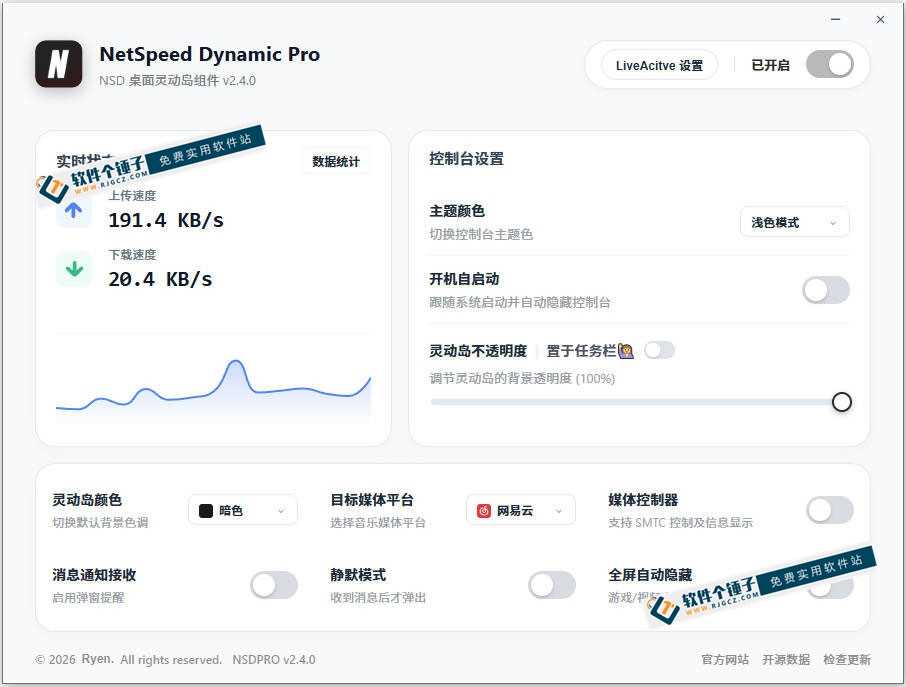
NetSpeed Dynamic ProThink of it as the Dynamic Island for Windows. It sits on the taskbar like a smart little capsule, showing real-time upload and download speed together with trend charts. It also monitors CPU, memory and GPU usage, highlighting warnings when load gets too high. It supports quick controls for NetEase Cloud Music, QQ Music, Kugou and other major music apps, auto-recognizing the current song so you can skip or pause with one click. It also aggregates system notifications with direct message previews. When you're gaming or watching video full-screen, it automatically moves aside so it never blocks the picture.
What practical problems does it solve?
① Real-time network and hardware monitoring, visible at a glance
The taskbar shows live upload and download speeds right on it, along with speed trend charts and a network status indicator. Connection state and traffic usage are clear at a glance. It also monitors CPU, memory and GPU usage with highlight warnings when load runs high. While gaming or editing video, one quick glance tells you whether the machine is running at full tilt.
② Quick music control — skip tracks without switching windows
Supports major music platforms including NetEase Cloud Music, QQ Music, Kugou and Apple Music UWP. It auto-recognizes the currently playing track and shows album art and song info. Skip or pause with one click, no need to jump back and forth between player windows — handy even when gaming or working full-screen.
③ Aggregated system notifications — quiet yet nothing missed
It gathers all the old-style pop-up notifications from the bottom-right corner of Windows into one unified feed. Message content is previewed directly, so you don't have to open each one. You can enable system do-not-disturb and receive messages only through this widget — quiet, without missing anything important.
④ Apple-style capsule design to lift your desktop's looks
Minimal and polished, the Apple-style capsule sits snugly on the taskbar and blends right in. It supports light/dark themes, adjustable transparency, and a customizable position. Built with Vue 3 + Rust, it uses almost no resources and never slows the system down. It auto-moves aside during full-screen gaming or video. Open source, free, ad-free, and fully functional out of the box.
Who is this tool for?
If you enjoy tweaking your desktop and want a more useful taskbar, this is for you. It's also a great fit if you regularly monitor network speed and hardware while gaming or editing video, or if you work while listening to music and want quick skip/pause controls. Anyone tired of constant notification pop-ups but afraid of missing messages should give it a try. Best of all, it's completely free, open source, and has no feature limits.
What are the system requirements?
Runs on Windows. Apple-style capsule design docked to the taskbar. Real-time network speed and trend charts. Monitors CPU, memory and GPU usage with highlight warnings. Quick controls for NetEase Cloud Music, QQ Music, Kugou, Apple Music UWP and more. Aggregated system notifications with message previews. Light and dark themes with adjustable transparency. Auto-moves aside in full screen. Built on Vue 3 + Rust with low resource usage. Open source, free, and ad-free.
In short
NetSpeed Dynamic Pro is a genuinely useful little Windows desktop tool: network and hardware monitoring, music control and notification aggregation, all packed into one polished capsule — open source, free, ad-free and lightweight. If you want your taskbar to be more practical and better looking, give it a try.










