



-
Solo Business Courses
-
 Others
-
Overseas Tutorials
-
Photography & Editing
-
Community & Private Domain
-
Self-Media Writing & Copywriting
-
Side Income Projects
-
E-commerce
-
Short Video & Live Streaming
-
Artificial Intelligence (AI)
-
Software & Tools
-
Operating Systems
-
Plugins & Scripts
-
MacOS Software
-
Android Software
-
Windows Software
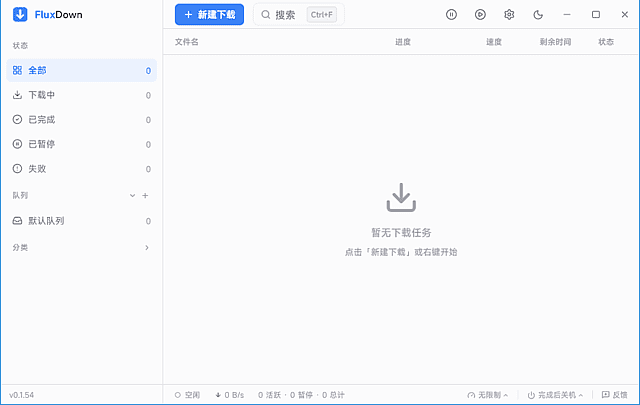
FluxDown v0.5.2 — Open-Source Multi-Protocol Download Manager
-
Game Gold-Farming Money-Making Plan: Earn 1k+ Daily, a Stable 3-Year Project Anyone Can Do in Spare Time [Revealed]
Study material — included with membership Get Membership -
Hot-game fully-automated earning: 500+ a day, no experience, simple operation - the steadiest long-term game-earning side hustle (revealed)
Study material — included with membership Get Membership -
FlyingMouse earns merit this time! Don't panic at Windows format problems — the open-source FlyingMouse format conversion tool helps, a popular GitHub gem
Study material — included with membership Get Membership -
Douyin Product-Selling Coaching Bootcamp: No On-Camera Appearance Needed, Newbies Can Produce Selling Short Videos by Following the Steps
Study material — included with membership Get Membership -
First-release game gold-farming money plan: 1K+ a day, ordinary people in spare time
Study material — included with membership Get Membership






-
FlyingMouse earns merit this time! Don't panic at Windows format problems — the open-source FlyingMouse format conversion tool helps, a popular GitHub gem
Study material — included with membership Get Membership -
LuDaShi v6.1024.4105.1121 Slim Single File
Study material — included with membership Get Membership -
2D Cartoon Animation Software Moho Pro v14.3
Study material — included with membership Get Membership -
Video Editor Aiseesoft Filmai v1.0.18
Study material — included with membership Get Membership -
To-Do Microsoft To Do v2.147 Free
Study material — included with membership Get Membership -
PR/AE/DaVinci/FCPX video Plugin Nobe OmniScope Win1.11.15 / Mac1.10.138
Study material — included with membership Get Membership





FluxDown multi-protocol downloader
Complete guide to fast open-source downloads
\
\ 🧲 BT magnets
\ 🎬 Stream capture
Ever installed a legacy downloader: member-boost badges everywhere, popups mid-download; want an m3u8 clip — install a tiny tool; switch to BT — a third client. Your disk ends up holding four or five downloaders, each used for one feature. FluxDown solves exactly this — a multi-protocol download manager covering direct links, torrent/magnet and streaming in one clean app, core features open.
\What is FluxDown? Open-source download tool explained
\A free open-source multi-protocol download manager — Rust + Tokio async engine, Flutter UI; HTTP/HTTPS/FTP direct links, BitTorrent and magnets; native HLS (m3u8) and DASH (mpd) parsing. It merges “normal file downloads,” “BT downloads” and “web video capture” into one app — no more switching tools.
\History lives in a local SQLite database — no login, offline history. A local-first design for users who care about experience and privacy.
\Use cases
\- \
- Batch office downloads — queue and archive large batches of direct links.
- Media collection — capture m3u8/DASH streams to local files.
- Torrent & magnet downloads — legal open-source mirrors, learning materials.
- Big overnight jobs — resume support + auto shutdown on completion.
- Parallel jobs on a capped link — custom up/down speed to protect meetings and games.
FluxDown vs. alternatives
\| Dimension | \Dimension | \IDM | \qBittorrent | \
|---|---|---|---|
| License | Open source, free | Commercial | Open source, free |
| Protocol coverage | Direct + BT + streaming | Direct + web media sniff | BT-focused |
| Engine | Rust async | C++ multithread | C++/Qt |
| Best fit | One-stop, open-source, privacy | Direct-link power users | PT/BT deep users |
5 core features
\1️⃣ All-protocol downloads
\HTTP/HTTPS/FTP links, torrents and magnets; native HLS/DASH. New task → paste link/torrent → auto protocol detect, start
2️⃣ Smart multi-threading
\Auto bandwidth test matches segmentation; high concurrent threads; idle threads rebalance slow chunks with dynamic sizes. Task settings → threads: auto → watch the chunk speed graph
3️⃣ Fine-grained task management
\Resume, batch queue, priority, pause/retry, batch delete; auto shutdown + file archival on completion. Select tasks → right-click priority → enable shutdown-on-complete
4️⃣ Global rate limiting
\Token-bucket global limiter — separate up/down speeds so downloads don’t strangle browsing or gaming. Settings → speed limit → set download cap → save, instant
5️⃣ Browser sniff & local data
\Companion Chrome/Edge extension detects page videos, archives, docs, subtitles — one tap to queue. History in local SQLite; offline browsing. Install extension → open page → click icon, push resources
Screenshots
\
| Case | \Input → output | \Scale | \Rating | \
|---|---|---|---|
| Case 1 Big office direct-link downloads | Input: ~8 GB of mirror/installer links, must not block video meetings Output: multi-threaded; capped download at 30 MB/s — smooth during meetings | ~8 GB | Rate limit works |
| Case 2 Web streaming archive | Input: m3u8 lecture, save for replay Output: extension sniffs the resource, one tap pushes it — natively parsed and merged locally | One lecture clip | No extra tool |
| Case 3 Overnight open-source mirror | Input: night torrent of an OS mirror, auto shutdown after Output: queue + shutdown-on-complete; next morning files are archived | ~12 GB torrent | Set-and-forget |
Tutorial: install to multi-protocol downloads
\Step 1: Get & install
\Download the FluxDown installer and pick your build. Small package — install to a disk with free space, since the download folder lives there too.
\Step 2: Set download dir & limits
\First launch → settings → default folder + category archiving. On a shared link, set the global cap — around 60% of bandwidth — so browsing and calls stay smooth.
\Step 3: New direct or BT task
\New task → paste HTTP/HTTPS link, magnet, or import a torrent. Protocol is auto-detected — no manual switching. Big files: enable multi-threading; small files: single thread is steadier, since chunk-scheduling overhead is visible on small files.
\Step 4: Install the browser extension for streams
\Install the companion Chrome/Edge extension; open a video page; click the icon to list detected media. Pick targets and push — the client shows the parsed m3u8/mpd task.
\Step 5: Queue & auto shutdown
\Batch jobs go into the queue — prioritize by urgency. Overnight big-file downloads: enable shutdown-on-complete; next morning files are archived. Clear completed tasks periodically — the local DB grows.
\









