


-
Solo Business Courses
-
 Others
-
Overseas Tutorials
-
Photography & Editing
-
Community & Private Domain
-
Self-Media Writing & Copywriting
-
Side Income Projects
-
E-commerce
-
Short Video & Live Streaming
-
Artificial Intelligence (AI)
-
Software & Tools
-
Operating Systems
-
Plugins & Scripts
-
MacOS Software
-
Android Software
-
Windows Software
PC To-Do Manager — ToDoList v9.1.9.0
-
Game Gold-Farming Money-Making Plan: Earn 1k+ Daily, a Stable 3-Year Project Anyone Can Do in Spare Time [Revealed]
Study material — included with membership Get Membership -
Hot-game fully-automated earning: 500+ a day, no experience, simple operation - the steadiest long-term game-earning side hustle (revealed)
Study material — included with membership Get Membership -
FlyingMouse earns merit this time! Don't panic at Windows format problems — the open-source FlyingMouse format conversion tool helps, a popular GitHub gem
Study material — included with membership Get Membership -
Douyin Product-Selling Coaching Bootcamp: No On-Camera Appearance Needed, Newbies Can Produce Selling Short Videos by Following the Steps
Study material — included with membership Get Membership -
First-release game gold-farming money plan: 1K+ a day, ordinary people in spare time
Study material — included with membership Get Membership






-
FlyingMouse earns merit this time! Don't panic at Windows format problems — the open-source FlyingMouse format conversion tool helps, a popular GitHub gem
Study material — included with membership Get Membership -
LuDaShi v6.1024.4105.1121 Slim Single File
Study material — included with membership Get Membership -
2D Cartoon Animation Software Moho Pro v14.3
Study material — included with membership Get Membership -
Video Editor Aiseesoft Filmai v1.0.18
Study material — included with membership Get Membership -
To-Do Microsoft To Do v2.147 Free
Study material — included with membership Get Membership -
PR/AE/DaVinci/FCPX video Plugin Nobe OmniScope Win1.11.15 / Mac1.10.138
Study material — included with membership Get Membership





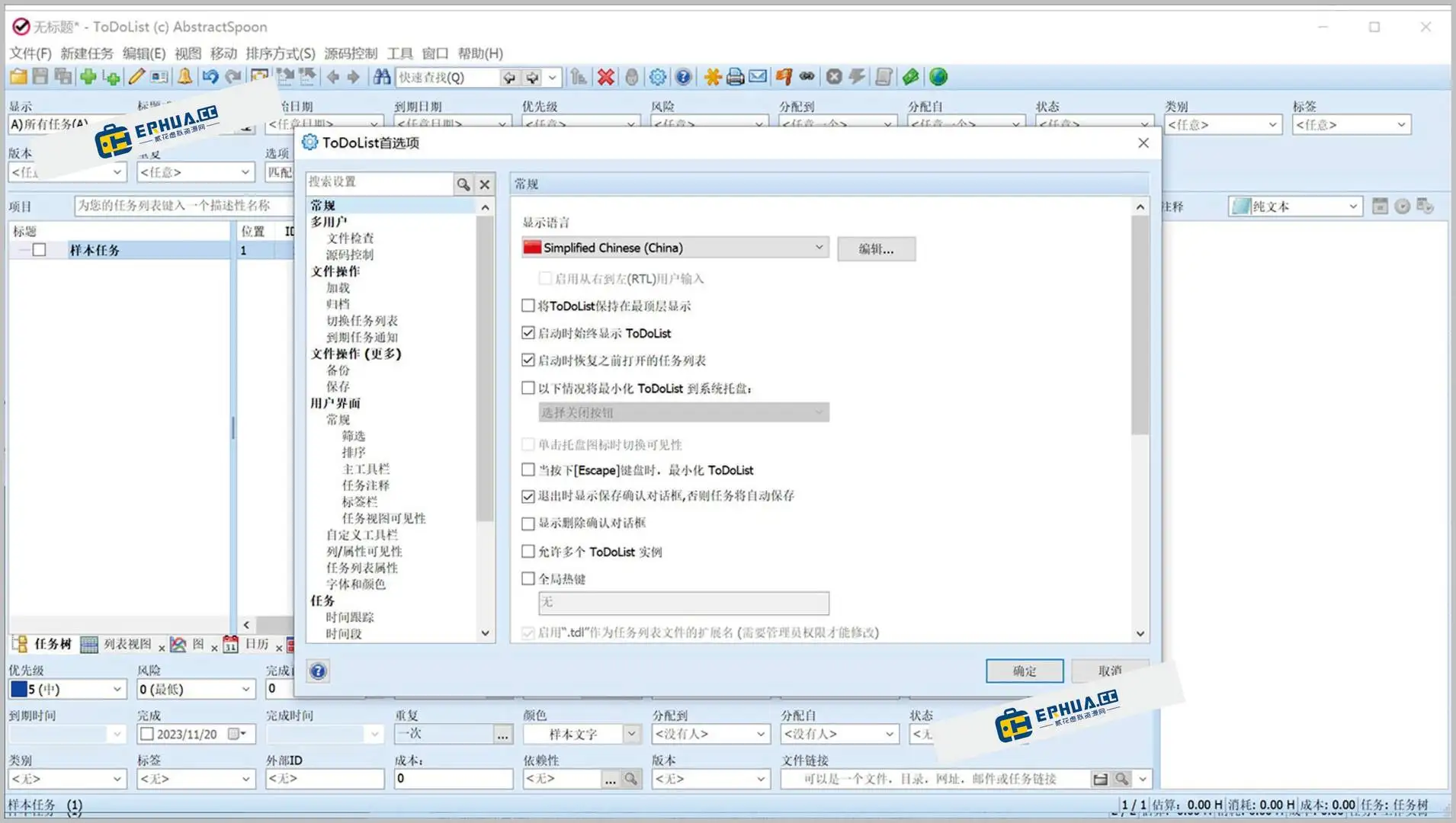
ToDoList is a to-do manager built for PC users, designed to help you organize and manage tasks efficiently and boost productivity. Through varied visualizations, it clearly shows task progress and workflow, making your plans crystal clear.
\ \
ToDoList feature highlights
\ \1. Task creation and efficient management
\ \ToDoList lets users create many task types — text, image and audio. Users set due dates, priorities and tags for each task to track progress. By dragging, users easily reorder tasks or file them into projects and lists, for flexible management.
\ \2. Smart reminders and notifications
\ \ToDoList offers powerful reminders — set a time per task so you never forget. It reminds you by email, SMS or push at the set time, ensuring tasks finish on schedule.
\ \3. Data sync and sharing
\ \It supports cross-platform sync, so you access and manage to-dos across devices. ToDoList also lets you share task lists with team or friends, aiding collaboration and sharing, boosting team efficiency.
\ \4. Rich extensions and customization options
\ \ToDoList supports many plugin extensions, such as calendar view, time tracking, etc., meeting different users' personalized needs. In addition, the software also supports custom themes and interface layouts, letting users adjust their work environment according to personal preferences.
\ \5. Statistical analysis and efficiency improvement
\ \ToDoList offers detailed stats and analytics on efficiency and time allocation. It generates daily/weekly/monthly completion reports and charts, helping you manage time and optimize workflows.
\ \



ToDoList multiple chart displays
\ \1. Task list
\ \The task list lets you view and manage all to-dos, sorting/filtering by date, priority and project, so you quickly find important tasks and plan time.
\ \2. Calendar view
\ \The calendar view lets users intuitively view task deadlines and time arrangements, helping plan schedules reasonably.
\ \3. Timeline view
\ \The timeline view shows the time distribution and duration of tasks, letting users clearly grasp task progress and workload.
\ \4. Weekly report chart
\ \Set weekly reports according to personal needs, clearly showing weekly work and plans, improving time management efficiency.
\ \5. Gantt chart
\ \The Gantt chart shows the sequence and dependencies of tasks, helping users optimize project progress and resource allocation.
\ \6. Mind map
\ \The mind map shows the structure of topics and related subtopics through branches, helping users better organize and present ideas.
\ \ToDoList features
\ \1. Simple and intuitive user interface
\ \ToDoList has a clean design, intuitive UI and easy operation, so you easily create and manage tasks, greatly boosting efficiency.
\ \2. Highly customizable system and user experience
\ \It offers rich customization — adjust appearance and features like theme color and font size — to build a personalized to-do manager.
\ \3. Data security and backup
\ \ToDoList offers data safety and backup — automatic periodic backup plus manual export/restore — keeping task data reliable and hard to lose.
\ \With ToDoList, manage tasks and time more efficiently for work-life balance.
\ \\ \ \ \
Related Courses

Super local toolbox! Built-in screen recording, audio/video cutting & merging, video compression & extraction, forever free - Kedou Video Converter

100% perfect free tool! One-stop multi-function PDF software: PDF convert, compress, edit etc., minimal, no ads, so nice - JOPDF

Open-Source Desktop Remote Tool, Beats Paid Versions! Free for Personal and Commercial Use Unlimited, Cross-Platform, HopToDesk Remote Control

Latest K-12 Textbook Downloader: Whole-Grade Resource Download, Courseware, Video, Audio in One Click

HuyanBao: free blue-light eye-care app with pet break reminders

Windows Can Have a Desktop Dynamic Island Too! A Modern System Control Center — Give Your PC a Black Notch, PyIsland

3D Simulated Comic Drama Production: Seedance2.0 Full-Process Practical Course - From Zero to One High-Quality Comic Drama Creation

Win/Mac Dual Support! Latest Permanent Lifetime Version, Supports Old Photo Restoration, Image Sharpening and Lossless Upscaling Tool, Aiarty Image Enhancer

Online Video Course: Github Open-Source Bilibili Video Download Tool! Supports 8K and Dolby Vision Bilibili Video Batch Download Tool, Easy to Use Bilidown


