


-
Solo Business Courses
-
 Others
-
Overseas Tutorials
-
Photography & Editing
-
Community & Private Domain
-
Self-Media Writing & Copywriting
-
Side Income Projects
-
E-commerce
-
Short Video & Live Streaming
-
Artificial Intelligence (AI)
-
Software & Tools
-
Operating Systems
-
Plugins & Scripts
-
MacOS Software
-
Android Software
-
Windows Software
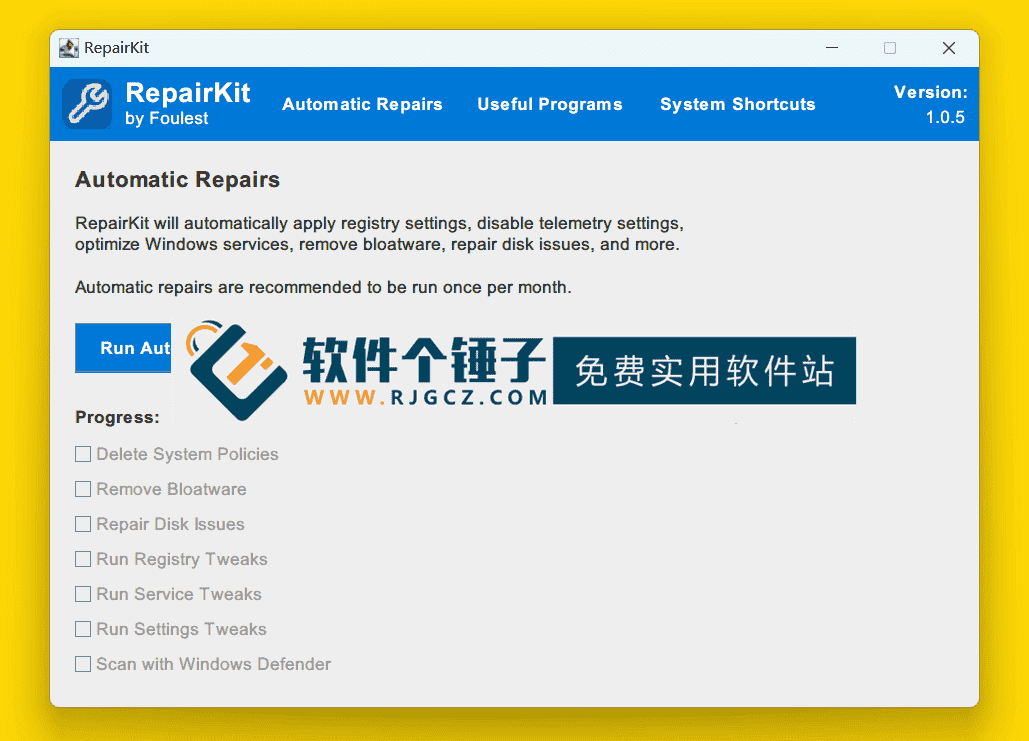
System Error Repair Tool RepairKit v1.3.7 English Version [Software Ge Chui Zi·R4826]
-
Game Gold-Farming Money-Making Plan: Earn 1k+ Daily, a Stable 3-Year Project Anyone Can Do in Spare Time [Revealed]
Study material — included with membership Get Membership -
Hot-game fully-automated earning: 500+ a day, no experience, simple operation - the steadiest long-term game-earning side hustle (revealed)
Study material — included with membership Get Membership -
FlyingMouse earns merit this time! Don't panic at Windows format problems — the open-source FlyingMouse format conversion tool helps, a popular GitHub gem
Study material — included with membership Get Membership -
Douyin Product-Selling Coaching Bootcamp: No On-Camera Appearance Needed, Newbies Can Produce Selling Short Videos by Following the Steps
Study material — included with membership Get Membership -
First-release game gold-farming money plan: 1K+ a day, ordinary people in spare time
Study material — included with membership Get Membership






-
FlyingMouse earns merit this time! Don't panic at Windows format problems — the open-source FlyingMouse format conversion tool helps, a popular GitHub gem
Study material — included with membership Get Membership -
LuDaShi v6.1024.4105.1121 Slim Single File
Study material — included with membership Get Membership -
2D Cartoon Animation Software Moho Pro v14.3
Study material — included with membership Get Membership -
Video Editor Aiseesoft Filmai v1.0.18
Study material — included with membership Get Membership -
To-Do Microsoft To Do v2.147 Free
Study material — included with membership Get Membership -
PR/AE/DaVinci/FCPX video Plugin Nobe OmniScope Win1.11.15 / Mac1.10.138
Study material — included with membership Get Membership





RepairKit is a genuinely handy piece of software whose main job is to fix all kinds of system faults and errors on your PC while boosting overall performance. In short, it's like a general practitioner for your computer: it scans and diagnoses what's wrong, gives repair recommendations, and bundles in practical tools for junk cleaning, system-speed optimization, and even repairing damaged digital files.

What exactly can RepairKit do for you?
Its features cover many aspects of system maintenance:
- Comprehensive system scan and diagnosis: it gives your PC a full check-up, scanning all key areas to find potential system problems and errors.
- Smart performance optimization: built-in optimization tools adjust system settings to speed up apps and processes, making your PC feel more responsive.
- Clear repair recommendations: after scanning, it presents a detailed results report with concrete recommendations on how to fix problems and improve performance.
- Repair damaged digital files: if your photos, documents and other files are corrupted or won't open, RepairKit can attempt to repair them.
- Deep junk cleaning: it hunts down and removes unnecessary temporary files, caches and other junk to free up valuable disk space.
Through all of this, RepairKit effectively boosts your PC's performance, extends its lifespan, and clears away those annoying system problems.
How to use RepairKit: a guide and important reminders
It's actually quite simple to use:
- After installing, open it and let it run a full system scan first.
- Once the scan finishes, the app shows a list of problems found along with optimization suggestions.
- Based on the suggestions, you can let the software fix problems automatically or tweak the settings manually.
- Besides scanning and repairing, you can also use its file-cleaning, system-optimization and digital-file-repair tools on their own.
Important safety note:Before any system repair or deep cleaning,make sure you have safely backed up your important data, files and documentsIt's a good habit that prevents accidents.
Summary
Overall, RepairKit is an all-in-one system maintenance tool. It packages problem diagnosis, performance optimization, junk cleaning and file repair into one convenient one-stop solution. If you want to improve your PC's condition and fix common system issues without wrestling with complex operations, it's a helper worth considering. Remember: regular maintenance and repair are the keys to keeping your device healthy and extending its life.
Related Courses

Super-lightweight C-Drive Manager for Windows! Very distinctive: disk analysis and cleanup reminders, 2MB size, completely free

Reinstall Without a USB Drive! This Tool Lets Newbies Quickly Reinstall Windows, Supports Unattended Setup, Data-Safe—CmzPrep_Rev2

A GitHub speed-up tool! Open GitHub faster, auto-responding to the fastest node - a lightweight open-source tool: Ghips

EasyRC: one-click Windows reinstall without USB, backup and restore included

Permanently Block Windows 10/11 Updates: Huawei Tool, Avoid Frequent Win Update Problems

Windows 7/10/11 System Update Blocker Is Here! Only 400KB, One-Click Disable System Updates and Restore Updates, Compact and Easy to Use

Stop Deleting Files Randomly! C Drive Red Alert Savior: Deep Cleanup + System Optimization, Works on Windows/macOS!

Office Fully-Automatic One-Click Deployment Installer, up to 2024, Customizable Components, Built-in Activation, All Free - Mocreak

Windows System Reinstall Tool, Supports Local Image File Install and Backup, Simple to Use, Safe and Stable, Supports All Scenarios

PC Acting Up? Newbie-Essential Driver Repair Tool—One-Click Update & Fix Driver Issues, It’s That Simple

