


-
Solo Business Courses
-
 Others
-
Overseas Tutorials
-
Photography & Editing
-
Community & Private Domain
-
Self-Media Writing & Copywriting
-
Side Income Projects
-
E-commerce
-
Short Video & Live Streaming
-
Artificial Intelligence (AI)
-
Software & Tools
-
Operating Systems
-
Plugins & Scripts
-
MacOS Software
-
Android Software
-
Windows Software
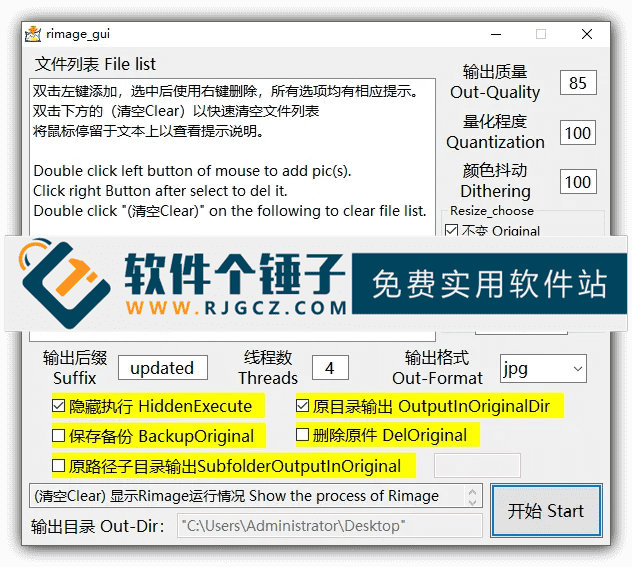
Batch Image Compressor/Converter — Rimage GUI v3.1.0
-
Game Gold-Farming Money-Making Plan: Earn 1k+ Daily, a Stable 3-Year Project Anyone Can Do in Spare Time [Revealed]
Study material — included with membership Get Membership -
Hot-game fully-automated earning: 500+ a day, no experience, simple operation - the steadiest long-term game-earning side hustle (revealed)
Study material — included with membership Get Membership -
FlyingMouse earns merit this time! Don't panic at Windows format problems — the open-source FlyingMouse format conversion tool helps, a popular GitHub gem
Study material — included with membership Get Membership -
Douyin Product-Selling Coaching Bootcamp: No On-Camera Appearance Needed, Newbies Can Produce Selling Short Videos by Following the Steps
Study material — included with membership Get Membership -
First-release game gold-farming money plan: 1K+ a day, ordinary people in spare time
Study material — included with membership Get Membership






-
FlyingMouse earns merit this time! Don't panic at Windows format problems — the open-source FlyingMouse format conversion tool helps, a popular GitHub gem
Study material — included with membership Get Membership -
LuDaShi v6.1024.4105.1121 Slim Single File
Study material — included with membership Get Membership -
2D Cartoon Animation Software Moho Pro v14.3
Study material — included with membership Get Membership -
Video Editor Aiseesoft Filmai v1.0.18
Study material — included with membership Get Membership -
To-Do Microsoft To Do v2.147 Free
Study material — included with membership Get Membership -
PR/AE/DaVinci/FCPX video Plugin Nobe OmniScope Win1.11.15 / Mac1.10.138
Study material — included with membership Get Membership





Do large website images slow your load times? Or size limits on social uploads? Rimage GUI is built to solve these. It is a graphical batch image compressor based on the Rust rimage engine, for users who need to shrink images a lot without visible quality loss. If you've searched for a Chinese AVIF/WebP batch compressor, a free open-source JPG/PNG optimizer, or a local tool that cuts image size by 80% with no visible difference, this is it. It gives web developers, designers, creators and everyday users a fully offline, efficient, near-zero-config solution.
\ \
Powerful compression technology
\ \Rimage GUI's core power comes from advanced encoding algorithms. It leverages modern image-coding tech like libavif for AVIF and libwebp for WebP. These smart algorithms compress common JPG, PNG and even JPEG XL images to 10–30% of their original size while keeping perceived quality nearly unchanged. That means faster page loads, precious cloud-storage savings, and a better social-media upload experience.
\ \Simple and efficient user experience
\ \This tool uses a minimal drag-and-drop UI that's very intuitive. You can easily drag multiple images or even whole folders in for batch import. It supports real-time compression preview so you can estimate results before acting. You can customize the output path and format — it keeps the original format by default, but you can force-convert all images to the more efficient WebP or AVIF.
\ \In terms of detailed design, Rimage GUI is very thoughtful:
\ \- \
\
- Hidden run mode: During batch compression, it avoids frequent pop-ups that disturb your other work. \ \
- Clear progress feedback: Through progress bars and file lists, you can track processing progress at any time, eliminating the anxiety of waiting. \ \
- Safe anti-accidental-delete mechanism: It ensures that your original images are never deleted before they are successfully compressed and output, safeguarding your data. \ \
Most importantly, all image processing happens locally on your PC. The tool doesn't go online, upload any images, or collect any data (telemetry) — fundamentally protecting your privacy. Compared to online compressors that require uploads (leak risk) or cumbersome pro software like Photoshop, Rimage GUI's 'MIT open-source + bilingual UI + zero-dependency single file' makes it a truly lightweight, efficient modern image optimizer.
\ \Feature overview
\ \Part 2: Let me share in detail what experience Rimage GUI offers:
\ \1. High compression ratio with almost no visible quality loss
\ \It supports smart formats like AVIF, WebP and JPEG XL, usually shrinking images 70%+ with almost no visible quality loss.
\ \2. Efficient batch processing capability
\ \Supports adding entire folders via drag-and-drop, compressing thousands of images at once, greatly improving work efficiency.
\ \3. Broad format support
\ \Input supports common JPG, PNG and more. For output, keep the original or convert to more efficient WebP, AVIF or JPEG XL.
\ \4. 100% local processing
\ \All operations are completed locally on your computer, no internet connection required, and your images will never be uploaded to any server, with absolute privacy and security guaranteed.
\ \5. Portable green version
\ \The software is a portable EXE executable, no need to install any additional runtime libraries, truly ready to use after download.
\ \6. User-friendly detailed design
\ \Beyond the mentioned progress display and one-tap clear, it has anti-accidental-delete protection, hidden run mode and more, making the experience smoother.
\ \7. Open source, free and transparent
\ \MIT-licensed, fully open source, with no ads and no subscription.
\ \8. Bilingual interface
\ \Provides both Chinese and English interfaces, adapting to different users' habits.
\ \Summary
\ \In short, Rimage GUI is an excellent image optimizer for modern workflows, perfectly balancing compression efficiency, quality and ease of use. For webmasters, UI/UX designers and content creators handling many images, it saves storage cost and page-load time. For everyday users, its simple GUI makes image 'slimming' effortless. If you want a safe, free, efficient and powerful local image compressor, Rimage GUI is well worth trying.
\ \ \ \Related Courses

Super-lightweight C-Drive Manager for Windows! Very distinctive: disk analysis and cleanup reminders, 2MB size, completely free

Reinstall Without a USB Drive! This Tool Lets Newbies Quickly Reinstall Windows, Supports Unattended Setup, Data-Safe—CmzPrep_Rev2

A GitHub speed-up tool! Open GitHub faster, auto-responding to the fastest node - a lightweight open-source tool: Ghips

EasyRC: one-click Windows reinstall without USB, backup and restore included

Permanently Block Windows 10/11 Updates: Huawei Tool, Avoid Frequent Win Update Problems

Windows 7/10/11 System Update Blocker Is Here! Only 400KB, One-Click Disable System Updates and Restore Updates, Compact and Easy to Use

Stop Deleting Files Randomly! C Drive Red Alert Savior: Deep Cleanup + System Optimization, Works on Windows/macOS!

Office Fully-Automatic One-Click Deployment Installer, up to 2024, Customizable Components, Built-in Activation, All Free - Mocreak

Windows System Reinstall Tool, Supports Local Image File Install and Backup, Simple to Use, Safe and Stable, Supports All Scenarios

PC Acting Up? Newbie-Essential Driver Repair Tool—One-Click Update & Fix Driver Issues, It’s That Simple

