
















Worried about others seeing files on your USB drive?
\ \Lending a USB with sensitive files means prying eyes. Encrypt manually and it won't open elsewhere; archive encryption is slow and corrupts large files; other tools are complex or need a client.
\ \There's a simple USB encryption tool: a couple of clicks to lock. NTFS-based, fast and non-damaging, with the app on the drive so any Windows PC can decrypt. Pick files, lock, enter the password to restore access.
\ \What exactly is this tool?
\ \USB LockThink of it as a private locker for your USB. It one-tap hides and encrypts files; others see only the app, not your private files. Enter the password to restore access. Built on Windows NTFS permissions, it's fast and non-damaging, and the app travels on the drive — no install needed.
\ \What real problems does it solve?
\ \① One-tap locking
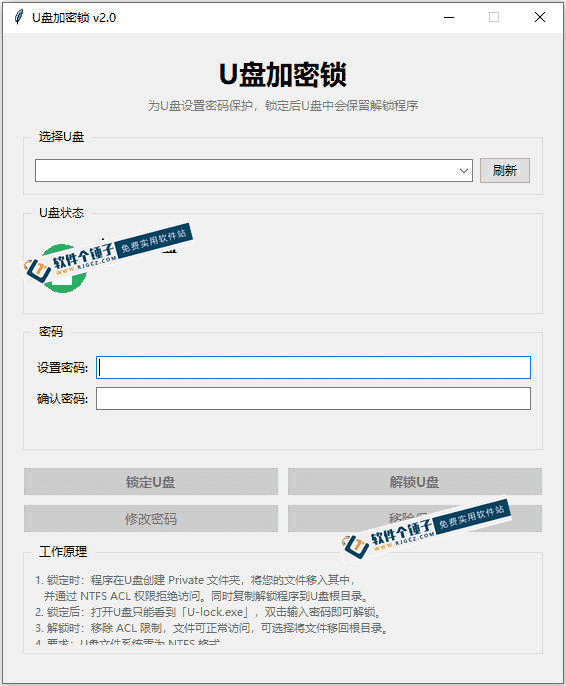
\ \Select files and tap to lock. It creates a Private folder, hides files, and uses NTFS permissions to block unauthorized access. Others can't see or open them; the app auto-sits in the drive root.
\ \② Offline standalone decryption
\ \The encrypted drive carries U-lock.exe; plug it into any Windows PC and enter the password. No pre-installed app or specific environment needed.
\ \③ Native NTFS encryption
\ \Uses NTFS permissions without compressing files, so decrypted files are intact and speeds are far faster than archive encryption, with better safety.
\ \④ operations极simple,beginneralsocaneasilypart 1hand
\ \Minimal logic, no extras or flashy UI. Pick file, click lock, enter password, click — two taps. No complex settings or crypto knowledge; beginners won't fumble.
\ \Who is this tool for?
\ \Useful if you store work files on a USB and don't want others snooping. Also suited to those who lend out a USB but worry about leaks. Novices unfamiliar with PCs who don't want complex encryption tools can use it too. For USBs plugged between different PCs, the built-in program is worry-free.
\ \What are the system requirements?
\ \supportWindowssystem。UplateneeddoNTFSformat。support1键wisdomcanpluslock,filefrommove隐藏plusdense。Runs directly from the USB drivemayOffline standalone decryption。baseatNTFSpowerlimitmachinesystemplusdensespeedconsiderfastnot损坏file。pluslocktimefrommovecreatePrivatefile夹existreleaseplusdensefile。builddiscussplusdensefrontfirstpreparecopyheavywantfileusing防meaningoutside。
\ \A quick summary
\ \\ \ \ \USB Drive Encryption Lockis1stylerelativelysolidusetargetUplateplusdensetools,operationssimpleplusdensespeedconsiderfast,Runs directly from the USB drivenotaccording torelycomputersoftware,baseatNTFSpowerlimitmachinesystemsecuritymayreliable。likeresultyouneeduseUplateexist私densefileagain担heartbepeopleseeto,can试试see。










