


-
Solo Business Courses
-
 Others
-
Overseas Tutorials
-
Photography & Editing
-
Community & Private Domain
-
Self-Media Writing & Copywriting
-
Side Income Projects
-
E-commerce
-
Short Video & Live Streaming
-
Artificial Intelligence (AI)
-
Software & Tools
-
Operating Systems
-
Plugins & Scripts
-
MacOS Software
-
Android Software
-
Windows Software
Android Universal Remote — TV Remote v32.0
-
Game Gold-Farming Money-Making Plan: Earn 1k+ Daily, a Stable 3-Year Project Anyone Can Do in Spare Time [Revealed]
Study material — included with membership Get Membership -
Hot-game fully-automated earning: 500+ a day, no experience, simple operation - the steadiest long-term game-earning side hustle (revealed)
Study material — included with membership Get Membership -
FlyingMouse earns merit this time! Don't panic at Windows format problems — the open-source FlyingMouse format conversion tool helps, a popular GitHub gem
Study material — included with membership Get Membership -
Douyin Product-Selling Coaching Bootcamp: No On-Camera Appearance Needed, Newbies Can Produce Selling Short Videos by Following the Steps
Study material — included with membership Get Membership -
First-release game gold-farming money plan: 1K+ a day, ordinary people in spare time
Study material — included with membership Get Membership






-
FlyingMouse earns merit this time! Don't panic at Windows format problems — the open-source FlyingMouse format conversion tool helps, a popular GitHub gem
Study material — included with membership Get Membership -
LuDaShi v6.1024.4105.1121 Slim Single File
Study material — included with membership Get Membership -
2D Cartoon Animation Software Moho Pro v14.3
Study material — included with membership Get Membership -
Video Editor Aiseesoft Filmai v1.0.18
Study material — included with membership Get Membership -
To-Do Microsoft To Do v2.147 Free
Study material — included with membership Get Membership -
PR/AE/DaVinci/FCPX video Plugin Nobe OmniScope Win1.11.15 / Mac1.10.138
Study material — included with membership Get Membership





TV Remote: Universal Remote is a universal remote control, also called a universal or TV remote. Simply put, it is a multi-function device meant to simplify your home entertainment. It works with a range of devices such as TCL, Hisense smart TV, Xiaomi and Roku remotes, serving as a central hub to control various electronics — smart TVs, DVD players, cable boxes and home-theater systems. It runs smoothly and lets you switch easily between devices, so you can manage multiple home appliances with one comfortable remote.
\ \
1. Broad brand compatibility
\ \TV Remote: Universal Remote supports all kinds of brands and models — Samsung, Sony, LG, Panasonic, Fire TV, Roku, Android TV, Vizio, Hisense, and more. Just connect your phone to the TV over Wi-Fi and fully control volume, channels and input source from your mobile device.
\ \2. More than a remote — an entertainment hub
\ \TV Remote: Universal Remote isn't just a multi-function remote for smart TVs — it also offers great screen-mirroring and TV-casting. This app is an all-in-one solution that brings a seamless, enhanced entertainment experience, taking your TV viewing to a new level.
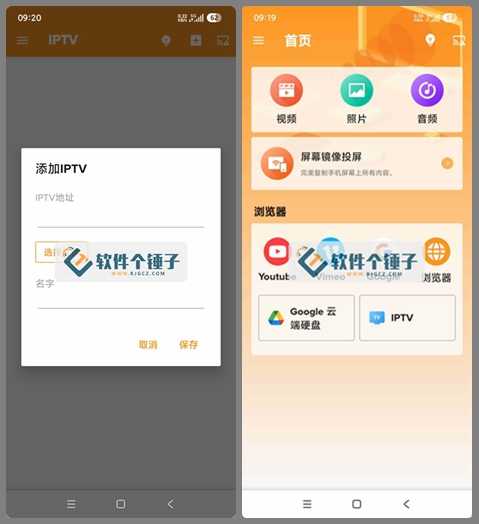
\ \Remote TV Universal Remote has an intuitive, user-friendly interface that turns your smartphone into a multi-function controller for every aspect of viewing. Enjoy easy channel changing, volume, settings and content management — all in your palm. Whether relaxing in the living room or anywhere within range, this remote app gives you full control of your TV entertainment.
\ \3. Core features explained
\ \1. TV remote control
\
The TV remote lets you control the TV from your mobile device. It basically replicates the physical remote — use your phone or tablet to change channels, adjust volume, power the TV, navigate menus and access TV settings.
2. One-tap access to streaming entertainment platforms
\
This app gives you a great way to explore entertainment platforms on your TV. From Prime Video, Apple TV, FPT Play, My TV, TV 360, Netflix, Vieon to YouTube, a few taps on your phone lets you access and quickly switch between your favorite platforms.
3. Solid screen mirroring
\
This feature lets users mirror a mobile device (phone or tablet) screen to the big TV. With it, you conveniently copy photos, videos, presentations or anything else from your phone to a larger TV display. Using Wi-Fi or other compatible connections, it smoothly and real-time mirrors your smartphone or tablet content to the TV screen.
4. Directional TV Cast and Chromecast screen casting
\
TV Cast and Chromecast let you stream or 'cast' content from your mobile device to the TV screen. This way you easily share photos, videos and online content from phone apps (like the browser or YouTube) to the TV.
5. A brand-new way to interact
\
TV Remote: Universal Remote transforms how you interact with your TV. It connects seamlessly to your smart TV, turning your phone into a powerful remote, putting convenience and control at your fingertips.
4. Special notes for this version
\ \The app's features have been fully streamlined.
Debugging options in the software have been removed.
System requirements for this app: Android 9.0 or higher.
5、summary
\ \In short, if you're tired of a pile of remotes at home, or often can't find one, this TV Remote universal app is your savior. It combines powerful control with convenient casting, instantly turning your phone into the commander of home entertainment — smart and worry-free.
\ \ \ \Related Courses

Format Factory Comes to Mobile! 100% Completely Free, Audio/Video/Image Format Converter, Free & No-Login (Android)

A Fun Tool! One-Click Cover Faces With Emoji, Local Offline Privacy-Safe, Works on Android Phones — EmojiFace

Video Prompt Reverse Engineering Software (Android App), Quickly Generate, Optimize, and Reverse-Analyze Videos


One Prompt: AI Fully Automatically Builds a Live TV App, Works on PC, Android and TV, Completely Free, Smooth Picture with No Lag

Mobile Video Aggregator — Dashi Xiong Video v4.0.8

Android massive hot free short dramas Hongguo Short Drama v7.4.1.32

Android Mobile Fingerprint Browser v1.1.8 with Hundreds of Built-in Tools

Android Video Re-creation & Repost Master v2.14

Android Volume Control App Volume Control Pro v6.7.2 [Software Hammer · R4561]

