


-
Solo Business Courses
-
 Others
-
Overseas Tutorials
-
Photography & Editing
-
Community & Private Domain
-
Self-Media Writing & Copywriting
-
Side Income Projects
-
E-commerce
-
Short Video & Live Streaming
-
Artificial Intelligence (AI)
-
Software & Tools
-
Operating Systems
-
Plugins & Scripts
-
MacOS Software
-
Android Software
-
Windows Software
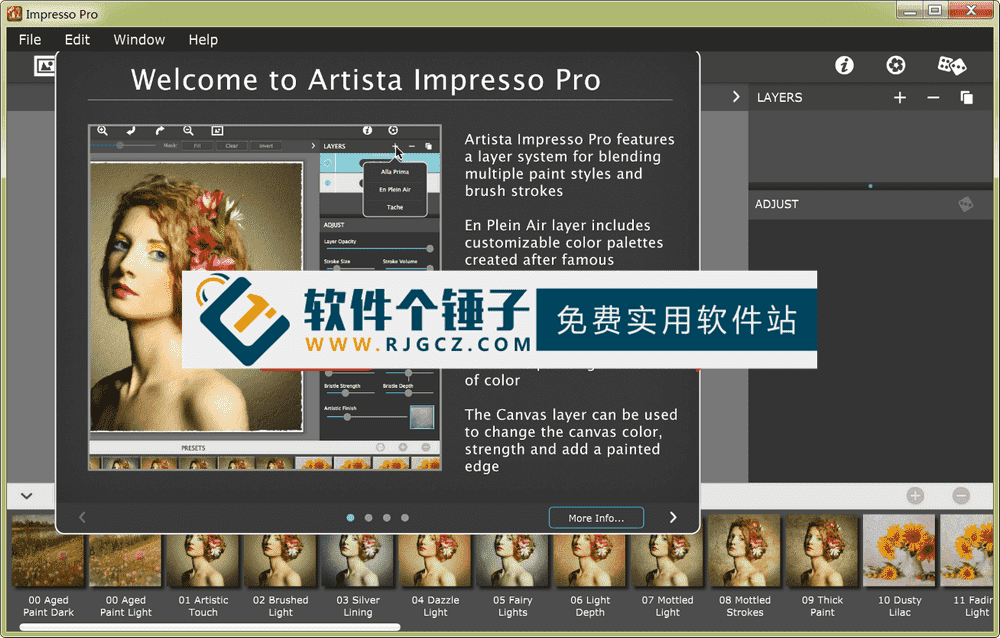
Oil Painting Effect — JixiPix Artista Impresso Pro v1.8.29 (English)
-
Game Gold-Farming Money-Making Plan: Earn 1k+ Daily, a Stable 3-Year Project Anyone Can Do in Spare Time [Revealed]
Study material — included with membership Get Membership -
Hot-game fully-automated earning: 500+ a day, no experience, simple operation - the steadiest long-term game-earning side hustle (revealed)
Study material — included with membership Get Membership -
FlyingMouse earns merit this time! Don't panic at Windows format problems — the open-source FlyingMouse format conversion tool helps, a popular GitHub gem
Study material — included with membership Get Membership -
Douyin Product-Selling Coaching Bootcamp: No On-Camera Appearance Needed, Newbies Can Produce Selling Short Videos by Following the Steps
Study material — included with membership Get Membership -
First-release game gold-farming money plan: 1K+ a day, ordinary people in spare time
Study material — included with membership Get Membership






-
FlyingMouse earns merit this time! Don't panic at Windows format problems — the open-source FlyingMouse format conversion tool helps, a popular GitHub gem
Study material — included with membership Get Membership -
LuDaShi v6.1024.4105.1121 Slim Single File
Study material — included with membership Get Membership -
2D Cartoon Animation Software Moho Pro v14.3
Study material — included with membership Get Membership -
Video Editor Aiseesoft Filmai v1.0.18
Study material — included with membership Get Membership -
To-Do Microsoft To Do v2.147 Free
Study material — included with membership Get Membership -
PR/AE/DaVinci/FCPX video Plugin Nobe OmniScope Win1.11.15 / Mac1.10.138
Study material — included with membership Get Membership





JixiPix Artista Impresso is an Impressionist oil-painting effect tool that converts photos into paintings, then combines painting effects with layers and brushes for print-worthy fine art as a standalone product. It also includes plugin versions for Photoshop, Elements, Lightroom and PaintShop Pro.
\ \
为专业人士设计的创意工具
\ \For pros who love creative control, we offer smart layers and brushes to blend painting styles, an edge library that fuses with the canvas, background paint effects for depth, soft-paint effects to enhance foreground subjects, vintage effects to add cracks, and an ultra-impressionist effect called Tache that covers the painting with broken strokes. Impresso Pro has everything artists or photographers need for gallery-style paintings with enough detail even for the largest prints.
\ \Professional version includes target features
\ \The pro edition includes smart layers, brushes, painted edges, and 6 painting styles: Alla Prima, En Plein Air, Soft Paint, Background Paint, Aged Paint and Tache.
\ \Main Features
\ \1. Rich brush effects
\ \Provides a variety of painting tools:
\ \11 brush effects – Provides multiple ways to create expressive paintings
\ \Easy-to-use brush library – Preview brush effects before applying
\ \3 bristle effects – Textured, thick and smooth strokes applied while preserving high-quality brushwork.
\ \2. Smart painting controls
\ \For more precise creation:
\ \Conform Strokes slider – Naturally reveals details when using large or abstract brush effects
\ \Canvas layer edge effects – Allows you to select painted edges or load custom edges
\ \3 impressionist styles – Control stroke size, stroke volume, bristle strength and depth
\ \3. Professional layer system
\ \Provides multi-layer creative capabilities:
\ \Soft Paint layer – Used to add realism to foreground subjects
\ \Background paint layer – Used to create a sense of distance
\ \Aged paint layer – Used for cracked surface paint
\ \Smart layer system – Used to mix impressionist styles and reorder, copy and delete selected items
\ \4. Advanced creative features
\ \This powerful feature lets you blend multiple painting styles for striking brushwork. *To add an Impressionist style, use the plus (+) at the top of the layers panel.
\ \Ellipse detail program – Release once in the painting area to add more details
\ \Smart link feature – Apply a unified color finish and canvas strength to all layers in place
\ \Presets – Use stored custom color palettes and settings to keep picture layers and settings unchanged for future projects
\ \5. Professional editing tools
\ \Provides complete creative control:
\ \Smart painting pen – Use it to delete or add Impressionist effects
\ \Mask selection – Use it to switch, clear, remove or fill brush effect areas
\ \70 types of art repair decoration – Add mottled target light lines and colors to the painting
\ \18 color-painted edges – You can control the pen touch size and edge blending
\ \6. Canvas effect for realistic painting
\ \Create realistic painting quality:
\ \Canvas background layer – Responds to painting like a real canvas, showing more texture in thinner paint and less in thicker paint.
\ \Stored painting layer presets – lets you store signatures for future use without a paint layer. When the layer icon appears in a preset thumbnail's corner, it's stored.
\ \Who is this software for?
\ \JixiPix Artista Impresso suits photographers, digital artists, graphic designers, and anyone wanting to turn photos into paintings. Whether a pro creator or art enthusiast, you can create stunning Impressionist-style work.
\ \Example use cases
\ \E.g. turn a portrait into oil painting, add impressionist effects to landscapes, create digital art, make unique design elements, or produce art for print.
\ \Operation
\ \Though professional, its UI is intuitive. A smart layer system makes complex artistic effects easy, so even users without art training create pro-level work.
\ \Compare with other art filter software
\ \JixiPix Artista Impresso's edge lies in its professional Impressionist oil effect and full layer control. It's not just a simple filter but a complete digital-painting environment, with more realistic, artistic results.
\ \Usage Tips
\ \Start with presets, getting to know brushes and layers. Save favorites as presets to reuse, and for important work, try different style combinations.
\ \Creative value
\ \Beyond turning photos into art, it provides full art-creation tools. Like a real painter, you control brushstroke, color and texture to make personal, unique work.
\ \Finally, to sum up
\ \JixiPix Artista Impresso is a professional Impressionist oil-painting tool that perfectly blends digital tech with traditional painting. Whether quickly turning photos into artworks or deep digital creation, it offers powerful tools and great results, helping you create print-worthy fine art.
\ \ \ \Related Courses

WorkBuddy zero-basics hands-on training: even non-programmers can follow the manual steps, learn agents systematically by doing

Higgsfield cinematic animation course: one-stop creation platform, complete animation production-flow teaching

The same dance with 6 outfits switching in order: I turned an outfit-change video into a Skill

An eye-catching domestic Markdown editor: local offline high-performance note tool, free and no login required

Domestic Markdown editor: local offline high-performance knowledge-note tool, free and no login required

WorkBuddy practical blue paper: user manual and practice guide, complete combined image-text edition

Jimeng challenges a 180-second long video: one-click a 3-minute movie? Full production flow shared in detail

Super handy! Douyin video downloader, supports batch download of user works, favorites and likes lists, open-source free Better-douyin-R

Nearly 200K stars on GitHub - Harness now runs by double-click: the Harness full-platform desktop edition

Nearly 200K stars on GitHub - Harness now runs by double-click: the Harness full-platform desktop edition DSH Desktop

