


-
Solo Business Courses
-
 Others
-
Overseas Tutorials
-
Photography & Editing
-
Community & Private Domain
-
Self-Media Writing & Copywriting
-
Side Income Projects
-
E-commerce
-
Short Video & Live Streaming
-
Artificial Intelligence (AI)
-
Software & Tools
-
Operating Systems
-
Plugins & Scripts
-
MacOS Software
-
Android Software
-
Windows Software
Database Designer — Navicat Data Modeler Premium v4.1.12
-
Game Gold-Farming Money-Making Plan: Earn 1k+ Daily, a Stable 3-Year Project Anyone Can Do in Spare Time [Revealed]
Study material — included with membership Get Membership -
Hot-game fully-automated earning: 500+ a day, no experience, simple operation - the steadiest long-term game-earning side hustle (revealed)
Study material — included with membership Get Membership -
FlyingMouse earns merit this time! Don't panic at Windows format problems — the open-source FlyingMouse format conversion tool helps, a popular GitHub gem
Study material — included with membership Get Membership -
Douyin Product-Selling Coaching Bootcamp: No On-Camera Appearance Needed, Newbies Can Produce Selling Short Videos by Following the Steps
Study material — included with membership Get Membership -
First-release game gold-farming money plan: 1K+ a day, ordinary people in spare time
Study material — included with membership Get Membership






-
FlyingMouse earns merit this time! Don't panic at Windows format problems — the open-source FlyingMouse format conversion tool helps, a popular GitHub gem
Study material — included with membership Get Membership -
LuDaShi v6.1024.4105.1121 Slim Single File
Study material — included with membership Get Membership -
2D Cartoon Animation Software Moho Pro v14.3
Study material — included with membership Get Membership -
Video Editor Aiseesoft Filmai v1.0.18
Study material — included with membership Get Membership -
To-Do Microsoft To Do v2.147 Free
Study material — included with membership Get Membership -
PR/AE/DaVinci/FCPX video Plugin Nobe OmniScope Win1.11.15 / Mac1.10.138
Study material — included with membership Get Membership





Navicat Data Modeler Premium is a database design tool built for PC. It has excellent compatibility, supporting major database systems including MySQL, SQL Server, Oracle, MariaDB, SQLite and PostgreSQL. With it, users can run reverse or forward engineering, visually design database schemas, import models from ODBC sources, generate complex SQL/DDL statements, and export models to files.
\ \
Lightweight design, powerful features
\ \Navicat Data Modeler Premium is small yet fully featured. Its clean layout and easy-to-understand menus greatly simplify creating complex ER models and generating SQL scripts. Whether transferring data across different database schemas or processing SQL text files, it handles them easily, fully solving database-adaptation issues from development-environment changes.
\ \Core features
\ \1. ER diagram creation and database design
\ \Supports creating professional ER relationship diagrams, helping users intuitively design database structures.
\ \2. databuildmodel反to工journey
\ \Able to load existing database structures and generate new ER diagrams, enabling visualization analysis of database structures.
\ \3. Multiple standard notation support
\ \Navicat Data Modeler supports three industry notations: Crow's Foot, IDEF1x and UML, suiting different design habits.
\ \4. Efficient model generation
\ \It auto-generates model parts, referential-integrity rules, comments and charset settings, greatly boosting efficiency.
\ \5. Multi-database system compatibility
\ \Fully supports database systems including SQL Server, MariaDB, MySQL, Oracle, SQLite and PostgreSQL.
\ \6. Visual database model
\ \See how elements relate without showing actual data — attributes, relations, indexes, keys, comments and other objects.
\ \
7. Rich editing features
\ \It supports adding images, layers, shapes and vertices, with align/distribute, auto-layout, search filters, comments/labels and unlimited undo/redo.
\ \8. Professional table design tools
\ \It offers professional table/view design tools to build and design data models. You clearly see attributes, relations, indexes, unique constraints and comments without showing actual data.
\ \9. Database synchronization feature
\ \The sync-to-database feature provides a full diff view. After comparing databases, you view specific differences and generate sync scripts to update the target database to match the model. Flexible settings let you customize key comparison/sync parameters.
\ \Software activation
\ \1. Software installation
\ \Download the software installation package, and follow the on-screen prompts to complete the installation step by step.
\ \
2. Patch file release and handling
\ \After installation, copy the Navicat_Keygen_Patch_v6.3.5.3_By_DFoX.exe file to the software installation directory, with the default path being C:\Program Files\PremiumSoft\Navicat Data Modeler 3.
\ \
3. Apply patch
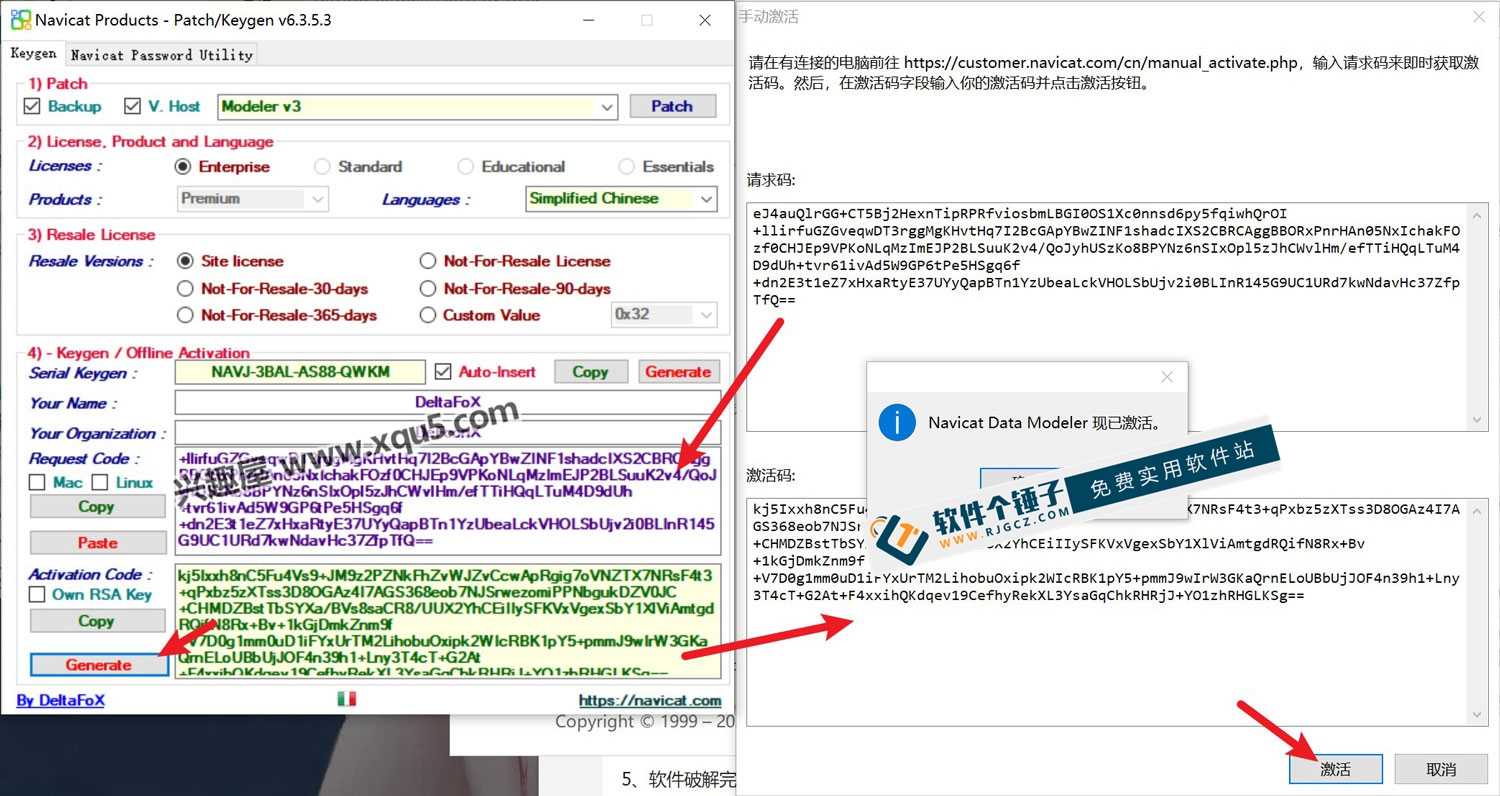
\ \Run Navicat_Keygen_Patch_v6.3.5.3_By_DFoX.exe, choose the Modeler v3 option, click the patch button; after the 'navicat.exe -x64-> patched!' prompt, confirm to finish.
\ \
4. Generate license key
\ \Click the generate button according to the prompts, and generate the corresponding license key.
\ \
5.
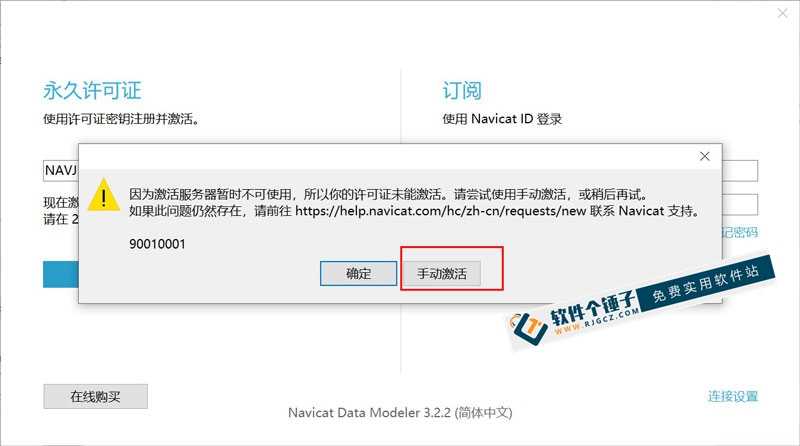
\ \Open installed Navicat Data Modeler, click register, paste the generated license key and activate. If activation fails, choose the offline method.
\ \
6. Generate
\ \Copy the request code from the app to the corresponding field, click generate to produce a new one. After it auto-fills, click activate to finish.
\ \
7. Activation complete
\ \After the installation is complete and activation is successful, you can use all the features of the software normally.
\ \
Related Courses

WorkBuddy zero-basics hands-on training: even non-programmers can follow the manual steps, learn agents systematically by doing

Higgsfield cinematic animation course: one-stop creation platform, complete animation production-flow teaching

The same dance with 6 outfits switching in order: I turned an outfit-change video into a Skill

An eye-catching domestic Markdown editor: local offline high-performance note tool, free and no login required

Domestic Markdown editor: local offline high-performance knowledge-note tool, free and no login required

WorkBuddy practical blue paper: user manual and practice guide, complete combined image-text edition

Jimeng challenges a 180-second long video: one-click a 3-minute movie? Full production flow shared in detail

Super handy! Douyin video downloader, supports batch download of user works, favorites and likes lists, open-source free Better-douyin-R

Nearly 200K stars on GitHub - Harness now runs by double-click: the Harness full-platform desktop edition

Nearly 200K stars on GitHub - Harness now runs by double-click: the Harness full-platform desktop edition DSH Desktop

