


-
Solo Business Courses
-
 Others
-
Overseas Tutorials
-
Photography & Editing
-
Community & Private Domain
-
Self-Media Writing & Copywriting
-
Side Income Projects
-
E-commerce
-
Short Video & Live Streaming
-
Artificial Intelligence (AI)
-
Software & Tools
-
Operating Systems
-
Plugins & Scripts
-
MacOS Software
-
Android Software
-
Windows Software
Lyric Video Studio v1.5.0 (English)
-
Game Gold-Farming Money-Making Plan: Earn 1k+ Daily, a Stable 3-Year Project Anyone Can Do in Spare Time [Revealed]
Study material — included with membership Get Membership -
Hot-game fully-automated earning: 500+ a day, no experience, simple operation - the steadiest long-term game-earning side hustle (revealed)
Study material — included with membership Get Membership -
FlyingMouse earns merit this time! Don't panic at Windows format problems — the open-source FlyingMouse format conversion tool helps, a popular GitHub gem
Study material — included with membership Get Membership -
Douyin Product-Selling Coaching Bootcamp: No On-Camera Appearance Needed, Newbies Can Produce Selling Short Videos by Following the Steps
Study material — included with membership Get Membership -
First-release game gold-farming money plan: 1K+ a day, ordinary people in spare time
Study material — included with membership Get Membership






-
FlyingMouse earns merit this time! Don't panic at Windows format problems — the open-source FlyingMouse format conversion tool helps, a popular GitHub gem
Study material — included with membership Get Membership -
LuDaShi v6.1024.4105.1121 Slim Single File
Study material — included with membership Get Membership -
2D Cartoon Animation Software Moho Pro v14.3
Study material — included with membership Get Membership -
Video Editor Aiseesoft Filmai v1.0.18
Study material — included with membership Get Membership -
To-Do Microsoft To Do v2.147 Free
Study material — included with membership Get Membership -
PR/AE/DaVinci/FCPX video Plugin Nobe OmniScope Win1.11.15 / Mac1.10.138
Study material — included with membership Get Membership





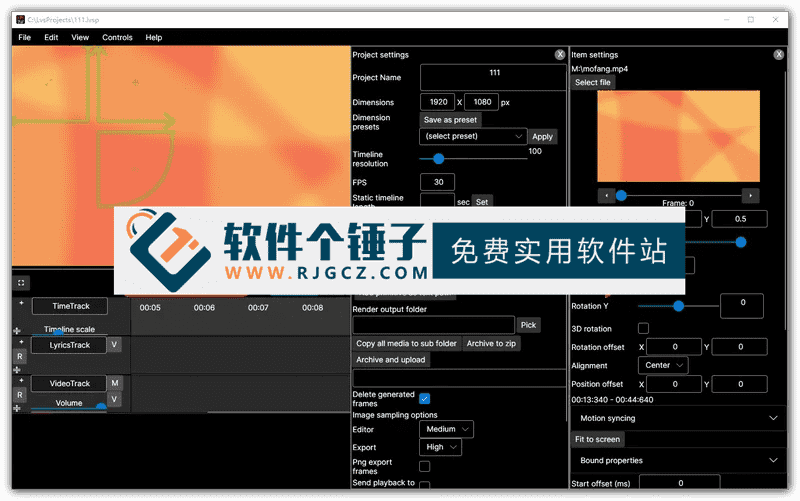
Lyric Video Studio is a lightweight, no-install lyric video creation tool designed for music lovers, self-media creators, and anyone who needs to publish content. Its main purpose is to quickly combine ordinary audio files (such as MP3, WAV) and lyric text (LRC, SRT, or TXT) into a high-definition music video with dynamic highlighted subtitles. If you often search online for "Chinese software that can automatically generate lyric subtitle videos," "MP3 to MP4 lyric video tools that support LRC sync," or "simple karaoke video creation software without AE/PR," it provides a perfect localized solution — no video editing experience required, and you can produce a finished video in three steps. The software automatically parses the timeline in LRC files to achieve word-by-word or line-by-line lyric highlighting, and also supports adding background images, gradient colors, font animations, particle effects, and other visual elements. It outputs MP4/H.264 videos that can be uploaded directly to YouTube, Douyin, Bilibili, and other platforms.
\ \
What is it best used for?
\ \This tool suits scenes needing subtitles: adding lyrics to cover songs, making language-learning videos, visualizing religious recitations, or making a cover-art video for a podcast. Its UI is clean and intuitive — drag in audio and lyric files, preview in real time, and tune font, color, position and the lyric fade in/out animation. Everything runs on your own PC: no network, no audio uploads, no watermarks, keeping your content safe. Versus spending hours hand-timing lyrics in Premiere, or online tools that limit resolution and exports, Lyric Video Studio's minimal workflow, precise LRC sync and portable no-install design make it ideal for non-professionals producing high-quality lyric videos fast.
\ \What useful features does it have?
\ \- \
\
- ✅ LRC/SRT precisesamestep:It automatically recognizes the timeline in lyric files to achieve word-by-word lyric highlighting. \ \
- ✅ One-click MP4 video generation:You only need to input audio and lyric files, and it directly outputs a video with subtitles. \ \
- ✅ Rich visual templates:Supports adding background images, gradient colors, particle effects, blur effects, light effects, and many other styles. \ \
- ✅ Customizable font and animation:You can adjust the font, size, and color of the lyrics, as well as the animation effects for their appearance and disappearance. \ \
- ✅ Multi-format input supportIt supports MP3/WAV audio and LRC/SRT/TXT lyric files. \ \
- ✅ No installation requiredIt's a single portable file you can carry on a USB, leaving no traces on the system. \ \
- ✅ Fully offline:The entire process requires no internet connection and will not upload your files, ensuring privacy and security. \ \
- ✅ Free to use without limitsSoftware requires no ads, guides you to output videos without watermarks, and includes all features in one package, completely free to use. \ \
Summary Part 2: Its Advantages
\ \Overall, Lyric Video Studio is a tool narrowly focused on lyric-video pain points. It simplifies complex subtitle sync and video compositing to the extreme, so users with no editing skills get started easily. Its offline, free nature protects privacy while offering great convenience. Whether music fans making share videos or creators needing quick high-quality audio-visual content, it's an efficient, reliable and completely free choice.
\ \ \ \Related Courses

Super local toolbox! Built-in screen recording, audio/video cutting & merging, video compression & extraction, forever free - Kedou Video Converter

100% perfect free tool! One-stop multi-function PDF software: PDF convert, compress, edit etc., minimal, no ads, so nice - JOPDF

Open-Source Desktop Remote Tool, Beats Paid Versions! Free for Personal and Commercial Use Unlimited, Cross-Platform, HopToDesk Remote Control

Latest K-12 Textbook Downloader: Whole-Grade Resource Download, Courseware, Video, Audio in One Click

HuyanBao: free blue-light eye-care app with pet break reminders

Windows Can Have a Desktop Dynamic Island Too! A Modern System Control Center — Give Your PC a Black Notch, PyIsland

3D Simulated Comic Drama Production: Seedance2.0 Full-Process Practical Course - From Zero to One High-Quality Comic Drama Creation

Win/Mac Dual Support! Latest Permanent Lifetime Version, Supports Old Photo Restoration, Image Sharpening and Lossless Upscaling Tool, Aiarty Image Enhancer

Online Video Course: Github Open-Source Bilibili Video Download Tool! Supports 8K and Dolby Vision Bilibili Video Batch Download Tool, Easy to Use Bilidown


