


-
Solo Business Courses
-
 Others
-
Overseas Tutorials
-
Photography & Editing
-
Community & Private Domain
-
Self-Media Writing & Copywriting
-
Side Income Projects
-
E-commerce
-
Short Video & Live Streaming
-
Artificial Intelligence (AI)
-
Software & Tools
-
Operating Systems
-
Plugins & Scripts
-
MacOS Software
-
Android Software
-
Windows Software
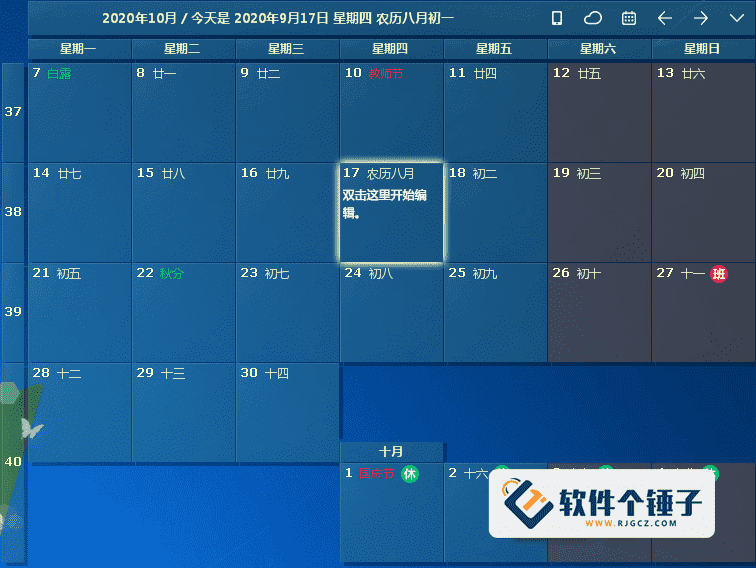
Desktop Calendar v3.26.265.8458, for managing appointments, to-dos and schedules [Software Ge Chui Zi·R4788]
-
Game Gold-Farming Money-Making Plan: Earn 1k+ Daily, a Stable 3-Year Project Anyone Can Do in Spare Time [Revealed]
Study material — included with membership Get Membership -
Hot-game fully-automated earning: 500+ a day, no experience, simple operation - the steadiest long-term game-earning side hustle (revealed)
Study material — included with membership Get Membership -
FlyingMouse earns merit this time! Don't panic at Windows format problems — the open-source FlyingMouse format conversion tool helps, a popular GitHub gem
Study material — included with membership Get Membership -
Douyin Product-Selling Coaching Bootcamp: No On-Camera Appearance Needed, Newbies Can Produce Selling Short Videos by Following the Steps
Study material — included with membership Get Membership -
First-release game gold-farming money plan: 1K+ a day, ordinary people in spare time
Study material — included with membership Get Membership






-
FlyingMouse earns merit this time! Don't panic at Windows format problems — the open-source FlyingMouse format conversion tool helps, a popular GitHub gem
Study material — included with membership Get Membership -
LuDaShi v6.1024.4105.1121 Slim Single File
Study material — included with membership Get Membership -
2D Cartoon Animation Software Moho Pro v14.3
Study material — included with membership Get Membership -
Video Editor Aiseesoft Filmai v1.0.18
Study material — included with membership Get Membership -
To-Do Microsoft To Do v2.147 Free
Study material — included with membership Get Membership -
PR/AE/DaVinci/FCPX video Plugin Nobe OmniScope Win1.11.15 / Mac1.10.138
Study material — included with membership Get Membership





Do you often forget little errands or appointments? Try Desktop Calendar! It's an ultra-handy desktop calendar that shows up right on your Windows desktop after installation. Best of all: just double-click on the desktop and start jotting things down — intuitive and practical. It manages appointments, to-dos and schedules, and thoughtfully includes the perpetual lunar calendar, the 24 solar terms, and all common holidays and anniversaries, so you can plan your life better.

Core features: quick capture and personalization
Desktop Calendar's design philosophy is speed and intuitiveness: nearly everything happens on the desktop, no need to open a bulky app.
1. Double-click the desktop to jot things down
It's shockingly simple: double-click any date cell in the desktop calendar and start typing a to-do, meeting reminder or life note — capturing inspiration before it slips away.
2. Personalized colors
To make your schedule clearer or more to your taste, you can freely color each calendar cell — for example, different colors for work, life and important items, instantly readable.
3. Rich lunar-calendar and holiday info
It includes the perpetual lunar calendar, the 24 solar terms, and common traditional festivals, public holidays and anniversaries — perfect if you plan things around the lunar calendar.
Advanced: data management and output
Beyond basic note-taking, Desktop Calendar offers powerful tools to manage your calendar data.
4. Strong import/export
Handy import/export tools let you back up your calendar data or migrate it between computers, so your schedule is never lost.
5. Flexible printing
Print a calendar for any date range and in any format — whether it's a monthly plan for the wall or a schedule for a specific project.
6. Custom daily backgrounds
Give any day a unique background color to highlight important dates and make them stand out.
Smart and safe
In a modern app, data sync and safety matter, and Desktop Calendar has thought of that too.
7. Easy personalization
Powerful yet easy settings let you define your own calendar — fonts, transparency, what's displayed — making your desktop both useful and beautiful.
8. Cloud sync and data safety
Powerful cloud sync keeps your schedule consistent across devices, and you can roll back to history for extra peace of mind.
9. Mobile app and real-time sync
Pair it with the mobile calendar app for real-time sync: view and edit your desktop schedule on the phone anytime — true cross-platform management.
Summary
Overall, Desktop Calendar is a desktop gadget that perfectly combines convenience and function. Its double-click-to-note minimalism completely streamlines schedule management. Rich customization (colors, backgrounds), practical extras (lunar calendar, solar terms), and professional data tools (import/export, printing, cloud sync) turn it from a simple note tool into a full personal schedule system. Whether you're an individual juggling daily errands or an office worker planning project progress, it's a capable helper on your Windows desktop.
Related Courses

Super local toolbox! Built-in screen recording, audio/video cutting & merging, video compression & extraction, forever free - Kedou Video Converter

100% perfect free tool! One-stop multi-function PDF software: PDF convert, compress, edit etc., minimal, no ads, so nice - JOPDF

Open-Source Desktop Remote Tool, Beats Paid Versions! Free for Personal and Commercial Use Unlimited, Cross-Platform, HopToDesk Remote Control

Latest K-12 Textbook Downloader: Whole-Grade Resource Download, Courseware, Video, Audio in One Click

HuyanBao: free blue-light eye-care app with pet break reminders

Windows Can Have a Desktop Dynamic Island Too! A Modern System Control Center — Give Your PC a Black Notch, PyIsland

3D Simulated Comic Drama Production: Seedance2.0 Full-Process Practical Course - From Zero to One High-Quality Comic Drama Creation

Win/Mac Dual Support! Latest Permanent Lifetime Version, Supports Old Photo Restoration, Image Sharpening and Lossless Upscaling Tool, Aiarty Image Enhancer

Online Video Course: Github Open-Source Bilibili Video Download Tool! Supports 8K and Dolby Vision Bilibili Video Batch Download Tool, Easy to Use Bilidown


